-1.png)
Welcome to our HubSpot Product Spotlight for October. In this blog, we’ll explore some of the team's favourite HubSpot updates from the last month. Ready? Let’s dive in!
Now Live
These are all the new features live and ready to use in your HubSpot portal.
1. Custom Skills in Breeze Assistant
What is it?
Custom skills let you give Breeze Assistant your own instructions for understanding your organization and running business-specific tasks. You can now create, import, and manage skills in the Breeze Assistant side panel, then invoke them by name in any conversation.
Why does it matter?
Breeze Assistant already picks up context from your portal, your memories, and past conversations. Custom skills add a direct, explicit path for prompting repeated tasks and context. Instead of re-explaining the same business context or steps prompt after prompt, you capture them once and reuse them across every conversation with Breeze.
2. Help Desk Channel Send-From Permissions
What is it?
Send-from permission in allow admins to control which users and teams can respond from each channel account connected to help desk.Why does it matter?
Channel send permissions let you decide which users are allowed to send messages out through a team email, WhatsApp, or custom channel account. Without it, anyone with help desk access can reply to a customer on any channel, which makes it hard to protect your most sensitive conversations or keep reps from replying on channels they should not Now you can grant send access channel by channel, so the right people respond on the right channels and every outbound message reflects the standard your customers expect.
3. Microsoft Dynamics 365 Custom Lookup Sync
What is it?
Custom Lookup properties in Dynamics 365, such as SDR Owner and CSM Owner, now sync in both directions with HubSpot, allowing you to update these fields from either platform.
Why does it matter?
Keeping custom Lookup properties aligned between HubSpot and Dynamics 365 used to require extra fields and automation. This native sync now resolves that complex workaround, keeps critical user-related data consistent, and reduces manual effort. For example, you can:
- Route new leads to the right SDR by keeping SDR Owner current in both systems.
- Give CSMs accurate account ownership in HubSpot reports and workflows.
- Remove duplicate “shadow” owner fields from your CRM.
4. Additional Custom Duplicate Detection Rules Guardrails
What is it?
We've added additional guardrails onto custom duplicate detection rules that will support us adding search and filtering functionality to the table of duplicates surfaced by custom rules.Why does it matter?
Today, users are unable to search and filter for specific duplicates on the table of duplicates surfaced by custom duplicate detection rules. Adding these simple guardrails sets us up to add this functionality in the near future.
5. Edit the create form to include any associations to your custom object
What is it?
You can now customize the create form to enable reps to create associations to any object which the custom object is associated with.
Why does it matter?
Previously, even though custom objects were associable to additional objects, the create form did not support these associations. This update removes this restriction for a more consistent and reliable experience.
6. Lead Object: Workflow Rotation Distribution and User Availability
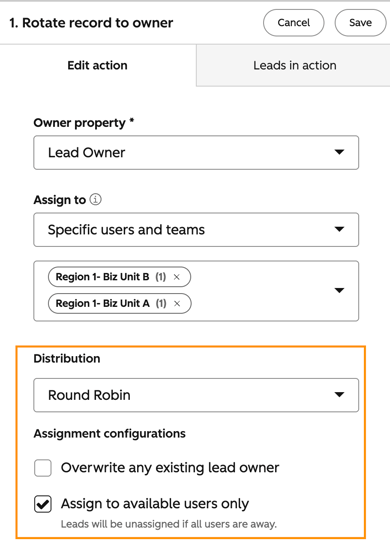
What is it?
When using the Rotate record to owner action in a lead-based workflow, you can now choose a distribution model (Round Robin, Balanced, or Random), as well as configure user availability for lead assignment.
Why does it matter?
Assigning leads fairly and strategically is critical for sales teams. Until now, the Rotate record to owner action for the Leads object didn't support the same distribution controls already available for other objects. Without these options, teams had to work around using manual processes, custom-coded actions, or third-party tools. Now you can easily automate it.
You can:
- Distribute incoming leads evenly across your team using Round Robin
- Route leads to the rep with the lightest current load using Balanced distribution
- Assign leads unpredictably using Random distribution
- Automatically skip users who are unavailable so leads don't land in an unworked queue
7. Pipelines: Create, clone, and update directly with Breeze Assistant
What is it?
You can now create pipelines and update pipeline configurations directly with Breeze Assistant from anywhere in the product. Breeze Assistant can do any of the following:
- Create or clone new pipelines of any object type (and rename them)
- Add, update, remove pipeline stages
- Update pipeline stage names, colors, status, probabilities, and whether stage calculated properties are enabled
Important note: Breeze Assistant cannot create or update pipeline rules, object tags, or automations, and cannot make changes to Contact or Company lifecycle stages.
Why does it matter?
Previously changes like these needed to be made manually in Global Settings > Pipelines. Now these changes can be made contextually as users use, manage, and build their object pipelines anywhere in the product.
8. Merge Rules | Winning Record Rules & Property Overrides
What is it?
Merge Rules allow customers to programmatically determine which record in a duplicate group should be the primary or "winning" record and what properties in a duplicate group should persist after the merge, regardless of which record that property value was part of.
Why does it matter?
Today, users have the option to manually select a winning record and property overrides -- or they can choose a winning record using basic criteria like "Created first" or "Most recent engagement." Users have told us that they need more advanced means for selecting a winning record based on information they have stored in the CRM. Winning records does just that -- giving users more granular options for merging records.
Merge rules will increase confidence when merging in bulk, and (in the future) directly support automated methods of merging duplicate records.
9. Human handoff routing by email channel type in Customer Agent
What is it?
Customer agent human handoffs now support routing by channel type, with separate configuration and handling for messaging and email conversations.
Why does it matter?
Before this update, you configured handoff routing the same way for every channel, which didn't work well for the different needs of live messaging and asynchronous email support. Routing by channel type makes handoffs more predictable and routes email conversations to the right team on the first try.10. Create videos from scratch in HubSpot's video editor
What is it?
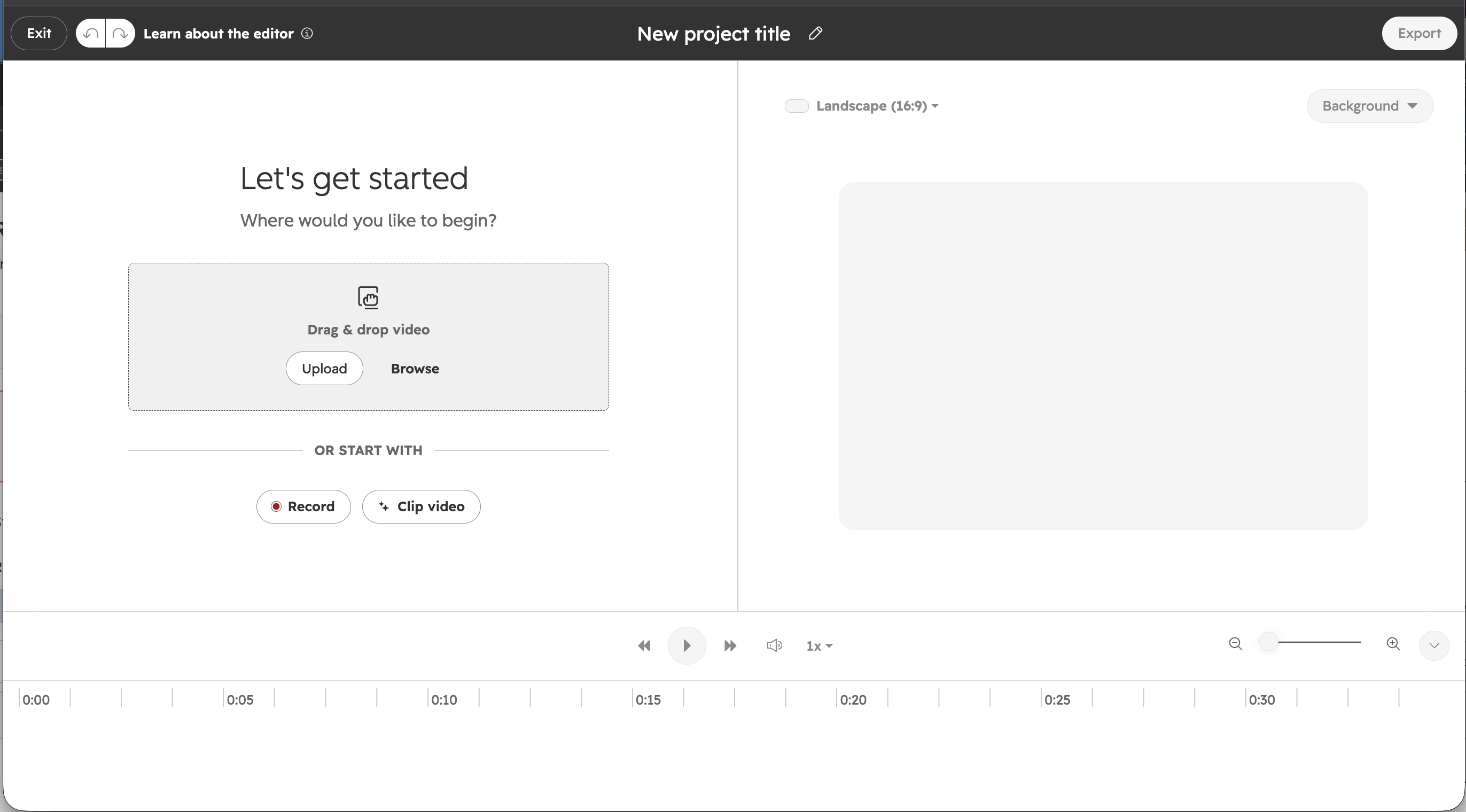
The video library now has a Create button, so you can start a blank video project without an existing video. New projects save automatically as drafts and stay in the video library until you’re ready to export.
Why does it matter?
Until now, you had to clone an existing video to open the video editor. If you hadn’t uploaded footage yet, you couldn’t use the editor at all.
Now you can open a blank project the same way you’d open a blank doc. You spend less time finding your way in and more time building content.
11. Updated Report Visualizations
What is it?
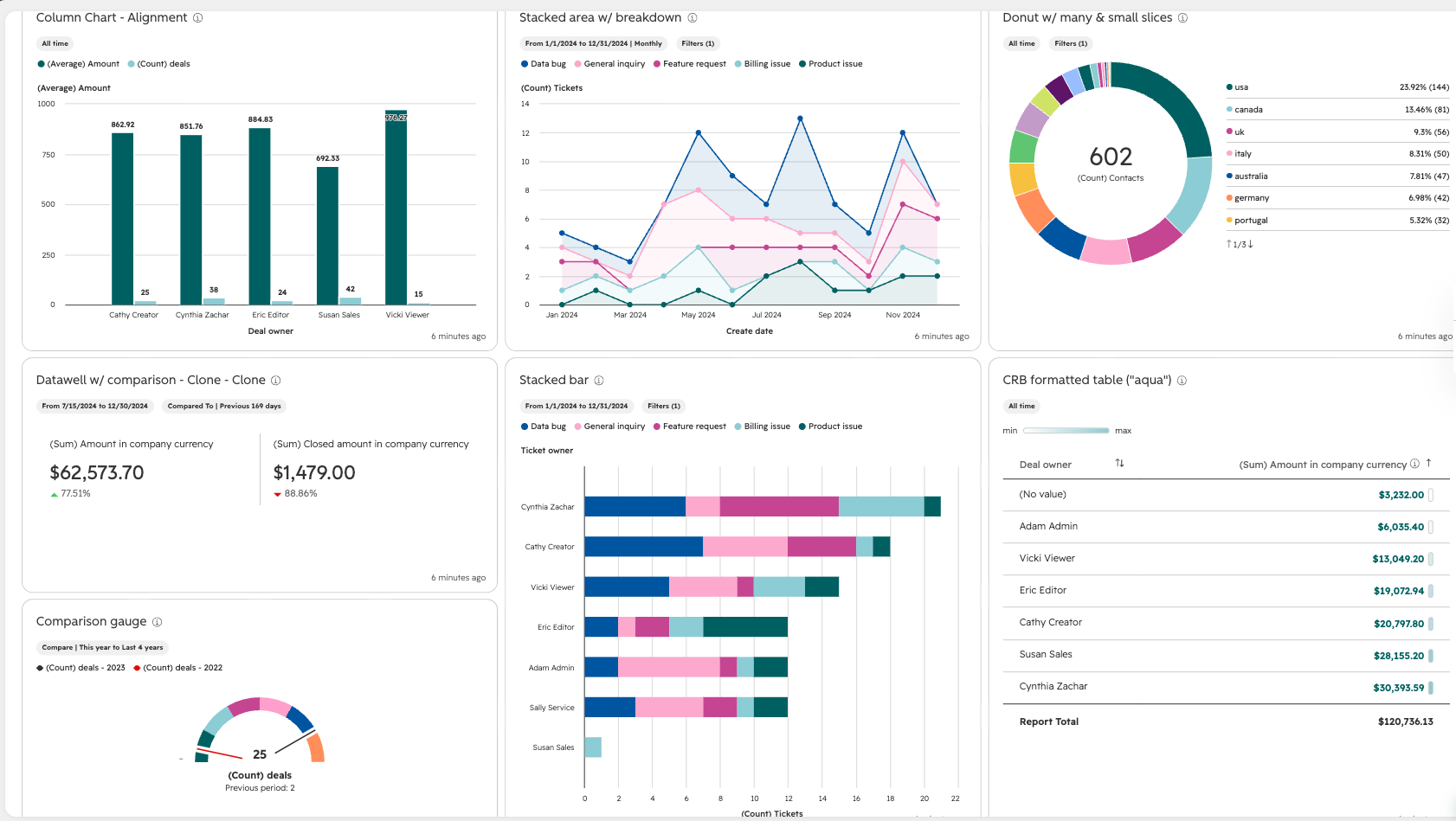
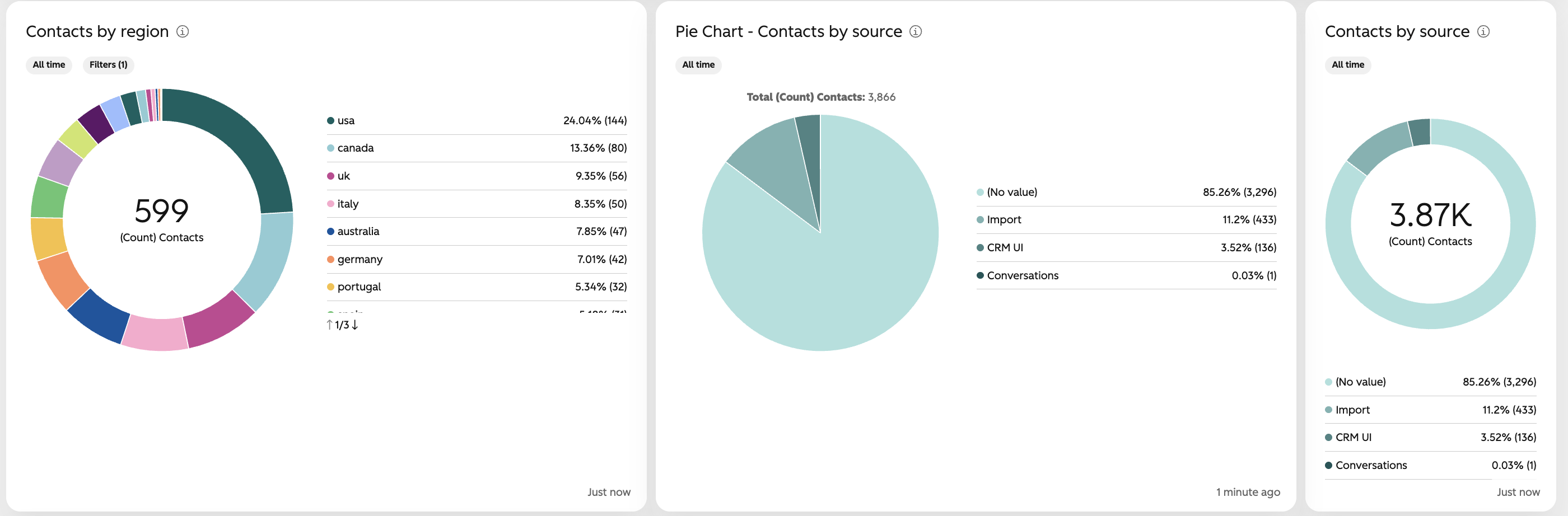
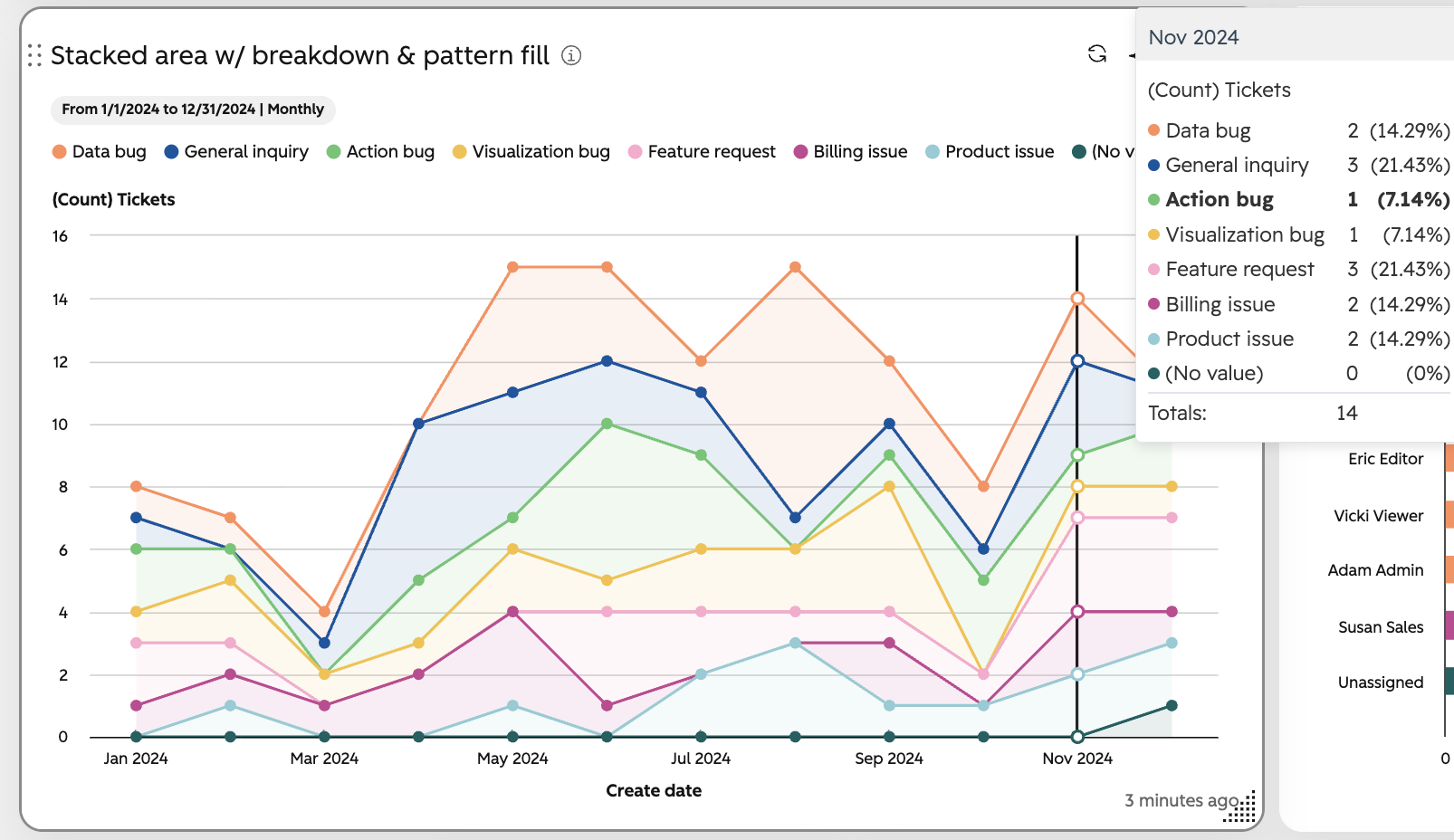
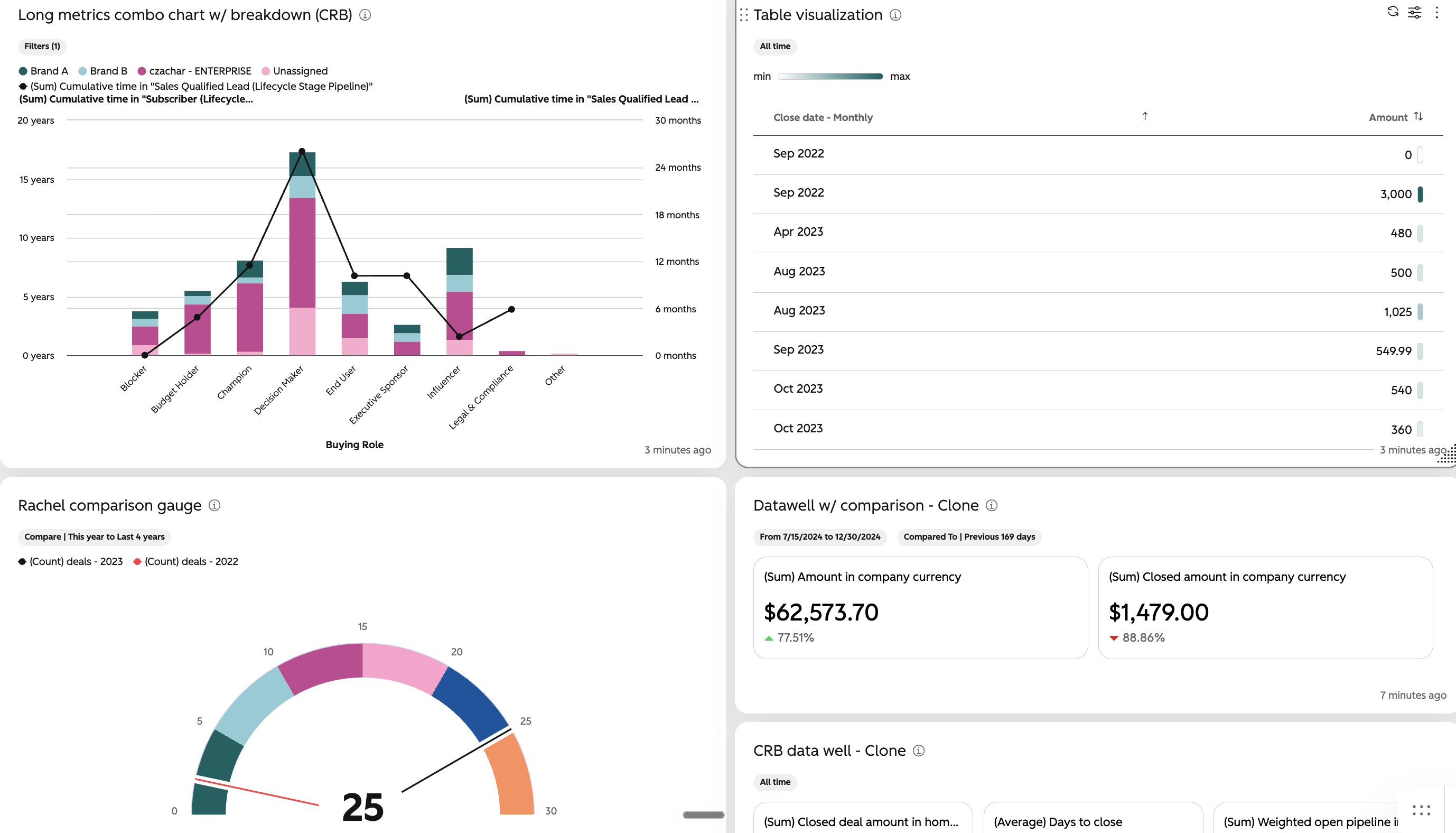
Report visualizations in HubSpot have been updated to give them a more polished, professional and consistent look and feel aligned with the new HubSpot theme. All chart types have been updated and key changes include:
- New default color palette: A refreshed color palette for data visualizations, now led by teal. The updated palette includes a broader range of colors designed to create clear distinction between data while providing a more cohesive visual experience. Note: If you have a custom color set on your report or dashboards, those will continue to be respected and not be overridden by the new color palette.
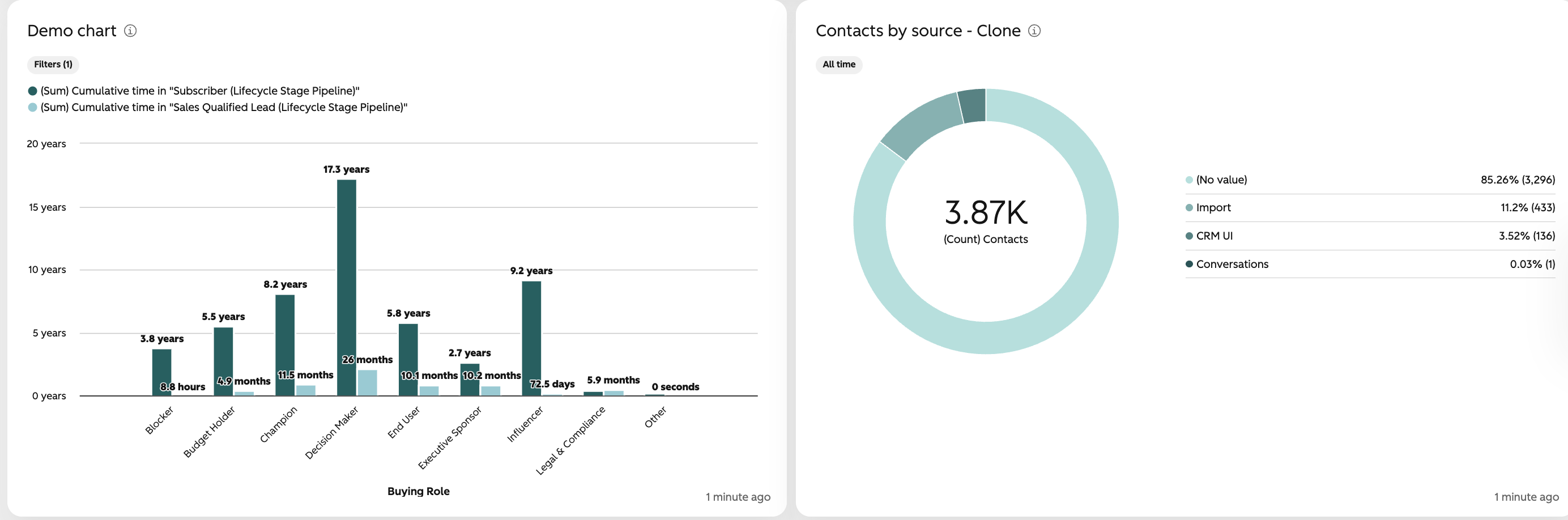
- Donut & Pie charts legends change: For newly created donut and pie charts, as well as existing donut and pie charts using the default legend settings, legends will now appear on the right side of the chart instead of the top. This makes it easier to scan categories and compare values without relying on labels directly on the chart. Data labels will be turned off by default to reduce visual clutter, since the same information is available in the legend. For smaller charts, the legend will automatically move to the bottom when there isn’t enough space to display it on the right. Note: You can still always change the legend placement and data label settings by going inside the report builder.
- Hover & Tooltip changes: For line and area charts, there is a line on hover to clearly indicate what data values are being hovered on. Additionally, the hover behavior generally has been slightly changed to make the hovered on value slightly more prominent.
- General Styling Updates: Chart font styles, spacing and alignment of charts, axis label headings have all had some minor style updates.
- Note: KPI charts will now be left aligned with a clear border for more natural left to right readability instead of being center aligned.
- Note: Conditional formatting is now shown as colored pills instead of the whole cell being colored. It is possible though that you might see your records list/object views still have the full cells colored when conditional formatting applied. This is a known issue that we are working towards resolving.
Why does it matter?
The new modernized visualizations make data easier to read, understand, and compare at a glance. The updates improve visual clarity and consistency while creating a more polished experience that aligns with HubSpot’s new theme
12. Reusable Metrics in the CRM
What is it?
You can now configure, analyze, and reuse metrics directly from CRM index views — the central place for Deals, Contacts, Companies, and Tickets — including automatically generated time series charts, owner and team breakdowns, and the ability to save metrics as reports.
Why does it matter?
Tracking the right metrics shouldn't mean rebuilding the same formulas in multiple places. Without a consistent way to define and reuse metrics across views, you're left manually reconciling numbers and second-guessing whether reports reflect the same logic as your CRM views.
With this update, you can define a metric once and use it across views, drill into performance with automatic time and team breakdowns, and save directly to a dashboard — all without leaving the CRM index page where you're already working.
These same metrics can also be used on your Global Home and in your board vi, increasing consistency in the numbers you see across the places you work.
13. Webhook Data Sources in Data Studio
What is it?
Webhook Data Sources allows customers to push JSON data into HubSpot's Data Studio in real time — without file uploads, manual imports, or a pre-built connector. Any system that can send an HTTP request can now be a data source in HubSpot.
Each webhook data source gets a unique inbound URL. The customer pastes it into their external system, sends payloads, previews the data, and creates a source — live in Data Studio.
14. Use Breeze Assistant in Slack to update records, workflow enrollment and much more
What is it?
Breeze Assistant can now update your CRM records, enroll records into workflows, help prep for meetings, log calls and more — all initiated from a Slack thread.
Why does it matter?
Cleaning up duplicate records, reassigning accounts in bulk, and enrolling contacts into workflows are recurring jobs for anyone managing data quality, territory changes, or outreach programs — work that today requires leaving Slack and often multiple steps in HubSpot.
This gives anyone doing this kind of cleanup a faster, trustworthy way to make changes from where the conversation is already happening.
15. Resizable Sidebars in Help Desk
What is it?
Help desk users can resize four panels in their workspace by dragging the panel edge:
- Left views sidebar
- Conversation or ticket preview panel (split view only)
- Message thread panel
- Right CRM sidebar
The layout updates as you drag, and the width you choose is saved.
Why does it matter?
Fixed-width sidebars forced trade-offs on every screen. The CRM sidebar was often too narrow to read customer details without scrolling, while the views list took space better used for the conversation. You can now widen the panel you rely on most and reclaim space from the others.
16. Memories Import for Breeze Assistant
What is it?
Memory Import lets you bring your existing AI memories from ChatGPT, Claude, Gemini, and other assistants directly into Breeze Assistant. Rather than starting from scratch, users can transfer the context, preferences, and knowledge up in another tool and have it available in Breeze from day one.
Why does it matter?
When users switch AI assistants, they lose all the context they've accumulated — preferences, working styles, business details and have to re-teach the new tool from scratch.
Memory Import removes that barrier. Users migrating from ChatGPT or power users working across Claude and Breeze no longer need to manually re-enter what they've already shared with another AI. The feature is most impactful for brand-new Breeze users: the more context someone has built elsewhere, the more they gain from importing it.
17. Request changes and approval stages for content approvals
What is it?
Approvers can now request changes on marketing emails, landing pages, website pages and blog posts. When they do, the approval moves to a new Changes requested status with their note attached. You can also set up approvals in stages, so each group of approvers reviews in order.
Why does it matter?
Until now, asking for edits meant leaving a comment while the approval stayed Pending, so it wasn't always clear who needed to act next. Now the status shows when changes are needed, the note explains what to fix, and you can tell the approver when the content is ready for another look.
Stages help when reviews need to happen in a set order, like an editor first and then legal. Approvers in a later stage aren't asked to review until the stage before them is complete.
18. Pipeline Object Tags: Increased limits
What is it?
We're raising pipeline object tag limits per portal as follows:
- Free: 0 tags (no change)
- Starter: 20 → 30 tags
- Pro: 40 → 50 tags
- Enterprise: 80 → 100 tags
*Note: object tag limits apply across all object types in a portal.
Why does it matter?
Earlier this year we made object tags available for more object types. Now we're increasing their limits to ensure customers can use them effectively across object types on their portals.
19. Clone Goals in Bulk
What is it?
Users can select multiple goals in the Goals table and clone them in bulk for the next fiscal year.
Why does it matter?
Cloning goals one-by-one is repetitive and time-consuming for teams. This update streamlines annual goal setup by letting users copy multiple goals at once, reducing manual effort and minimizing errors.
20. PowerPoint Decks in Breeze Assistant
What is it?
Breeze Assistant now builds real, editable PowerPoint decks. Ask for a presentation and Breeze creates it slide by slide as an artifact, where you can edit it directly, ask Breeze to change it, present it fullscreen, and download it as a .pptx file for PowerPoint, Keynote, or Google Slides.
Why does it matter?
Reps spend hours copying CRM data into slides for prospect meetings, proposals, and business reviews. With the updated PowerPoint deck capability in Breeze, you can now create presentations that follow your brand guidelines and templates, so decks come out on-brand and ready to present without reformatting.
21. Export your AEO prompt data
What is it?
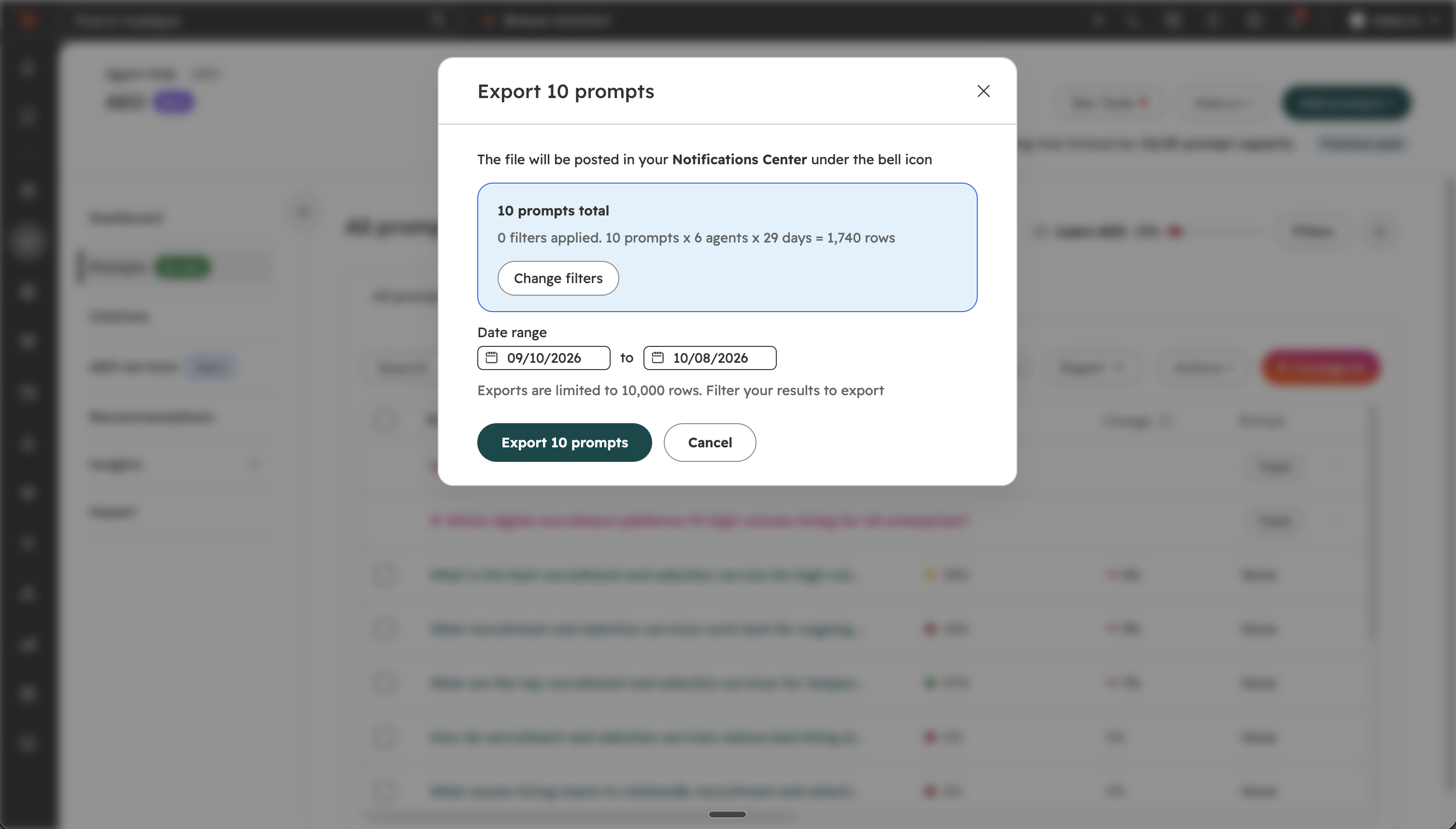
You can now export your tracked AEO prompt data as a CSV file. Each row is one answer and includes the prompt text, engine, location, ideal customer profile, buying journey phase, brand mentions, competitor mentions, citation URLs, and the full AI-generated response. A separate export gives you citation analysis by URL.
Why does it matter?
You can now use your raw prompt data for monthly scorecards, before and after experiment analysis, and offline reporting pipelines. Before, there was no way to export this data in bulk.
22. Analytics Suite: Save changes when navigating away
What is it?
You can now save or discard report changes when navigating away in the Analytics Suite. Your existing saved configurations have been carried over automatically.
Why does it matter?
This update helps prevent accidental loss of report edits and makes it clear what will happen before you leave a report. You can move through the Analytics Suite with confidence that your changes can be saved, discarded, or kept open for further editing.
23. Mobile Calls Reviews and Actions
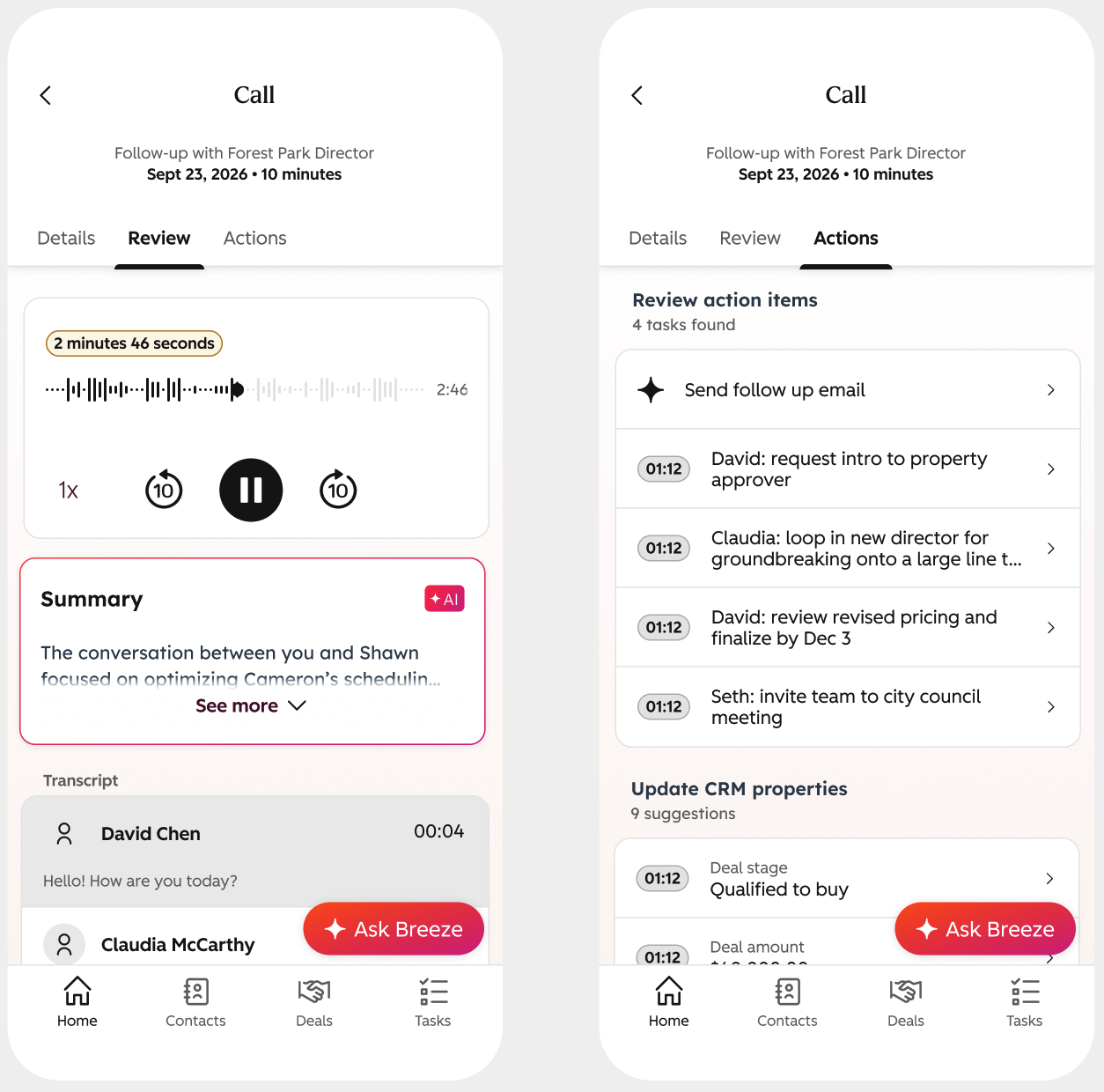
What is it?
Mobile Calls Reviews and Actions enables reps to review recordings, view transcripts, and take post-call actions directly from the HubSpot mobile app for recorded calls.
Reps can now replay call recordings, review AI call summaries and transcripts, and accept or dismiss AI-suggested tasks and CRM updates on mobile immediately after a HubSpot Calling engagement.
Why does it matter?
After a call ends while on the go, sales reps often have little time before their next commitment. Previously, call recordings and AI-generated summaries sat exclusively on the desktop app, forcing reps to defer administrative tasks or rely on memory, leading to forgotten follow-ups and incomplete CRM data.
Bringing call recaps and automated next steps directly to mobile ensures CRM updates and follow-up tasks are captured immediately, helping sales reps save time, maintain clean data, and close deals faster without ever opening a laptop.
Beta
These updates are currently in the works and nearly ready to be released on your HubSpot Portal.
1. Marketing Event Based Workflows
What is it?
Marketing Events are now available as a workflow trigger. Customers can automate actions such as sending notifications, creating tasks, and updating properties when a Marketing Event is created or updated.
Why does it matter?
Users need to automate processes based on Marketing Event activity across associated objects such as companies, deals, and campaigns. This solves the problem of manual follow-up and coordination for Marketing Event-related business processes, enabling faster and more consistent workflows.
2. Team approvers for content approvals
What is it?
You can now request approval from a team on marketing emails, landing pages, website pages and blog posts. Anyone on the team can approve or request changes, and the approval sidebar shows who responded on the team's behalf.
Why does it matter?
Picking individual approvers means requesters need to know exactly who reviews what, and approver lists fall out of date as people join, leave or change roles. With team approvers, you manage who can approve in Users & Teams. Requests go to everyone on the team and any member can respond, so a request isn't stuck waiting on one specific person.
3. Handoff Summaries
What is it?
When a conversation moves from Customer Agent to a human rep, getting up to speed shouldn’t mean scrolling through the entire thread. Handoff summaries are automated recaps of the conversation that appear instantly when Customer Agent reassigns a ticket to a human.
Handoff summaries are published as notes in the conversation timeline, and contain:
- A sharp headline summarizing the customer’s core issue
- A brief handoff reason explaining what triggered the handoff to occur
- A concise conversation recap (what the customer asked + what Customer Agent already tried)
- Clear unresolved issues so reps know exactly where to pick up
- Customer-shared resources like links, files, and attachments
Why does it matter?
Prior to this change, it was easy for context to get lost when a ticket was reassigned from Customer Agent to a human support rep—and every minute spent re-reading a transcript is time not spent solving the problem.
Handoff summaries help reps:
- Reduce time-to-first-response after reassignment
- Avoid asking customers to repeat themselves
- Triage tickets faster in busy queues
4. Premium Engines in the AEO Tool: Claude, AI Mode, and AI Overviews
What is it?
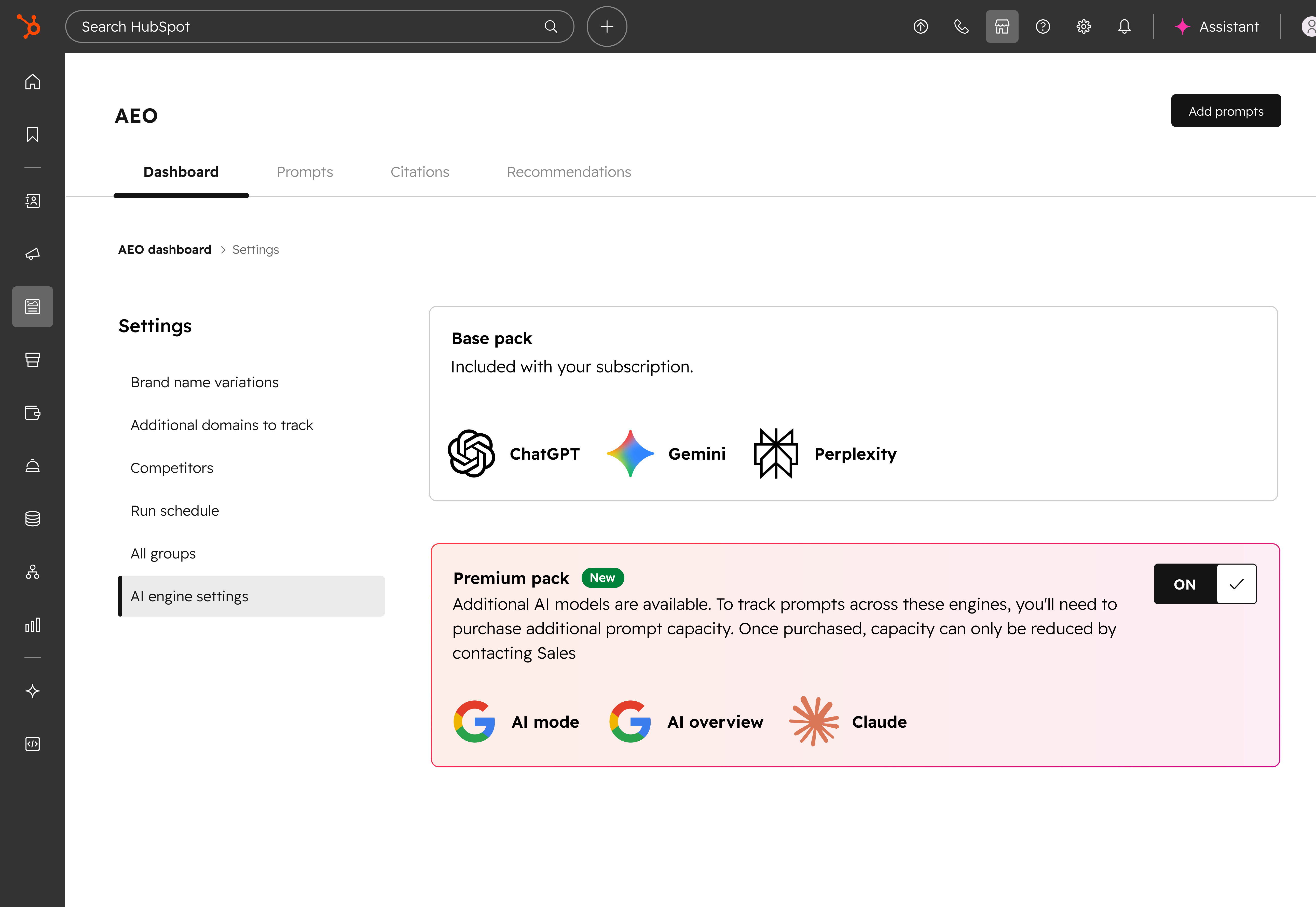
Premium Engines is a new setting in the AEO tool. When you turn it on, your tracked prompts also run through Claude, Google AI Mode, and Google AI Overviews, in addition to ChatGPT, Perplexity, and Gemini. Results from all six engines count toward your overall brand visibility score.
Why does it matter?
Until now, you could track your brand in three engines. Buyers also ask Claude, search with Google AI Mode, and read the AI-generated summaries at the top of Google results. Turning on Premium Engines helps you answer three questions:
- Claude: Does your brand show up when people ask Claude about your category?
- Google AI Mode: Is your brand mentioned in Google's conversational search results?
- Google AI Overviews: Does your brand appear in the AI-generated summaries at the top of Google search results?
This gives you a more complete view of where buyers find your brand, and where they don’t.
5. Customer States and Follow-up Actions
What is it?
Customer success managers can track customer states, such as onboarding, upcoming renewal, declining usage, or cancellation indicated, directly on customer records. They can trigger standardized follow-up actions for each state from the customer success workspace or through workflows.
Why does it matter?
Context about a customer’s situation is scattered and unstructured, so customer success managers miss key moments and follow up inconsistently. With states, they can see changes in a customer’s situation as they happen and act on them the same way every time, which improves response consistency and retention.
6. Image Display for File Properties
What is it?
File properties can now display image thumbnails directly on CRM record and index pages. Images stored in these properties are also available as personalization tokens for use in marketing emails and CMS content.
Why does it matter?
Teams that rely on images stored in HubSpot — from real estate listings to insurance claims — currently have no way to see those images without leaving the record to open a file link. This update brings images into the CRM view where your team is already working, so you can identify records at a glance and use those images in your outreach without re-uploading or manually syncing files.
- Any marketing emails using these images will automatically reflect the latest version of the file stored on the record. No manual updates needed.
- Industries like real estate, manufacturing, and insurance can reference listing photos, product images, or claim documentation directly from the record.
7. Smart Transfer - Custom Object Transfer
What is it?
Customers can now transfer custom objects from Salesforce, Zoho CRM, and Dynamics 365 into HubSpot custom objects, preserving schema, properties, associations, and records.
Why does it matter?
Customers transferring from Salesforce, Zoho CRM, or Dynamics 365 often need to import critical custom object data without manual modeling, re-mapping and import.
This update allows users to transfer both custom object records and data structures, maintains relationships, and keeps source data in sync, all of which reduces transfer time and potential errors.
8. Data Quality Read Public API
What is it?
External developers can now programmatically read from the Data Quality Duplicates endpoints to view duplicates identified by the HubSpot model and a portal's defined custom rules.
Why does it matter?
External developers and integration partners need a way to automate data quality and deduplication at scale, without manual configuration in the UI. Previously, there was no means for developers or AI agents to reference the duplicate management tool via API. This API removes friction for customers managing large datasets.
9. Updated "Add to Dashboard" Panel
What is it?
The Add to Dashboard panel has been updated with a smart layout that surfaces report recommendations and organizes your report options more clearly.
Why does it matter?
Finding the right report to add to a dashboard used to mean scrolling through an undifferentiated list. The updated panel puts relevant recommendations at the top and organizes the rest of your reports in a clearer structure, so you spend less time searching and more time working with the data that matters to you.
10. Personalized Product Updates
What is it?
The Product Updates page has been redesigned to highlight what’s most relevant to your team, so you can spend less time searching for updates and more time putting them to work.
Why does it matter?
When every update looks the same, it’s hard to tell what actually matters. Important changes like fixes you asked for, updates to tools your team relies on, or features that could drive impact can easily get lost in the noise.
This redesign surfaces the updates that are most relevant to your team so you can quickly understand what’s important and take action.
11. Reusable Metrics on Dashboards
What is it?
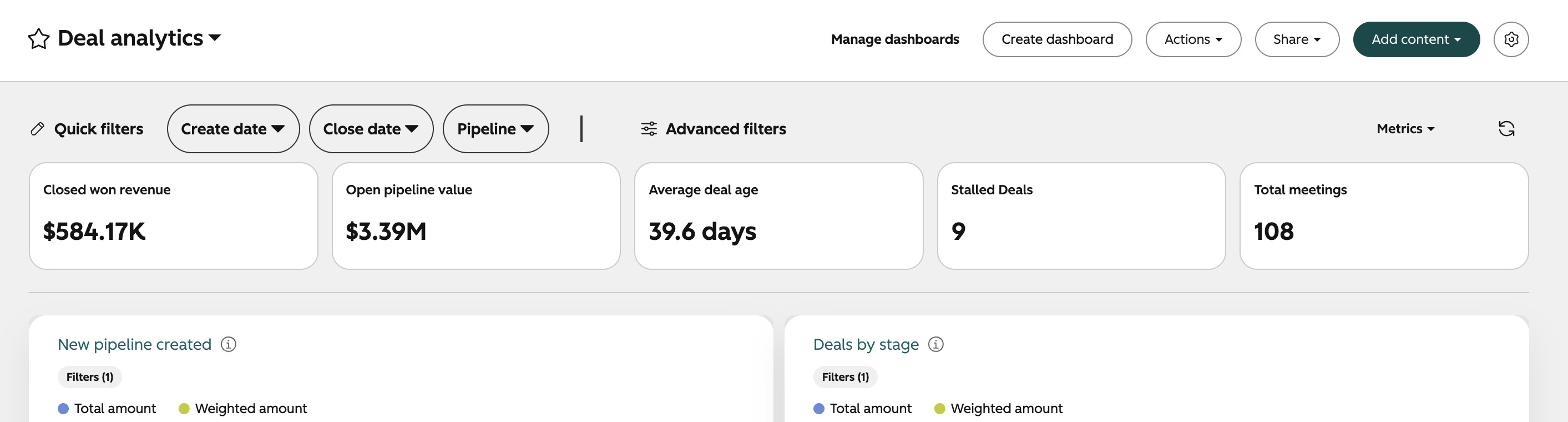
You can now add a row of up to six metrics to the top of any dashboard. Choose from a library of default metrics, or build your own using aggregations and custom formulas. Metrics support all object types, including custom objects, and update automatically when you apply dashboard filters.
Why does it matter?
Key numbers like closed won revenue, stalled deals, or average days to close are often spread across multiple reports, which makes it hard to understand the big picture quickly. A metrics row puts those figures at the top of the dashboard before any reports, so you get a read on what matters without scrolling through every chart to find it.
12. Contracts API
What is it?
The contracts API lets you create and manage HubSpot contracts programmatically. A contract tracks the lifecycle of a relationship between a merchant and their buyer over time, inclusive of terms of service, pricing, and duration for a set of purchased line items.
Why does it matter?
Contract APIs will provide the ability to integrate external systems with HubSpot's connected CPQ and Billing tools, and tap into the business logic behind these systems independent of HubSpot's UI.
For customers who do not use HubSpot quotes, Contracts API unlocks the ability to manage contracts directly without the need for additional seats.
13. Flexible Defaults for Account Cleanup
What is it?
The account Cleanup tool now allows removal of many of the default guardrails in your custom cleanup policy. Cleanup can now be configured to delete in-use or published assets based on your custom filters. You can also select new date and time properties to use for the lookback window in account cleanup, allowing you to delete assets automatically based on fields like create date, publish date, or last activity date, rather than just last modified or updated date.
Why does it matter?
Account cleanup is designed to allow you to manage your own asset deletion policy, but until now, the feature has included strict guardrails to ensure that you didn't accidentally delete assets that your account might need. However, in the last few months we've added a lot of options in the cleanup tool to help admins quickly fix mistakes if something goes wrong, such as allowing for a full revert of a cleanup job. With these options in place, we're providing admins more tools to make cleanup more powerful, so it can do more work on your behalf.
14. Trigger Workflows When a Social Post is Published
What is it?
You can now trigger a HubSpot workflow automatically when a social post is published.
Why does it matter?
Until now, there was no way to connect social publishing to the rest of your HubSpot automation. The most common request: send a Slack notification to a team channel when a post goes live so employees can engage, reshare, and comment. This connects social to workflows the same way email, forms, and deals already are.
15. Zoom Connector for Breeze Assistant
What is it?
The Zoom connector lets Breeze Assistant and HubSpot agents securely access your Zoom meetings, AI Companion summaries, recordings, and Zoom Docs using Model Context Protocol (MCP). Breeze pulls this information when prompted, so it’s available right in your HubSpot conversations.
Why does it matter?
Your meeting data is in Zoom, but your customer context lives in HubSpot. With this connector, your team can bring what was actually said in a meeting into their HubSpot work without searching Zoom for the right recording or summary.
Try asking Breeze:
- “Find my last meeting with [company name] and summarize the key takeaways.”
- “Pull the transcript from yesterday’s call and list the action items.”
- “Find the recording of our kickoff meeting with [customer].”
- “Search my Zoom meetings from last month for mentions of pricing.”
- “Create a Zoom Doc with talking points for tomorrow’s renewal call.”
16. Reporting Dashboard header simplification
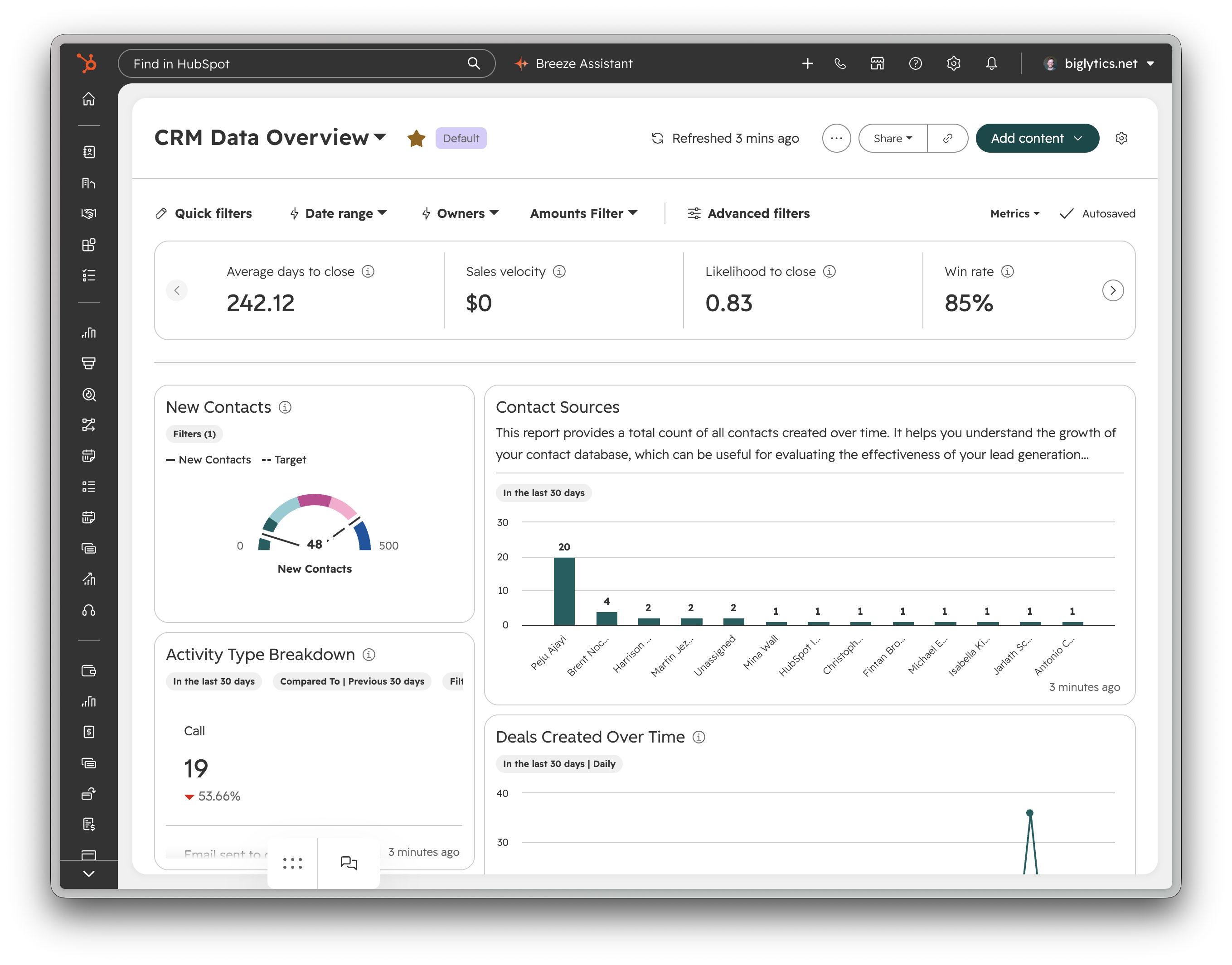
What is it?
The header of Reporting Dashboards now displays only the most important actions, with cleaner, simpler design and improved action and settings menus.
Why does it matter?
It's often hard to find key actions quickly due to a cluttered reporting dashboard top bar. Simplifying this area helps your dashboard look cleaner and simpler.
17. View external posts on the social calendar
What is it?
You can now see posts published outside of HubSpot on the social calendar.
Why does it matter?
If your brand or business publishes natively or uses different social media tools to publish content, your HubSpot calendar will appear empty and does not provide an accurate view of content created to date. We are closing that gap by adding posts published outside of HubSpot to our social calendar.
18. Consent Email Tracking Capabilities
What is it?
Manage email tracking per contact with a new consent record for each email address in your CRM.
Why does it matter?
Updated guidelines from Italy (Garante) and France (CNIL) require explicit consent before tracking emails. This feature gives admins a practical way to manage consent per email address which will directly govern tracking behavior for marketing and one to one emails.
19. Analyze your Help Desk and Customer Agent performance by topic
What is it?
HubSpot now automatically understands what your customers are contacting you about, and helps you analyze your Help Desk and Customer Agent performance by those topics. No manual tagging, no setup. You get a clear picture of what's driving volume and where your team has room to improve, straight out of the box.
Why does it matter?
Support leaders have never had a reliable, low-effort way to answer a basic question: what are customers actually reaching out about, and where are we falling short? Manual ticket categories depend on reps tagging every conversation correctly and consistently, so the picture is often incomplete and out of date.
Topics does the work for you. Every conversation and ticket is classified automatically, so you can spot common inquiries, coach your team on it, and catch emerging issues early, without running a data project.
20. Video share pages, redesigned for viewers
What is it?
HubSpot's video share pages have been redesigned to give viewers more context when you share video content externally. Video share pages now show the video's title, description, chapters, and a searchable transcript next to the player. The previous share page showed only the player.
The new design applies to share links you create after your portal is ungated. Links you've already created and sent will keep the old design, so anything already in a customer's inbox looks and works the same as before.
Why does it matter?
The share page is often the first thing a prospect or customer sees when you send them a video. It's also where recipients land when they click to play a video embedded in a marketing email. Until now, that page was a video player with no title, description, or other controls, so viewers had to work out what they were watching and find the relevant parts on their own.
A title, description, chapters, and a searchable transcript change that. Now viewers can see what the video is before they press play. They can jump to a chapter, search for a keyword, or click a transcript line to go straight to that moment. This makes it easier for people to watch longer content like demos, interviews, and webinars instead of opening and closing it.
21. A new look for the marketing email editor
What is it?
A new look for the marketing email editor. You'll see a streamlined layout with a collapsed sidebar, floating editing tools, and a persistent action bar, all designed to put your email content front and center.
Why does it matter?
For marketers who design emails regularly, working in the editor has meant managing competing panels sidebar, header, toolbar, and settings all vying for limited screen space. The result: more time navigating than designing.
With the new look, you can now:
- See your full email, edge to edge: The sidebar collapses to an icon strip, so your email preview fills the screen.
- Reach key actions without opening menus: A/B testing Preview & test, in a persistent tab bar always visible, one click away.
- Switch device views without leaving your canvas: Desktop and mobile preview toggles sit in the bottom corner alongside undo/redo.
22. Deal Progression: Next Best Actions and Deal Plans
What is it?
Deal Progression eliminates post-conversation manual work so reps can focus on winning deals. Using your emails, call transcripts, notes, and deal context, HubSpot automatically:
- Suggests or auto-approves CRM updates to keep your pipeline accurate.
- Surfaces Next Best Actions so critical opportunities are never missed.
- Drafts personalized follow-up emails based on real buyer interactions.
After each interaction, reps can quickly review and approve these updates directly on the deal progression card giving them everything they need to understand deal status and act on it.
Before the next call, deal progression updates deal plans and surfaces methodology-driven context so reps enter every meeting fully prepared with a clear, complete picture.
Why does it matter?
Deals rarely stall because of bad strategy. They stall because execution breaks down between conversations. Instead of forcing reps to hunt through endless meetings and call transcripts, notes, and emails to figure out what to do next, HubSpot now synthesizes those signals into a clear, confident next best action. And when your sales methodology is configured, those recommendations reflect how your team actually sells. Less time reconstructing context more time selling.
23. Personalized Navigation
What is it?
Users now get a streamlined navigation tailored to their own use cases and can customize it by adding their own groupings, re-ordering, and adding/removing items.
Why does it matter?
The current navigation with 80+ items is overwhelming for users and isn't tailored to their individual use cases, making it hard to find and focus on the tools they use most. This update streamlines onboarding and daily use by reducing complexity, helping users adopt the platform, build habits, and see value faster.

.png)
.png)


.webp?width=98&height=94&name=HubSpot%20Elite%20Badge%20(2).webp)