-1.png)
Welcome to our HubSpot Product Spotlight for February. In this blog, we’ll explore some of the team's favourite HubSpot updates from the last month. Ready? Let’s dive in!
Now Live
These are all the new features live and ready to use in your HubSpot portal.
1. Timezone Offsets Supported in Import for Date/Time Properties
What is it?
You can now include timezone offsets when importing date/time properties. Previously, you needed to make sure all of your timestamps were converted to your portal's local timezone before importing.
Why does it matter?
If your team works across multiple time zones, it can be tricky to accurately reflect timestamps when importing data. We currently assume all date time properties reflect the portal's default timezone. Supporting timezone offsets gives power users more control over their data.
2. Filter Insights
What is it?
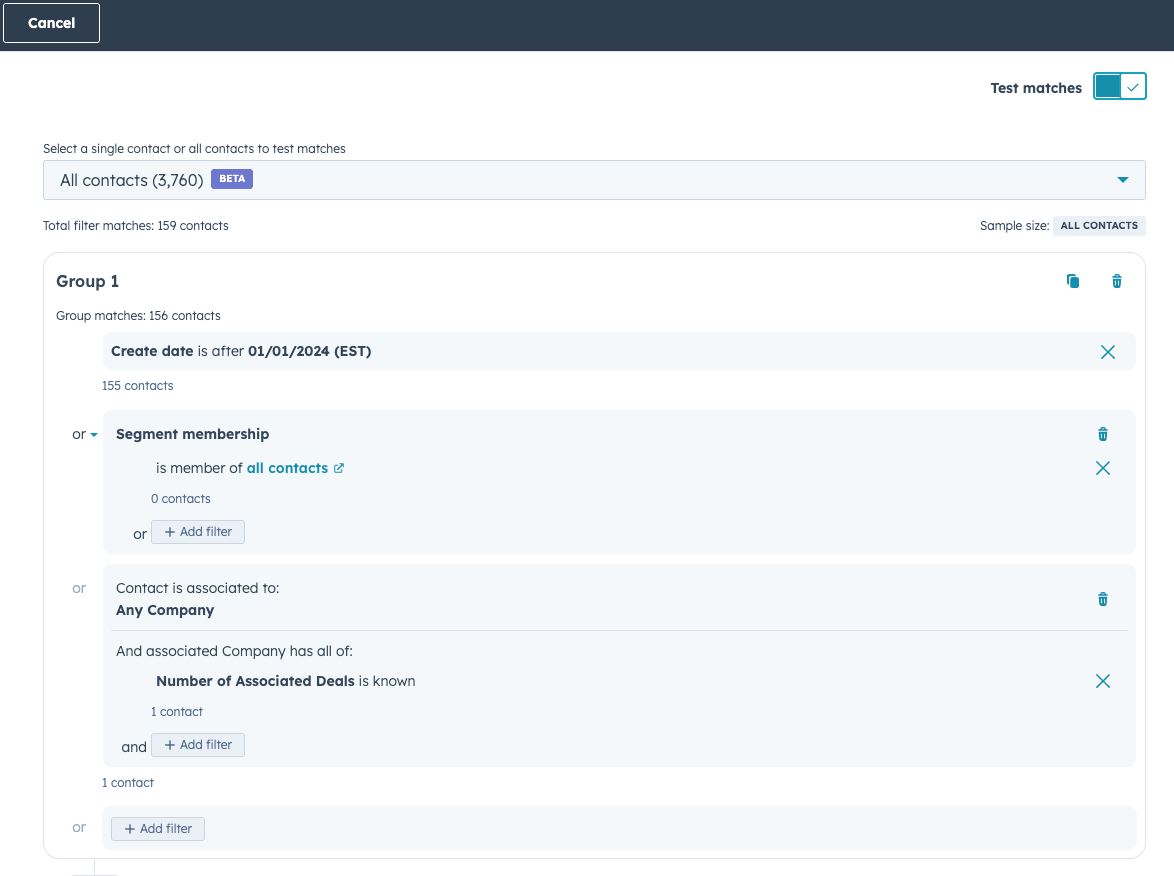
Granular Filter Insights show you how each filter affects your segment size in real-time as you build it.
As you create or refine a segment, you'll see:
- How many records match at each step
- Which filters expand or narrow your audience
- Filters with no effect (flagged at 0 matches)
Why does it matter?
Previously, building complex segments involved guesswork. You'd add filters, save the list, and check if results matched expectations. This made it hard to know which filters were helpful, harmful, or ineffective.
With Granular Filter Insights, you can:
- Test filters as you go, saving time
- Immediately identify unexpected filter behavior
- Create precise segments that match your exact needs
This leads to faster, more confident segment building and improved targeting for your campaigns.
3. Manage Permissions on Line Item Properties
What is it?
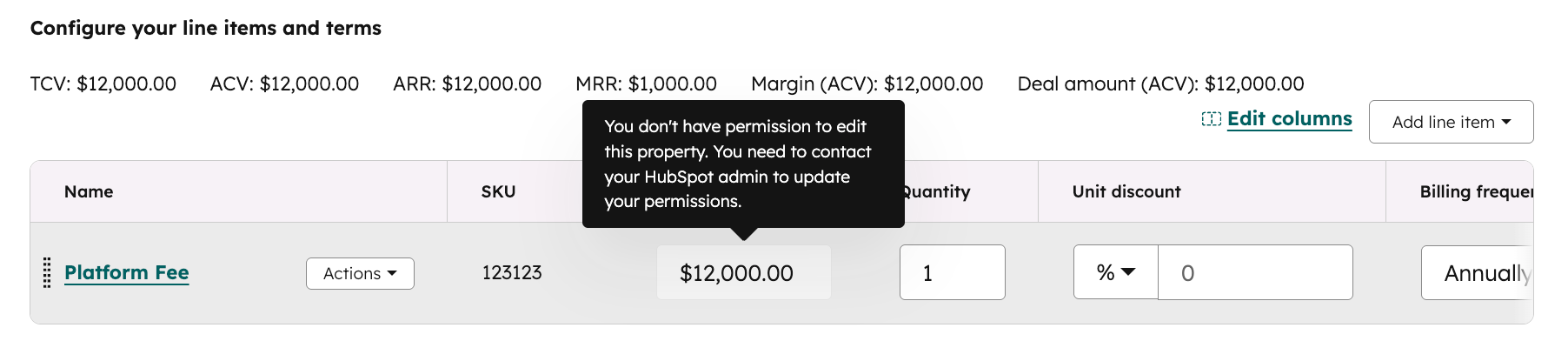
You can now restrict access to specific line item properties (like name, unit price, or discount) by user or team. This gives you greater control and security within your quoting and sales workflows.
Why does it matter?
Until now, line items didn’t support field-level permissions—creating risk and operational inefficiencies for teams needing more control. With this update, you can:
- Prevent reps from editing sensitive fields (like product name or unit price)
- Give finance or RevOps teams exclusive access to key pricing data
- Align permissions on line items with how you already manage deals, contacts, and other records
- Reduce errors and manual oversight by locking down what should stay fixed
4. Test the Complete Install Flow from Your Listing Preview
What is it?
You can now test your app's complete install flow directly from the listing preview in the listing editor before submitting your app listing for review.
Why does it matter?
Previously, there was no way to test the install flow from the listing preview, which could lead to install issues that only surfaced after submission. Now you can validate the full end-to-end experience — including OAuth authentication — and catch any problems early, giving your users a smoother install experience from day one.
This update is available for all apps, and is especially useful if you're adopting the new marketplace install flow.
5. HubSpot Developer MCP Server (Local)
What is it?
The HubSpot Developer MCP (Model Context Protocol) Server is now generally available, giving developers a production-ready, fully supported path to build HubSpot integrations and CMS experiences using natural language workflows.
Installed locally via the HubSpot CLI, the Developer MCP Server enables you to more intelligently build, test, and deploy your apps and content on the HubSpot Developer Platform using AI-powered clients.
Supported IDEs and AI coding assistants include VS Code, Cursor, Claude Code, Gemini CLI, Codex CLI, and Windsurf.
Why does it matter?
By delivering relevant context and functionality to IDE copilots and AI coding assistants, the Developer MCP Server helps you save time, improve quality, and reduce costs when building on HubSpot.
The Developer MCP Server handles the repetitive, context-heavy parts of development so you can spend more time building. You can use it for assistance with common tasks like:
- Building and iterating on apps — Scaffold, configure, and iterate on HubSpot apps without context-switching between tools
- Creating and managing CMS content — Draft, update, and publish pages, blog posts, and other CMS content directly from your IDE or AI coding tool
- Accessing app analytics — Query performance and usage data conversationally to understand how your apps are performing
- Troubleshooting with context — Debug and resolve issues faster by providing the Developer MCP Server with direct access to your HubSpot developer environment
6. Set Favorite Tab on Mobile Records
What is it?
Mobile app users can now set a preferred default tab (About, Activity, or Overview) for each CRM record type, so their chosen tab displays first when opening records.
Why does it matter?
You can now customize which tab appears first when opening CRM records on mobile, reducing the number of taps needed to access the information most relevant to your workflow. Different roles prioritize different data. Sales reps might need quick access to activity history, while account managers focus on deal details. This personalization helps you work more efficiently in the field by eliminating the extra navigation steps to reach your most-used information.7. Approvals Notifications now available in Slack and Teams
What is it?
We’re adding Approvals notifications to our Slack and Teams integrations so approvers get real-time pings when something needs their review, without relying solely on email.
Why does it matter?
Approvals often stall because approvers miss or overlook email notifications, especially in fast-moving teams. Bringing Approvals notifications into Slack and Teams keeps reviewers in the tools they already use, reducing turnaround time and preventing work from getting stuck.
8. Admin Toggle for Sales Workspace Versions
What is it?
Super admins can now control which sales workspace version their users access through a new toggle in settings.
Why does it matter?
Late last year, we launched an updated sales workspace with deeper Smart CRM integration and new features. New users automatically received the updated workspace, while existing users remained on the previous version to avoid end-of-year disruption.
Until now, existing users could only access the updated workspace through a temporary beta opt-in or by contacting support.
9. Retroactive SLAs
What is it?
Currently, any new changes made to SLAs in the Help Desk are applied to new tickets only. This new feature gives admins the option to apply SLA changes to existing tickets. Teams can retroactively align in-flight tickets with their latest SLA configurations without manual intervention.
Why does it matter?
Customers expect the ability to configure SLA goals that apply to their current tickets, not just new ones. This allows them to establish new goals and immediately reflect them in active workflows, ensuring reporting accuracy and consistent expectations for agents and managers alike.
10. Sales Documents Nested Folders
What is it?
Sales Documents now supports multi-level folder hierarchies, allowing you to organize, move, and manage sales collateral in nested folders.
Why does it matter?
As document libraries grow, a single folder level makes it difficult for sales teams to find key content and match their specific sales structure. This can lead to confusion and the accidental use of duplicate or outdated documents.
By enabling nested folders, teams can organize content in a scalable, intuitive hierarchy. This saves time, reduces administrative errors, and keeps sellers focused on closing deals rather than hunting for PDFs.
11. Subdomain Support in Buyer Intent
What is it?
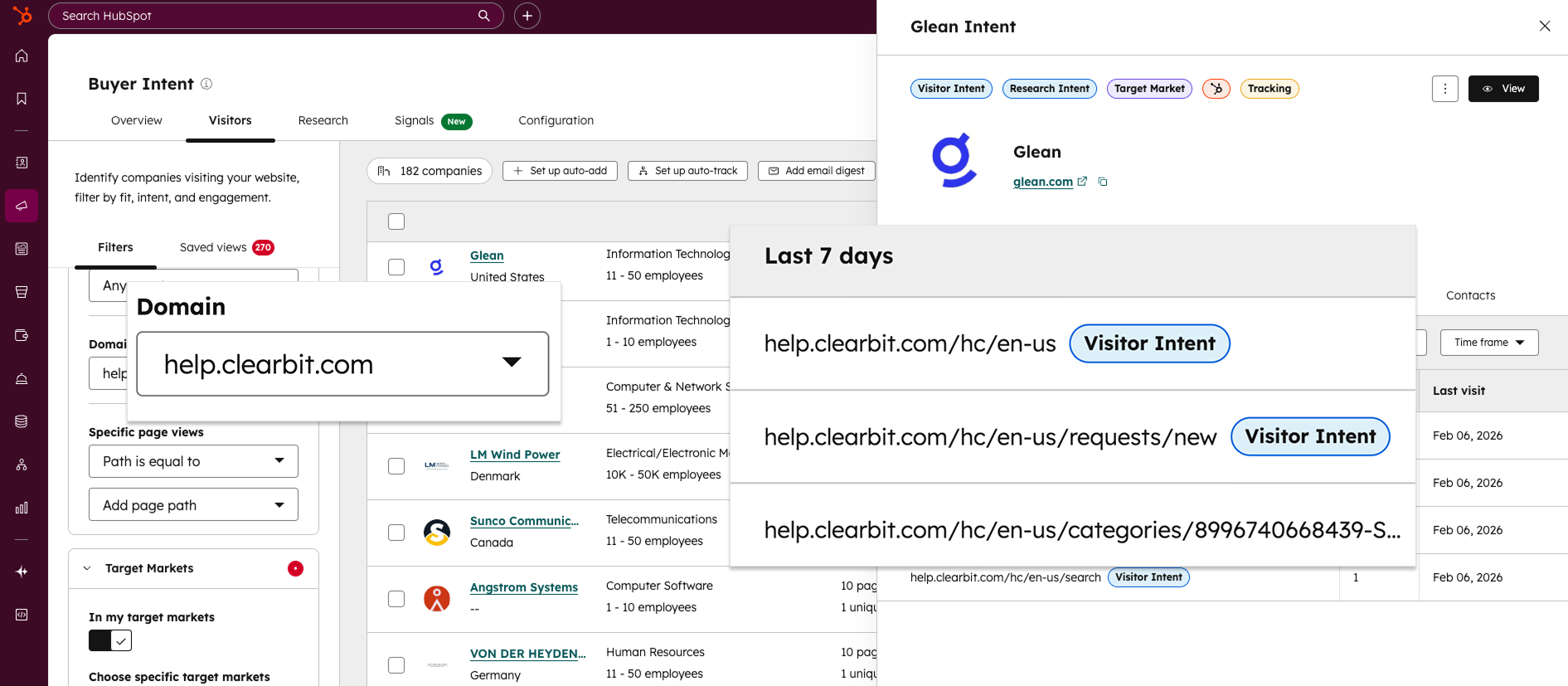
Manage multiple websites, including ones on subdomains? And don't want buyer intent grouping all traffic under one root domain?
Well, good news. You can now filter for and segment by subdomains in buyer intent—giving you a clearer picture of who's visiting and where.
Why does it matter?
Starting today, you can now do the following:
- Segment traffic across different brands or business units: For larger companies managing multiple websites on subdomains, you can now easily differentiate traffic. Create unique views and intent criteria for each specific brand, product, or business unit.
- Separate app users from marketing prospects: Is your app on a subdomain like
app.yourcompany.com? Easily distinguish between product users and prospects on your marketing site to focus your team's outreach on the right accounts. - Track campaign performance with precision: If you run marketing campaigns on dedicated subdomains, you can now isolate that traffic. Hone in on campaign-specific visitors to measure performance and generate leads more effectively.
12. Send an email to create a ticket in help desk
What is it?
Users can now send an outbound email to create a ticket in help desk.
Why does it matter?
Until now, the process of manually creating a ticket in help desk has slowed support reps down, with too many steps and too many clicks. In order to help their customers and meet their SLAs, reps need a fast and efficient way to create tickets on the fly. This update also addresses customer feedback requesting that tickets can be created in help desk from new outgoing emails, not just incoming messages.
13. Connected Apps: New Connections Home & Connection Insights
What is it?
Connections Home is a new centralized page for managing your integrations. It provides a comprehensive view of apps connected to your account, apps requiring immediate attention, and apps installed by other users across your organization.
This update also includes a new Connection Insights section that provides a detailed overview of app activities, Academy content, new API call usage, and new Record Insights that track how your apps interact with HubSpot and CRM data.
Why does it matter?
More data. Fewer silos. These updates surface critical information to simplify integration management and reduce the time and effort required to maintain your app ecosystem.
You can now spot and resolve app connection issues, monitor app activity across your organization, understand how apps interact with CRM records, and avoid surprises like expired connections or API limits - all from one place.
14. Export History Retention Policy
What is it?
Beginning on March 2, HubSpot will automatically delete export records that are 3 or more years old to optimize system performance.Why does it matter?
- You'll maintain access to recent export history while HubSpot focuses engineering resources on new feature development
- Your export workflows remain unchanged—only the historical record of very old exports will be affected
- Export files themselves are still available for 30 days after creation, as always
15. Marketing Studio: UTM Settings Page
What is it?
We’re releasing a new UTM Settings experience for Campaigns that makes it easier to manage how campaign UTMs are generated and maintained across your HubSpot account.
If you rely on UTMs, this update gives you more control, better visibility, and safer ways to clean up or change existing UTMs.
Why does it matter?
These changes will:
- Reduce manual cleanup work and one‑off UTM fixes across campaigns
- Give you better alignment between HubSpot Campaigns
- Make it easier to standardize UTM conventions as your team and campaign volume grow
16. Granular Filter Insights in Segments
What is it?
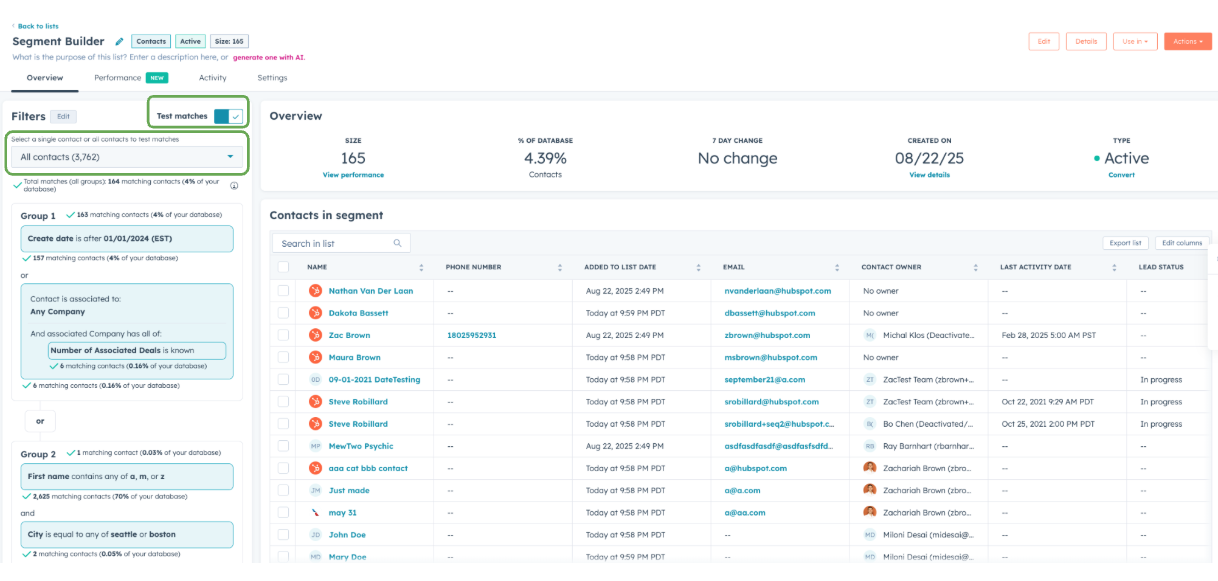
For the first time, you can see exactly how each filter shapes your segment as you build it.
We’re introducing Granular Filter Insights to the segment-building experience, providing you with real-time visibility into how each filter influences your total audience size. As you create or refine a segment, whether you’re adding a single filter or combining multiple, you will now be able to see exactly:
- How many records match at each step
- Which filters are expanding or narrowing your audience
- Whether a filter has no effect at all (clearly flagged at 0 matches)
With this added transparency, you can build smarter, more accurate segments without the guesswork. Understand how each filter impacts your total segment by understanding which part of your total population meets each filter's criteria.
Why does it matter?
Until now, building complex segments often involved trial and error: you’d add filters, save the list, and then see if your results matched expectations. This made it difficult to determine which filters were beneficial, which were detrimental, and which had no effect at all.
Granular Filter Insights changes that by providing real-time feedback as you build. You’ll be able to:
- Test your filters regularly to prevent wasted effort.
- Spot issues instantly when filters don’t behave as expected.
- Fine-tune segments with precision, ensuring your audience is exactly what you need.
The result: faster, more confident segment building and better outcomes when you put those segments into action
17. Enhanced multi-step form logic (hide & show steps)
What is it?
We’re introducing powerful, new upgrades to conditional logic in multi-step Forms, giving you more control over what visitors see as they move through your form.
You’ll now find two new step-level logic actions available in the Forms Editor:
- Hide steps: Hide one or more steps when conditions are met.
- Show steps: Reveal steps dynamically based on a visitor’s responses.
We’ve also improved the field-level actions you already use today:
- Show fields now includes rich text and content blocks, allowing you to reveal content dynamically.
- Skip to step is now deprecated, as Hide Steps provides a simpler and more flexible way to design multi-step paths.
In addition, forms now support a smoother completion experience when logic hides the final step: if Hide Steps removes all remaining visible steps, the form will automatically surface the Submit button, allowing the visitor to submit without navigating further.
These improvements make it easier to build clean, personalized, and frictionless multi-step experiences for every visitor.
Why does it matter?
Forms work best when they feel straightforward and relevant.
Previously, it was difficult to tailor multi-step forms to each visitor’s situation - “Skip to step” required multiple rules and couldn’t hide the final step.
With the new Hide Steps and Show Steps actions, your forms can now adjust automatically based on how someone responds. This means visitors only see the steps and information that apply to them, while irrelevant sections are removed.
The result is a shorter, clearer experience that reduces friction, improves completion rates, and makes complex forms easier to manage.
18. Ask Breeze Assistant about App Listing Performance
What is it?
HubSpot Marketplace app owners can now use Breeze Assistant within marketplace analytics to analyze the performance of their app listing. Ask natural-language questions about your listing’s analytics and receive immediate, data-backed responses.
Why does it matter?
Previously, analyzing app listing performance can require manually filtering reports and interpreting multiple data points. Using Breeze streamlines this process.
Instead of navigating dashboards, you can ask direct questions such as:
- “How many page views has my listing received, and where is the traffic coming from over the past 30 days?”
- “What were the top search terms where my listing appeared?”
- “What about the last 5 days?”
Breeze acts as an analytical partner, helping you quickly surface insights so you can focus on optimizing your listing and driving growth.
19. Conditional Scoring with "and" for Lead Scores
What is it?
You can now create conditional scoring rules using "and" that award points only when multiple criteria are met. Check out this quick 🎥 video demo to learn more!
Two types of conditional scoring:
- Cross-property criteria (Fit scoring): A contact or company only receives points when they meet all the property criteria.
- Example: Add 15 points only when a contact's job title is "CEO" AND role is "Decision Maker" AND industry is "Tech"
Event-specific criteria (Engagement scoring): A contact or company only receives points when the action they take meets all the criteria.
- Example: Add 10 points only for a contact that clicked link in email if email name is "new email" AND URL is "hubspot.com" AND location state is "CA"
Why does it matter?
Previously, Lead Scoring only supported single-criterion rules. While you could use segment (list) membership or workflow enrollment as workarounds for conditional logic, those approaches added friction and required you to leave the Lead Scoring app.
Now, you can create conditional scoring rules natively within Lead Scoring. This lets you capture compound qualifications for fit (job title AND industry) and contextual signals for engagement (specific link click in a specific email), resulting in more accurate lead prioritization.
20. Access Group Search & Member Status Visibility
What is it?
You can now quickly search for contacts across access groups and see their registration status at a glance. Find contacts by name or email, view which access groups they belong to, and understand their membership status without clicking into each group individually.
Why does it matter?
Previously, finding a contact in access groups required clicking into each group and manually searching, making it time-consuming to understand who has access to your private content. Additionally, there was no clear way to see a contact's registration status—whether they received the email, opened it, registered, or logged in. With these updates, you can efficiently manage access group memberships and confidently understand who has access to your content.
21. Unifying Reply Recommendations & Customer Agent
What is it?
We're unifying Reply Recommendations and Customer Agent into a single, cohesive experience. This update includes:
- Reply Recommendations setup now lives within the Customer Agent app
- A streamlined rep experience in help desk with an improved reply flow
- Higher quality recommendations—more personal, thorough, and accurate
Why does it matter?
The challenge: Support teams need to move faster without sacrificing quality or control.
The solution: Reply Recommendations give reps AI-powered recommendations that keep humans in the loop. Review, edit, and send—reps stay in control while moving significantly faster.
Why now: Reply Recommendations and Customer Agent already share the same knowledge sources. This update makes it easier to get immediate value from Customer Agent without deploying a live autonomous agent. It's a low-risk entry point that lets teams:
- Respond quickly and close tickets faster
- Deploy AI assistance without going fully autonomous
- Build confidence in AI outputs through hands-on experience
- Improve answer quality over time as your team refines content sources
- Manage everything from a unified admin experience
22. Breeze Assistant Prompts Reimagined
What is it?
A reimagined prompt experience for Breeze Assistant with @Mentions for CRM object search, a saved prompts library with reusable templates and placeholders, and categorized prompt suggestions (Summarize, Create, How do I, Prepare). Users can organize saved prompts with tags (Customer Success, Marketing, Sales, Support) and assign them to specific assistants.
Why does it matter?
Reduces time wasted retyping effective prompts. Helps users discover Breeze capabilities through intelligent suggestions.
23. Search and Filter Chatflows
What is it?
You can now filter and search your chatflows table to find specific chatflows without scrolling through pages.
Why does it matter?
As your website grows, you may create more chatflows to support different pages, audiences, or use cases. When managing many chatflows, searching or filtering helps you quickly locate the one you need to edit or review, saving time navigating through your chatflows table.
24. Sales Documents Multi-Brand Support
What is it?
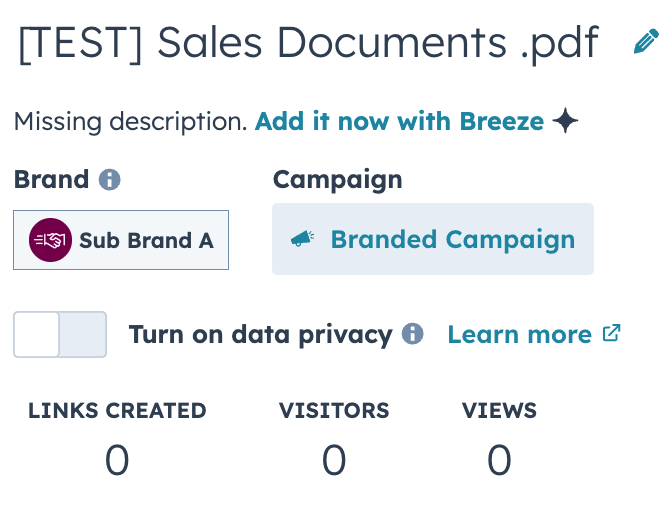
Extend multi-brand support to Sales Documents so that each document can be assigned a specific brand and the correct brand logo and colors are displayed in the Document Viewer, ensuring buyers always see the intended brand identity.
Why does it matter?
Multi-brand organizations need all sales collateral and buyer interactions to consistently reflect the right brand, without manual work, so buyers have a coherent experience and sellers avoid mistakes.
This change lets users assign and change brands for sales documents, enables brand-based filtering, and ensures branded visuals are always consistent in every buyer interaction.
25. Customer Agent Source Performance Reporting for Knowledge Sources
What is it?
Empower you to optimize their Customer Agent with confidence. Source Performance Reporting connects agent outcomes—like resolutions, conversions, and customer satisfaction—directly back to the knowledge sources driving them. You can now see which articles, files, and help docs are performing well and which need attention. This creates a clear path to continuously improve agent performance by identifying top performer sources to keep updated, underutilized content to surface better, underperforming content that needs sources to edited, and low impact sources to remove. The result: you can confidently invest in the right content, systematically boost resolution rates, and prove ROI on your knowledge base.
Why does it matter?
You need to understand which knowledge sources help or hurt your agent’s performance, as currently there is no visibility into which content is driving successful outcomes or causing issues. This enables you to make data-driven decisions, prioritize updates, and continuously improve agent effectiveness, eliminating guesswork and wasted effort.
26. Two New Calculated Properties Available: "Time in Current Stage" and "Date Entered Current Stage"
What is it?
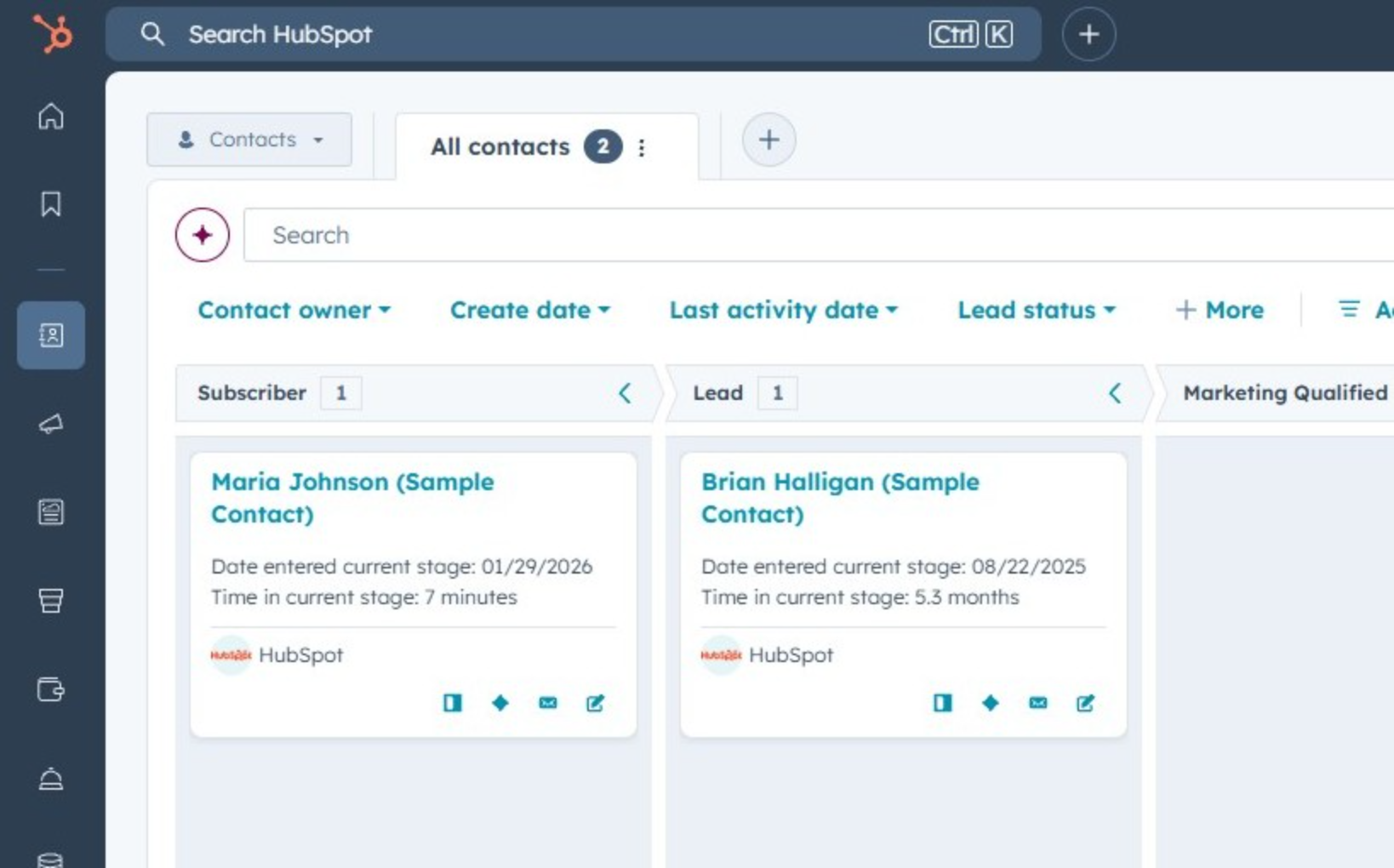
Two new stage calculated properties for contacts, companies, leads, tickets, and services: Time in Current Stage and Date Entered Current Stage.
Why does it matter?
You can now:
- Gain deeper insights into how long records spend in each stage
- Identify bottlenecks in your processes
- Automate actions based on time spent in a stage
27. Add comments to Workflow Triggers
What is it?
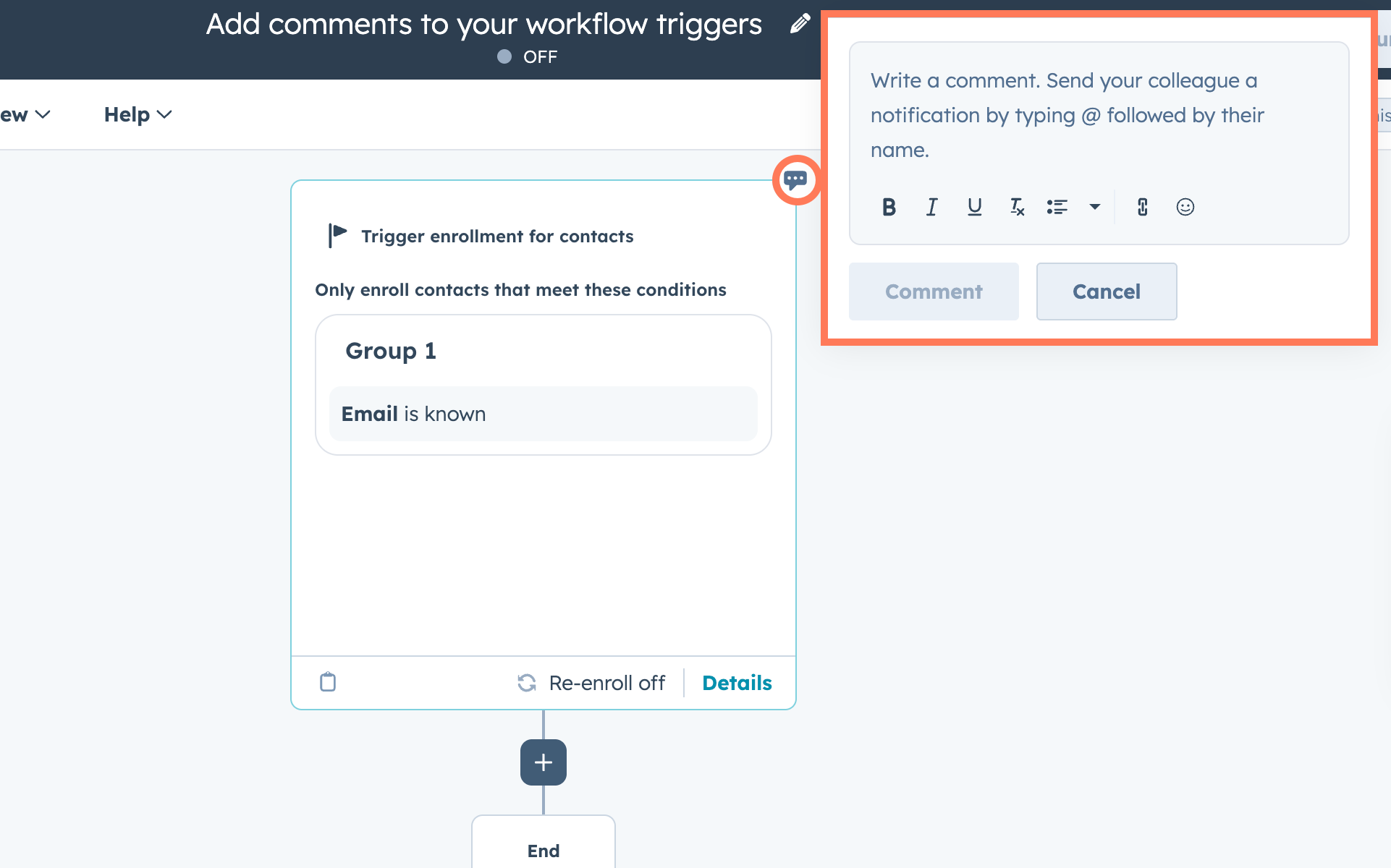
You can now add comments directly to workflow triggers, not just workflow actions. This lets teams explain why a workflow starts, share context about trigger logic, and collaborate right where the automation begins. Comments on triggers work just like action comments, making it easier to document and discuss workflow setup in one place.
Why does it matter?
Workflow triggers often contain complex logic that’s critical to how automations behave. By commenting on triggers, teams can reduce confusion, speed up reviews, and make workflows easier to understand for collaborators—especially when onboarding new teammates or revisiting workflows later.
28. Assign Customer Agent to Email during channel connecton
What is it?
In the Help Desk and Conversations Inbox team email setup flow, Customer Agent appears as the initial option for automatically assigning a ticket or conversation.
Why does it matter?
Ads in discovering and learning about a powerful, time-saving tool.
29. Social Metrics in the Custom Report Builder
What is it?
Unlock your social media data directly within the Custom Report Builder. You can now build customized reports using a wide array of social media metrics to gain deeper insights into your performance across networks.
Why does it matter?
Why it matters: This feature addresses the need for deeper, more flexible analysis of social media performance than currently available in standard reports. It allows users who need detailed insights to create tailored reports specific to their business goals.
Problem solved: It solves the limitations of pre-defined in-app social reporting by giving advanced users direct access to a wider range of social metrics within the familiar Custom Report Builder. This empowers users to conduct in-depth analysis and build reports that meet their specific needs, comparable to dedicated social media analytics tools.
30. Take Action with Claude: Update CRM Records and Access Engagement History
What is it?
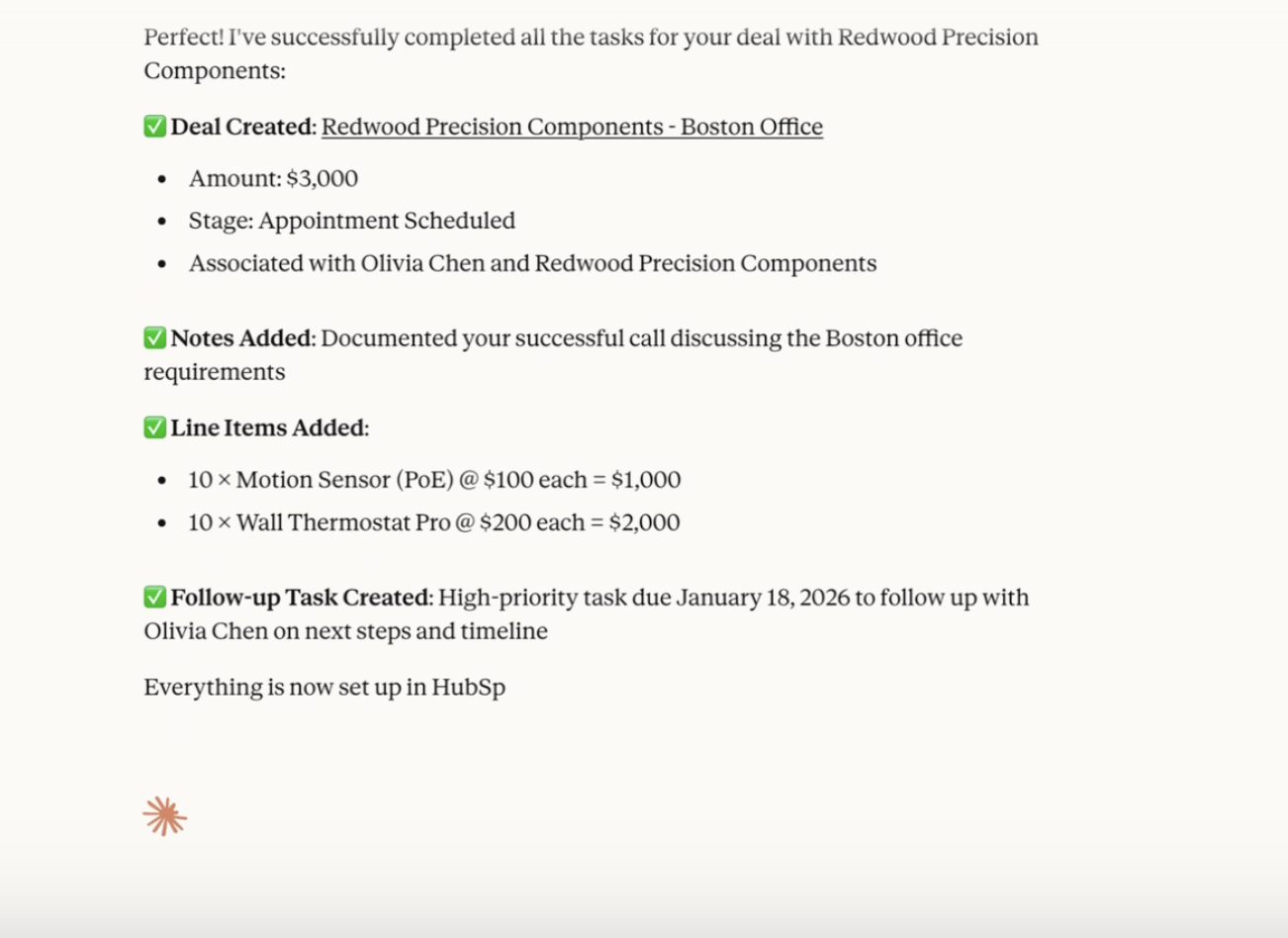
The HubSpot connector for Claude can now create and update CRM records and log activities (engagements) directly from Claude’s chat window – including new contact and deal creation, and logging notes or tasks.
Claude can also generate on powerful insights based on your complete engagement history (emails, calls, meetings, tasks, and notes).
Please note:
- If your HubSpot account has sensitive data enabled, the HubSpot connector for Claude will not have access to any engagement data for added security.
- When using create and update actions in the HubSpot connector for Claude, attribution will be recorded in your HubSpot account’s Audit Log to the user and the Claude connector.
- HubSpot connector for Claude cannot delete records or engagements in your CRM.
- The HubSpot connector for Claude supports bulk Create and Update actions for a maximum of 10 records in a single request.
Why does it matter?
With expanded write access and engagement visibility, the HubSpot connector for Claude allows you to update your HubSpot context directly without leaving Claude. Ask Claude to log a discovery call, create follow-up tasks, update deal stages, or analyze months of customer emails using natural language.
By accessing engagement history such as emails, tasks, and notes, Claude can surface meaningful insights and let you take action on them instantly, right from the chat window. This unlocks faster, more intelligent use cases, like:
- Faster workflows: Create a task to follow up with a prospect who had questions on pricing.
- Smarter insights: Claude can now access your email threads and call notes to provide context-aware recommendations.
- Less manual work: No more copying insights from Claude into HubSpot properties manually – update directly from Claude’s chat window.
- Better decisions: Analyze real customer conversations, not just CRM snapshots.
31. View Statistics in the Reports List
What is it?
View counts now appear in the Reports list, showing you how often each report has been viewed and by whom.
Why does it matter?
When you invest time building reports, you need to know which ones your team actually uses. Previously, you could see when reports were modified through dashboard activity logs, but couldn't easily identify which reports were being viewed and which were going unused.
With view counts, you can:
- Identify your most valuable reports based on actual usage
- Find unused reports that can be archived or deleted
- Make data-driven decisions about which reports to optimize or retire
32. Assign CRM Views to Any Team
What is it?
Super Admins can now assign any view to any team, even if they’re not a member of that team.
Why does it matter?
Previously, Super Admins could only assign views to teams they belonged to, which created unnecessary workarounds. This update gives them the flexibility to manage and share views across all teams without needing to be added to each one.
33. Merge History CSV Export
What is it?
Merge History CSV Export allows customers to download a complete audit trail of duplicate records merged through the Manage Duplicates tool. From within the tool, customers can select "Export History" and choose a date range (last 7 days, 30 days, or up to 90 days). The export includes all merged records along with their original property values before the merge occurred.
Why does it matter?
When customers merge duplicate records, some data is inevitably lost as values from one record overwrite another. If a merge happens accidentally, or if the wrong record was selected as the primary, customers previously had no way to recover that data. Merge History Export gives customers self-service recovery capabilities. With the full pre-merge data in hand, they can manually restore records or at minimum identify what was lost.
34. Live Chat Availability Fix
What is it?
We’re updating how live chat availability is enforced to ensure chat behavior matches customer expectations and settings.
Previously, visitors could still send messages when all agents were set to “away”, even if the chat was configured to be disabled during agent unavailability. This inconsistency only existed for live chat chatflows. With this update, live chat will now respect agent availability settings and prevent visitors from sending messages when no agents are available.
Why does it matter?
Customers rely on agent availability settings to control when real-time conversations can happen. When messages go through despite agents being away, it creates false expectations for visitors who assume someone is actively monitoring chat. This discrepancy also introduces inconsistent behavior between bots and live chat availability settings.
This update in availability controls and settings ensures they work as expected.

Beta
These updates are currently in the works and nearly ready to be released on your HubSpot Portal.
1. Associate Contacts, Deals, and Tickets with Campaigns
What is it?
You can now associate contacts, deals, or tickets with campaigns directly from multiple locations in HubSpot: the campaigns tool, object record pages, object index pages, and workflows. Contact and deal associations contribute to attributed revenue.
Why does it matter?
Marketing impact isn't limited to digital touchpoints. You need to measure ROI from offline activities like trade shows, field events, and in-person meetings. By manually associating contacts and deals with campaigns, you can accurately track revenue attribution across all marketing efforts, not just web-based interactions.
2. Active Lookalike Segments
What is it?
Keep your Lookalike Segments up to date as your business changes. This update allows you to automatically refresh your lookalike segments on a scheduled basis, so your lookalike segment stays aligned with your evolving business segments.
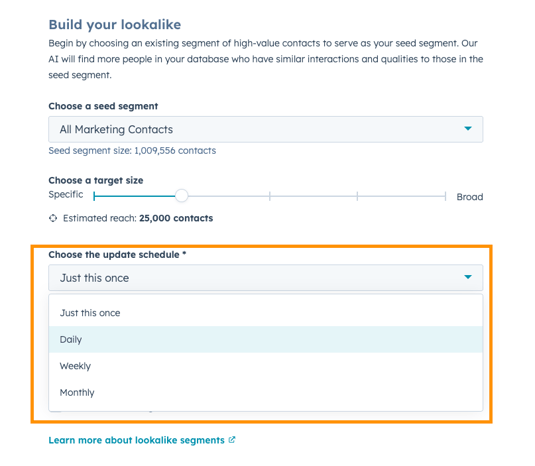
Why does it matter?
Prior to this release, lookalike segments represented a point-in-time snapshot. If the seed segment changed, whether through new contacts being added or updates to contact properties, the lookalike segment did not update. Over time, this created drift between the original seed segment and the lookalike segment being targeted.
Now, as the seed segment evolves, the lookalike evolves with it. Active Lookalike Segments ensure your targeting evolves as fast as your business does.
3. Light Color Theme, Improved
What is it?
HubSpot have made meaningful refinements to HubSpot's visual design based on feedback from customers who tried the initial release. If you haven't seen the theme yet, this is a great time to check it out - and if you have, you may notice some changes since the last version.
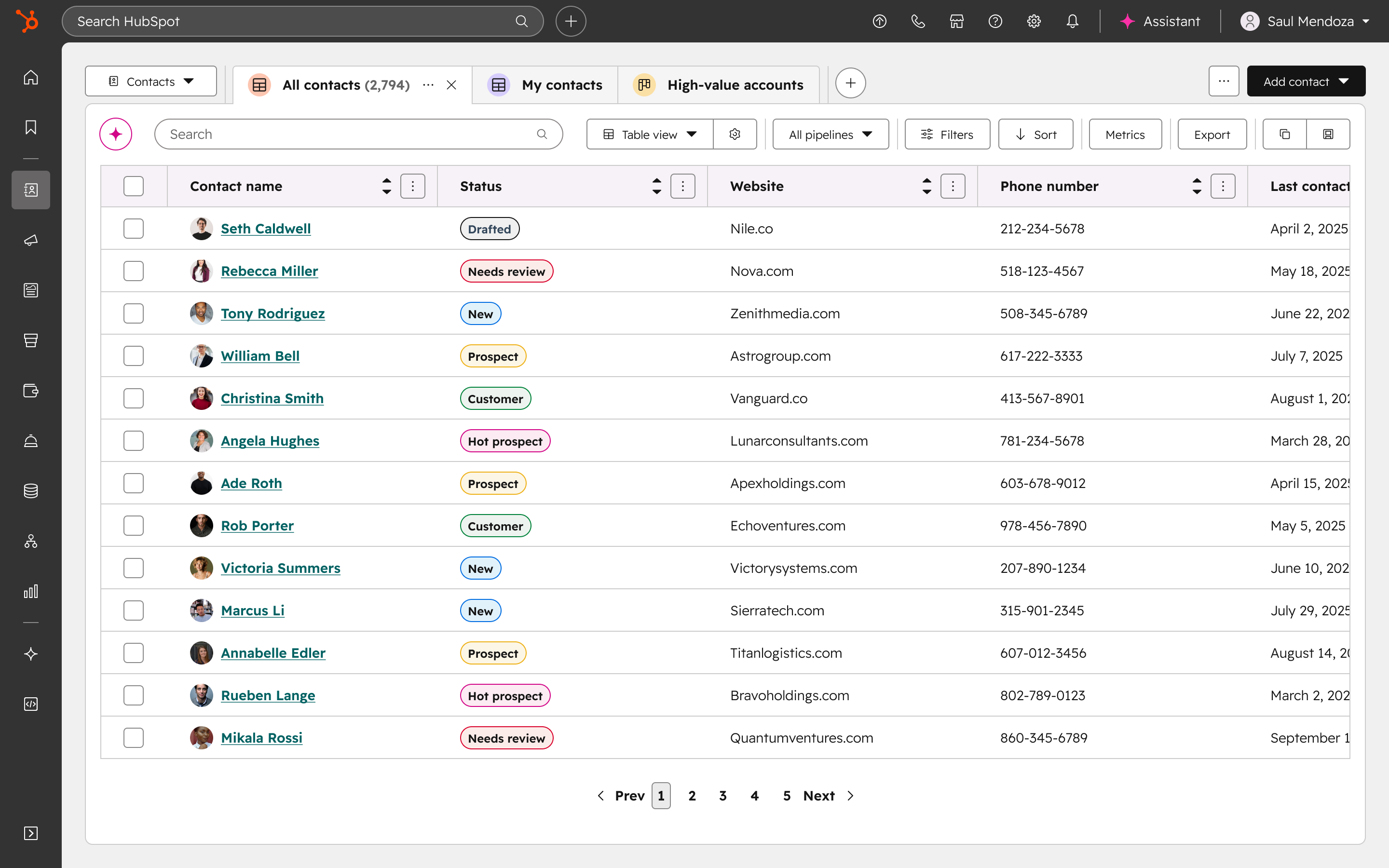
Why does it matter?
A workspace that gets out of your way makes a real difference. This update brings better contrast, a more refined color palette, and a cleaner visual layer that reduces eye strain and cuts down on distractions — so you can stay focused on the work that actually matters.
4. Buying Groups
What is it?
Introducing Buying Groups for Sales Hub and Service Hub Professional 🎉
HubSpot are excited to announce the launch of Buying Groups, HubSpot’s new native version of OrgChartHub, which joined the HubSpot family in June — now available in Sales Hub and Service Hub Professional.
Buying Groups bring powerful context right into HubSpot, making it easier than ever for your team to understand and influence every decision-maker involved in a sale or renewal.
The Buying Group functionality allows Sales and Customer Success teams to get a clear visual of the key stakeholders they are prospecting, selling to and working with.
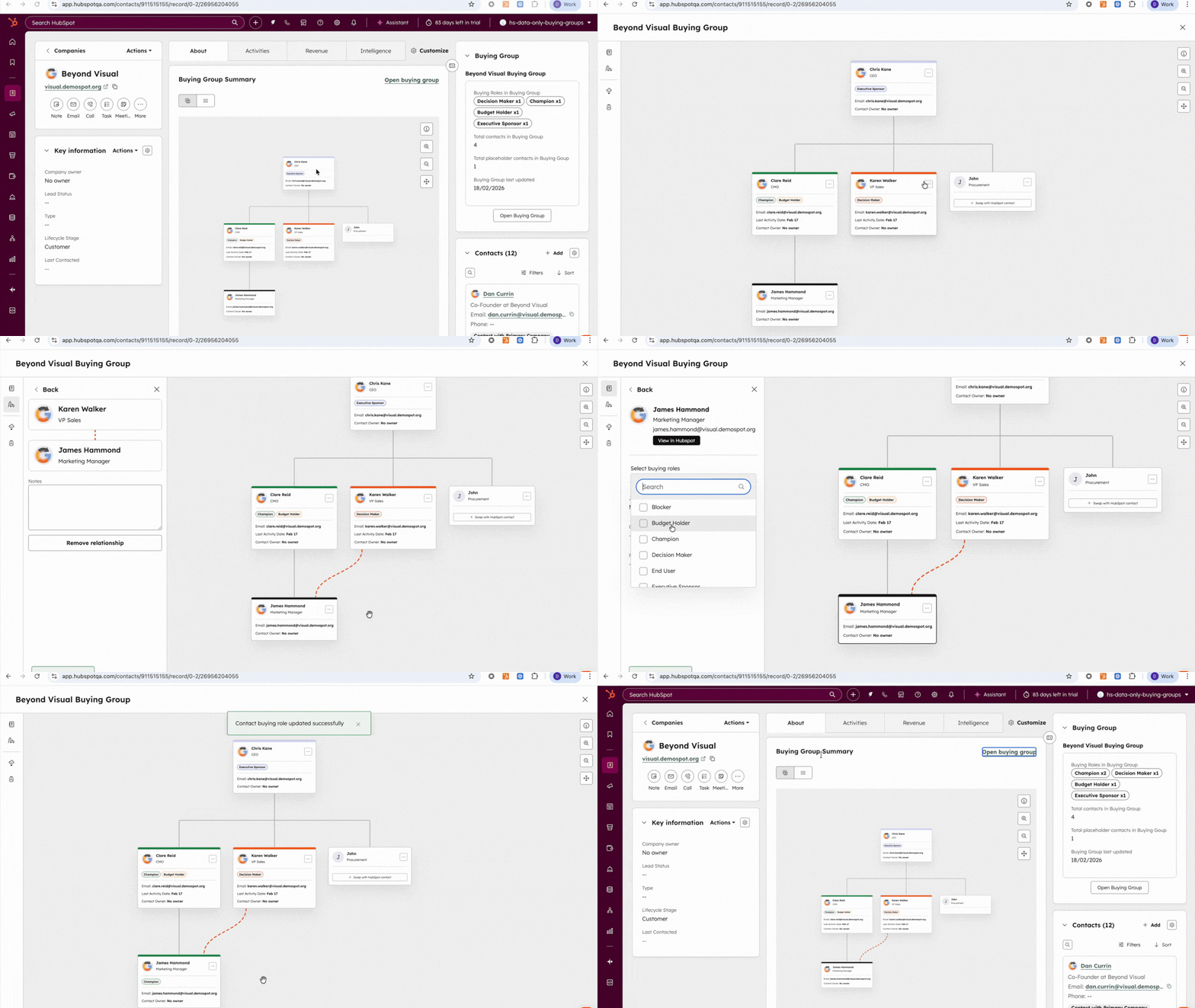
Why does it matter?
When you’re selling to or managing large accounts, you’re not just engaging one person, you’re working with a big, complex buying group.
That’s why top HubSpot customers map out the buying group and each buyer’s role from prospecting, to close, to renewal. It helps them:
- See the whole picture: Who’s in the group, who’s calling the shots, and who’s influencing from the sidelines.
- Spot the gaps: Identify missing connections or weak relationships before they become roadblocks.
- Protect the deal and renewal: Keep everyone engaged and aligned to reduce the risk of a last-minute derail.
5. Improved Users Table & Page
What is it?
The Users page has been redesigned with modern data table functionality to streamline admin workflows and reduce friction in user management. Admins can now leverage bulk operations to update user properties directly from the table without navigating away. The redesign introduces customizable and movable columns, saved custom views, and optimized default views with total user counts for quick reference, enhanced quick filters, and export filtered views.
Why does it matter?
Admins report that the prior Users page was slow, required deep navigation to complete simple tasks, and lacked editable columns, saved views, and bulk workflows needed for scaled organizations. Basic tasks, such as updating user properties, adjusting permissions, or filtering to monitor inactive or pending users, often required dozens of repetitive clicks, leading to frustration and operational inefficiency.
This redesign focuses on reducing administrative overhead and introducing predictable, modern table experiences that already exist elsewhere in the CRM.
6. Custom Reports Included in Email Shares with Attachments
What is it?
Custom reports can now be attached when you share dashboards or reports via email. This fixes an issue that previously caused custom reports to be omitted from email attachments.
Why does it matter?
If you rely on scheduled or one-time email shares to distribute insights to stakeholders who don't log into HubSpot regularly, missing custom reports broke your workflow and made email sharing unreliable. Custom reports now behave consistently with all other report types, so your email shares are complete every time.
7. A new Notion integration
What is it?
A new two-way data sync app with Notion.
This new app mirrors the comprehensive integration capabilities found in our 100+ data sync apps which automate the synchronization of data fields and objects across platforms, reducing manual work and ensuring data consistency. With customizable field mappings, filter settings, and real-time updates, Data Sync allows users to maintain up-to-date information across their business tools.
Alongside two‑way sync, Notion is available as a source in Data Studio*, where teams can ingest Notion databases into a pre‑CRM workspace to join, clean, and transform the data. When (and only when) they’re ready, they can activate the dataset in HubSpot.
*Data Studio is currently in beta and included with Data Hub Professional and Enterprise.
Why does it matter?
With this data sync app, Notion and HubSpot stay aligned automatically. Changes made in either system are reflected in the other, so both tools are always up to date. It also makes moving data from Notion into HubSpot fast and painless when you’re ready to migrate.
With Data Studio, you can bring Notion data into your workspace to join, enrich, combine, and clean data before using it in the CRM, reports, workflows, segments or even export it again.
8. Breeze Assistant to Add and Edit Workflow Actions
What is it?
You can now use Breeze Assistant to add and edit workflow actions while building a workflow.
Why does it matter?
The workflows "Generate actions with AI" feature brought the power of AI assisted building to automation. However, this embedded action panel feature only gave you one shot at communicating your goal. If the generated actions didn't meet your needs, you'd have to start over, with no guidance on how to more effectively communicate your use case.
Adding and editing workflow actions with Breeze Assistant replaces the "Generate actions with AI" feature to provide a more powerful and iterative action building assistant. Just tell Breeze what you want your workflow to do, and Breeze will help you make that goal happen. Breeze Assistant prompts for missing information, provides recommendations and builds on your behalf, all in its familiar conversational interface.
9. Meeting Notetaker with Smart Deal Progression
What is it?
Enable Sales and Customer Success teams to close more deals, faster, by ensuring every conversation leads to clear next steps and timely follow-up.
Smart Deal Progression uses your meeting transcripts and deal history to handle the manual work that follows a customer call. After every meeting, HubSpot analyzes the conversation to suggest CRM updates, draft follow-up emails, and surface high-value next steps such as sending a proposal or booking a follow-up. Reps can quickly review and confirm these suggestions, ensuring every interaction moves the deal forward.
Why does it matter?
Reps spend hours every day on manual tasks like writing follow-up emails, creating tasks, and updating CRM records. Smart Deal Progression automates this busywork so reps can stay focused on their customers.
By using the actual context from your conversations, HubSpot provides accurate suggestions that ensure no detail is forgotten. This helps your team follow up faster, keeps your pipeline data clean, and prevents deals from stalling. When every conversation leads to a clear next step, you can close more deals with less manual effort.
10. Visual Search in Video Library
What is it?
HubSpot now supports visual search in the Video Library. You can search for specific visual elements (like “a person in a red hat” or “headphones on a table”) across your video content, in addition to transcript and title-based search. This makes it easier than ever to find and reuse the exact moments you need.
Why does it matter?
Until now, search has relied on titles and transcripts, which misses everything that’s purely visual. That means marketers spend too much time scrubbing through footage or re-creating assets they already have.
Visual search changes that. Whether you're trying to locate a speaker, identify a product demo, or surface visually distinct scenes from an old webinar, you can now find it instantly just by describing what you see. This helps you reuse content more effectively, reduce redundant work, and keep valuable footage in circulation.
11. New look for Approvals Settings
What is it?
A redesigned Approvals settings experience that makes it easier and clearer for admins to configure how approvals work across their account.
Why does it matter?
The new design reduces confusion and setup friction, so teams can get the right approvals in place faster and with more confidence.
12. TikTok Ads Integration
What is it?
You can now create a new TikTok ad account or connect your existing TikTok ad accounts to HubSpot.
Once you do so, you'll be able to:
- View TikTok ad reporting alongside other channels
- View how many contacts and deals are attributed to your TikTok ad campaigns
- Sync contact segments as TikTok audiences
- Add tracking TikTok pixels to your website.
Why does it matter?
TikTok is one of the fastest-growing ads channels, especially since short-form video has become the #1 content type for marketing ROI.
Connecting your TikTok ads account to HubSpot will allow you to have all of your ads data in one unified place, view attribution insights, and sync first-party data which would not be possible by using TikTok Ads alone.
13. Improved Spam visibility & management in Forms
What is it?
We’ve made updates that improve how spam submissions are surfaced and understood across forms. These changes make existing spam information easier to find, interpret, and - most importantly - act on.
Updates include:
- A new Spam tab on each form that surfaces organized insights like spam severity, top spam types, and upcoming automatic deletions, along with a filtered list of blocked spam submissions and in-context actions to view, (bulk) release, or (bulk) delete.
- Easier access to spam protection settings, with Bot Filtering and reCAPTCHA now surfaced directly within each form’s details page.
- Easier access to spam submissions across all forms from the global Forms Analyze tab.
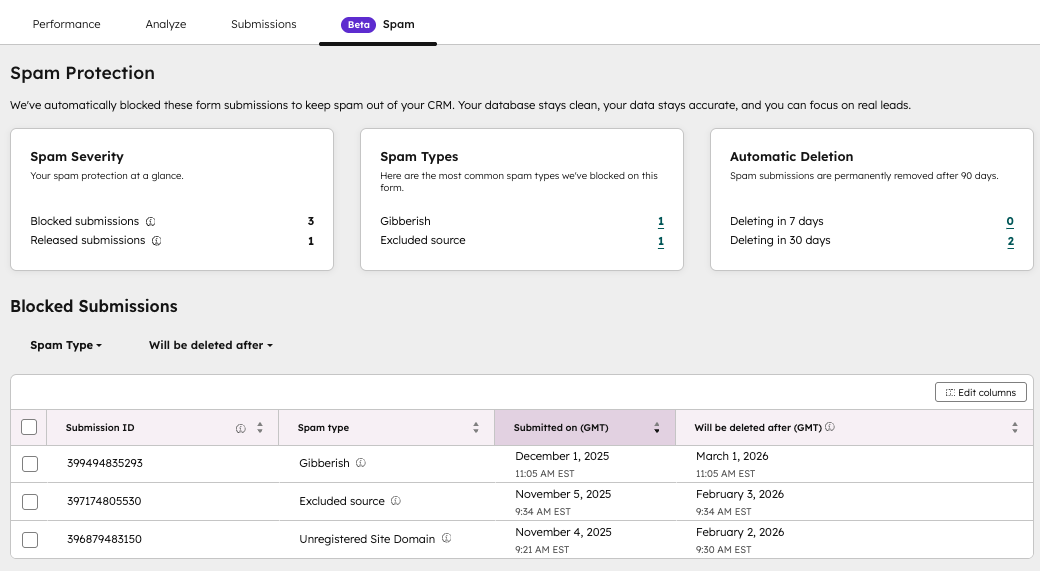
Why does it matter?
It’s been challenging to understand where spam shows up, how serious it is, and what actually needs your attention. Spam submissions haven't been easy to locate, making it confusing and time-consuming to review and clean up your data. These updates make spam easier to notice, interpret, and manage - reducing the time needed to triage submissions and improving clarity across the entire Forms experience.
14. Give instructions to your Customer Agent
What is it?
You can now define clear guidelines for your agent’s tone, response style, scripted responses, and guardrails.
Why does it matter?
Previously, the agent’s tone, style, guardrails came from a single personality and a fixed set of HubSpot guidelines. Customers wanted more control. Guidelines solve this by letting you write natural-language instructions so the agent consistently responds the way you intend.
15. Quote Associations to Custom Objects
What is it?
Customers can associate quotes with custom objects. For example, if a customer creates a car custom object, each quote can be linked to a specific car model or trim, ensuring the quote reflects the correct configuration.
Why does it matter?
Linking quotes to a custom object keeps everything in one place, making it easy to reference quotes directly from the object and ensuring accurate reporting.
16. Enhanced Frozen Columns
What is it?
We’ve upgraded our table experience to give you total control over how you view your data. You can now freeze as many columns as you need to keep your most important information in sight. We’ve also made it much more intuitive—simply drag and drop any column into the frozen area to lock it in place instantly.
Why does it matter?
Every workflow is unique, and we don’t believe your tools should limit how you organize your data. Whether you need to see two columns or ten while you scroll, you now have the flexibility to build the exact view you need. This update is part of our ongoing commitment to quality, ensuring our tables are not only more powerful but also easier and more natural to use.
17. Workflow CRM Property Data Restore
What is it?
Workflow CRM Property Restore is a feature that allows admins to safely undo CRM property changes made by a workflow within the last 14 days.
Instead of manually fixing records, you can restore property values that were changed during that period, helping you quickly recover from unintended changes.
Workflow Data Restore is built on HubSpot’s Unified Data Backup and Restore system, which automatically captures CRM changes made in the last 14 days. This ensures you can reliably restore CRM property updates done by a Workflow!
Why does it matter?
Workflows are a powerful automation tool in HubSpot that can update thousands of CRM records in seconds. However, if it's configured in a way that doesn't match the intended outcome, such as incorrect enrollment criteria, logic errors, or accidental edits, it can unintentionally update or delete a large number of CRM records.
Without an easy way to undo those updates, users spend hours manually exporting, filtering, and repairing data to get things back to the way they were.
18. Support Multiple Main Teams for Full Functionality
What is it?
Users can now be fully functional members of multiple teams in HubSpot, with equal access to routing and workflows across all assigned teams.
Why does it matter?
Previously, users assigned to more than one team could only be full members of a single 'main' team, leading to reduced capabilities and workflow friction for those working across regions or functions.
The idea “Allow users to be ‘primary team members’ of more than one team” has collected 200+ upvotes, including 70+ replies and numerous comments over multiple years. This change removes artificial limitations, improving collaboration, and ticket coverage for organizations with flexible or matrixed team structures.
This update also ensures predictable and transparent routing behavior. Previously, many customers did not realize that “extra” team members were excluded from assignment pools, leading to confusion or inequitable workload distribution. By making all team members fully functional, teams can now rely on routing rules and workflow logic behaving consistently.
19. Restore Deleted Contacts by User or Workflow
What is it?
You can now filter contact deletions in the recycle bin by user and workflow source, making it easier to restore only the contacts deleted by a specific source.
Why does it matter?
Workflow and user-triggered bulk deletions can mistakenly remove hundreds of contacts at once. Previously, you could only restore records by date, which often meant restoring unwanted deletions alongside the contacts you needed. This targeted filtering allows you to pinpoint and restore only the contacts affected by a problematic source, saving time and reducing the risk of restoring irrelevant records.
20. Exclude weekends from "Time between" calculated properties
What is it?
You can now exclude weekends when using Time between calculated properties. This option allows you to calculate the time between two dates while skipping weekends, defined as 12:00am Saturday through 11:59pm Sunday, based on your account’s time zone. This update is available when creating or editing a Time between calculation property.
Why does it matter?
For many teams, weekends aren’t working time—but until now, Time between properties counted them anyway. This made it harder to accurately measure things like response times, resolution times, or internal SLAs.
By excluding weekends, you can:
- Better reflect actual working time in your calculations
- Get more accurate reporting for operational and service metrics
- Reduce the need for workarounds or manual adjustments
This is especially helpful for teams that want clearer insights into how long work actually takes during business days.
21. Make Campaigns Automatable in Workflows
What is it?
You now have access to campaign properties and events in workflows.
With this update, you can automate based on campaign-level data (like budget, spend, revenue, or owner) and react when contacts are influenced by specific campaigns.
Why does it matter?
Until now, Campaign automation was limited. You couldn’t trigger workflows when a campaign overspent or follow up automatically with influenced contacts. This resulted in manual monitoring and missed opportunities to optimize or scale.
With this release, you can:
- Trigger alerts when a campaign overspends its budget.
- Automatically follow up with influenced contacts via tailored sequences.
- Route tasks and updates based on campaign owner or team.
- Use Breeze Assistant to create a campaign-based workflow
22. Configure unsubscribe links in email
What is it?
Configurable unsubscribe links let marketers control how an unsubscribe action is applied in emails. Instead of always removing a contact from all email communications, you can configure the link so that it only unsubscribes them from the specific subscription type tied to that email.
Why does it matter?
Marketers can control the unsubscribe experience choosing for contacts to either opt out of just one category of communication while staying subscribed to others; it can minimize users unsubscribing from all communications unintentionally.
23. Participant State Management for Marketing Events
What is it?
Update contact registration and participation status for marketing events directly from the contact record in HubSpot.
Why does it matter?
Accurate event participation data is crucial for effective marketing segmentation and follow-up. You can now easily update this information without time-consuming imports, allowing you to:
- Segment contacts based on their attendance record before, during, and after events
- Maintain up-to-date registration statuses (registered, canceled, attended, no-show)
- Improve the accuracy of your marketing and sales reporting
24. Never Log Option for Meetings
What is it?
The Never Log setting in HubSpot now applies to meeting activities. Your never log list will now exclude both email and meeting activities from appearing in HubSpot for specified email addresses and domains.
Why does it matter?
Previously, calendar sync in HubSpot was an all-or-nothing setting. You either chose to sync all meeting events that contain at least one contact, or you chose not to sync any meeting events from your connected calendar into HubSpot.
Now, you have the flexibility to turn on calendar sync with the reassurance that you can define specific email addresses and domains whose meetings should not sync into HubSpot.
.png)


-1.png)




.webp?width=98&height=94&name=HubSpot%20Elite%20Badge%20(2).webp)