-1.png)
Welcome to our HubSpot Product Spotlight for January. In this blog, we’ll explore some of the team's favourite HubSpot updates from the last month. Ready? Let’s dive in!
Now Live
These are all the new features live and ready to use in your HubSpot portal.
1. Marketing Email API Migration to folderIdV2
What is it?
HubSpot is updating the Marketing Email API endpoints to include both the existing folderId and the new folderIdV2 fields in the JSON response during the migration period to allow you to map the folderId to folderIdV2.
folderId is the field that represents the folder containing Marketing Emails in HubSpot.
Beginning January 28th, 2026, folderID property will stop working. Use only folderIdV2 property in your API requests after this date.
Full details are available in this changelog.
Why does it matter?
To focus our future development efforts on the improved V3 Marketing Email API, which offers a richer and more comprehensive experience, we're sunsetting the folderId object for the Email API.
2. Breeze Assistant mobile app: Conversation Starters to Help You Get Going Faster with Custom Assistants
What is it?
We’ve added Conversation Starters to Custom Assistants on the Breeze Assistant mobile app—making it easier than ever to kick off a chat, especially when you’re not sure what to ask or where to begin.
Now, when you open a Custom Assistant, you’ll see a set of helpful prompts tailored to that assistant’s purpose. These are designed to give you hints on what the assistant can do and help you jump right into a productive conversation.
Why does it matter?
Conversation Starters make Custom Assistants more approachable, helpful, and fast—especially for mobile users:
- New team members can explore what an assistant can help with, without needing to guess.
- Busy users can get help on-the-go with one tap, no typing required.
- Admins can guide users toward high-impact use cases, ensuring assistants are used the way they were designed.
It’s a small improvement that makes a big difference in driving adoption, clarity, and speed.
3. Associate Payments with Tickets
What is it?
Payments can now be directly associated with tickets. You can add the payments card to a ticket view and manually associate payments with tickets.
Why does it matter?
When a payment is associated with a ticket, you can take payment actions, like refunding or reissuing receipts, directly from the ticket, without leaving it.4. Filters in Agent Inbox
What is it?
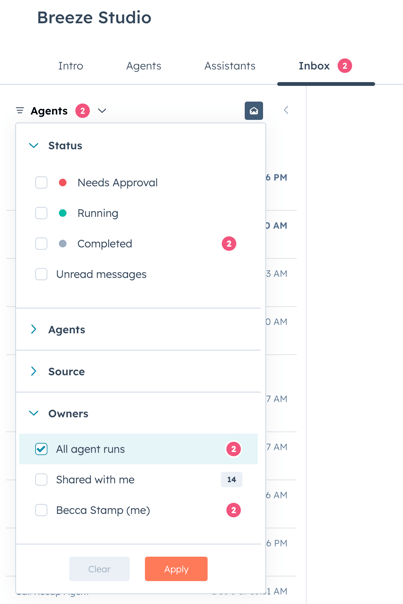
A redesigned inbox experience that introduces comprehensive filtering capabilities across agent executions.
The new filter system allows users to view and organize inbox items by execution status (Success, Error, Needs Approval, Running), request source (Breeze Studio, Automation, MCP Connector, API, CRM Card), and specific agent instances.
The unified interface combines inbox items for individual users ("Me" view) and administrators ("All" view) with execution data, replacing the previous separate executions view.
Why does it matter?
The inbox is often the first place users engage with agent execution results and requests for input. Without robust filtering, users face difficulty finding relevant items in busy inboxes, particularly when managing multiple agents or reviewing execution histories.
This redesign transforms the inbox from a simple chronological list into an intelligent workspace where users can quickly surface what matters most—whether that's items requiring approval, executions from specific sources, or unread notifications.
For administrators managing teams, the enhanced filtering provides visibility across all agent activity while maintaining the ability to focus on personally relevant items. By consolidating executions into the inbox with clear status indicators and source attribution, we reduce context-switching and create a single source of truth for agent activity management.
5. Connect Custom Objects to Knowledge Vaults
What is it?
Knowledge Vaults now sync with HubSpot Segments built on custom objects, making all custom object data and associations available for agent queries!
A new capability that allows users to connect HubSpot custom object focused segments to Knowledge Vaults, making business-specific data accessible to Breeze Agents and Custom Assistants. Users can select segments built on custom objects (like inventory items, orders, or any unique business entity) through the existing knowledge vault connection flow, and the vault will sync all records, properties, and associations for intelligent querying.
Why does it matter?
Companies rely on custom objects to capture business-specific data, but agents previously could not access this information for queries or assistance.
Companies store critical business logic in custom objects—from pet records at kennels to vehicle inventory at dealerships to order tracking systems. Currently, Knowledge Vaults only access standard CRM objects via segments, creating a significant blind spot where agents can't answer questions about a company's unique data model. This limitation forces incomplete responses and reduces agent effectiveness for business-specific workflows.
By enabling segments of custom objects, agents gain complete context about how a company actually operates. This means personalized, accurate responses that understand the full scope of their business—whether that's querying inventory availability, tracking custom workflow statuses, or reasoning about unique business entities and their relationships. The feature transforms agents from helpers with partial information into knowledgeable assistants who understand the complete data structure that powers each business.
6. Customer Agent Message Insights: See How Your Agent Updates Records & Qualifies Leads
What is it?
When the Customer Agent generates a response, people will naturally ask "why?", an "audit card" shows what actions the agent took in order to answer the question or when it performs actions like identifying customers for CRM and when the agent has discovered a lead.
Within the Tester experience, this audit card shows when the agent has identified, matched, and updated customer records in the CRM system. The card displays which specific properties were modified and provides transparency into the agent's CRM actions.
Additionally the audit card will surface if the agent determined a visitor's lead qualification status (Qualified, Partially Qualified, or Unqualified) based on predefined criteria and the qualification properties collected during the conversation.
Why does it matter?
- Users can verify that the agent actually performed the CRM updates they requested, building confidence in the agent's capabilities
- Lead Quality Transparency: Sales teams can immediately understand why a lead was categorized as qualified, partially qualified, or unqualified
- Qualification Criteria Validation: Shows which specific properties were collected (job title, city) that influenced the qualification decision
- Process Improvement: Helps teams refine their qualification criteria by seeing what data points are being captured
- Data Protection: Ensures email collection requirement is met for secure lead qualification processes
7. Business Days support for Workflow Delays
What is it?
We’ve updated the Delay action in Workflows to include an option to exclude weekends. When this option is enabled, delays count only Monday through Friday. For example, if a contact enters a 1-day delay on a Friday with weekends excluded, the next action will run on the following Monday.
Note that this only excludes weekends. It does not account for holidays or business hours.
Why does it matter?
This update makes workflow timing more aligned with normal business operations. With it you can:
- Stop sending emails on weekends when your team won’t be available to respond.
- Ensure follow-ups happen on workdays, improving conversion and engagement rates.
- Avoid confusing timing logic where calendar days push next actions into unexpected gaps (like weekend dates).
This update will help your team maintain professional, predictable communication cadences and reduces manual workarounds people previously used to approximate business day timing.
8. Enable Call Recording Settings by Call Direction
What is it?
You can now choose to record calls based on the call direction, either inbound or outbound.
Why does it matter?
Call recording often requires compliance with specific regulations. This feature allows you to selectively record calls, helping you adhere to legal requirements while still capturing important conversations. For example, you can choose to record only inbound support calls for quality assurance, or limit recording to outbound sales calls for training purposes.
9. Block and unblock in help desk
What is it?
You can now block and unblock senders directly in help desk. Blocking a sender ensures that all future outreach from that contact will go to spam automatically, and that restriction can be lifted later if needed.
Why does it matter?
Block and unblock is an important tool that helps support teams stay safe, focused, organized, and efficient.
- Spam and abuse prevention: without blocking, spam tickets can overwhelm a team's triage process and affect response times for real customers. It's critical that reps have a way to block unwanted messages, bots, or malicious actors who target support channels with junk or harmful content. Blocking keeps the queue organized, protects the team from phishing or unsafe messages, and lets them focus on the important customer problems in front of them.
- Focus and efficiency: blocking also saves reps time by preventing recurring non-customer inquiries like sales pitches or bots. It reduces the amount of time they need to spend on individually flagging those inquiries and manually marking them as spam each time. Block also allows admins to make it clear what help desk channels are for, and who the support team serves.
- Data integrity and reporting: spam and unwanted tickets can often skew support's reporting, inflating ticket volume and distorting time-to-first-response metrics. For admins and managers, blocking helps make sure that metrics reflect the real support demand without additional spam or noise.
10. Breeze Assistant: Your Loop Marketing Expert
What is it?
Quality updates to Breeze Assistant to create a better Breeze experience for Marketers. Breeze Assistant now has access to:
- All of HubSpot Academy's content. Breeze Assistant can even show clipped Academy videos inline related to a user's question.
- Website analytics as a data source. Marketers can now "talk to their data" in Breeze Assistant and get generated reports related to their website traffic and conversions.
- Persona awareness. Breeze Assistant now knows whether the user is a marketer, so it can tailor its responses to what marketers need.
- Loop Marketing expertise. Breeze Assistant now has access to a comprehensive Loop Marketing playbook. When a marketer asks a "how to" marketing question in Breeze Assistant, Breeze can now tailor its response based on Loop Marketing best practices and tactical advice.
Why does it matter?
Breeze Assistant has lacked the context and data sources that marketers need to make it useful. As a result, marketers have had low engagement with Breeze. These quality improvements are a first step toward Breeze Assistant becoming a true hybrid teammate for marketers in HubSpot.
11. Customer Agent now adds inline citations in emails
What is it?
Whenever the agent references documentation, knowledge base articles, or website pages, it will now hyperlink the sources inline.
Why does it matter?
Inline citations give customers immediate confidence and a fast path to deeper detail, reducing back-and-forth.
12. Custom event import now supports existing events and more object types
What is it?
You can now import event data into existing custom event types for any supported object type, not just contacts.
Why does it matter?
Until now, imported events lived as separate event types that made trend analysis unreliable. This update lets you maintain a single source of truth for each event you're tracking, whether the data comes from HubSpot, another platform, or offline interactions.
- Migrating from another platform? Import past events into the event type you're currently using so your trend reports stay clean and continuous.
- Track offline interactions (e.g. conference interactions, phone calls, direct mail responses) alongside digital touchpoints in one unified view.
- Importing events against companies, deals, or custom objects opens up analysis that wasn’t available before, such as account-level engagement or deal progression signals.
13. Additional associations support for Campaign public API
What is it?
Customers can now associate many new assets to HubSpot campaigns using the Campaigns public API (Dev docs here).
With this release, we are adding support for the following 11 asset types:
- Ads
- Blog Posts
- Files
- Landing Pages
- Marketing Email
- Marketing Events
- SMS
- Social Posts
- Video
- Website Pages
- Workflows
Why does it matter?
Previously, the Campaigns assets public API only supported a subset of the campaign asset associations available in-app*. For example, customers could not add or remove a marketing email to/from a campaign through the API and would need to do this within the HubSpot app.
However, it was possible to add or remove a form to the campaign through the same API along with a selection of other assets. This mismatch caused confusion and reduced the API's usefulness for customers.
Now the associations public API supports all the most important marketing assets customers want to tie to campaigns - making it simple to manage a campaign programmatically and mirroring the in-app functionality.
Note*: up to now, the campaign associations endpoint supported the following asset types: (Calls, Case Studies, CTAs, External Website Pages, Feedback Surveys, Forms, Knowledge Base Articles, Lists, Meetings, Playbooks, Podcasts, Sales Documents, Sales Email, Sequences)
14. Deploy Customer Agent through Workflows & chatflows
What is it?
You can now deploy Customer Agent directly through Workflows and Chatflows, giving you greater control over when and how the agent engages with customers. This update allows you to trigger Customer Agent responses as part of your automated processes or existing bot logic — no additional setup or routing required.Why does it matter?
Smarter automation
Integrate Customer Agent seamlessly into your current automation flows.
Target exactly which conversations the agent should respond to — across any supported communication channel.
Flexible deployment
Trigger Customer Agent only in the scenarios where it adds value.
Use workflow branches based on any contact, ticket, or conversation property (e.g., customer type, issue category) to control when the agent engages.
Example use cases:
- Deploy the agent only to specific customer segments (e.g., free users).
- Route specific categories of tickets (e.g., billing inquiries) to Customer Agent first.
- Note: Requires Service Hub Enterprise and AI Categorization to be enabled.
Control credit spend
Allocate Customer Agent usage strategically.
Deploy the agent only in the conversations where it drives the most impact — not across every interaction.
15. Help Desk Recent Searches
What is it?
Help desk recent searches makes it easier to pick up where you left off by showing your three most recent searches directly in the help desk search experience.
Why does it matter?
Recent searches save time and reduce repetition. Instead of re-entering the same filters or search terms, you can quickly return to searches you use often.
16. Disable Download Toggle in Document Viewer
What is it?
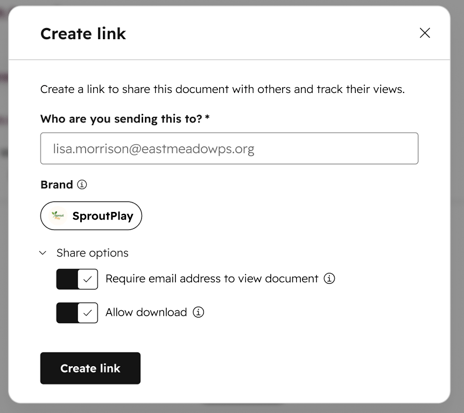
Sellers can now control whether recipients see the "Download" button in the Document Viewer by toggling the download option for each share link.
Why does it matter?
Many customers need to securely share sales documents, such as contracts, proposals, and pricing sheets, without recipients downloading or sharing them outside the intended audience, addressing both content control and confidentiality. This change gives sales, marketing, and service teams more granular control and visibility over who has access to content, without changing how the document itself is stored or tracked.
17. Export Workflow Enrollments and Action Log data into a CSV file
What is it?
Admins can now export detailed workflow enrollment and action logs into a CSV file, giving them a complete, record-level view of how workflows are executing over time. With this feature, teams can export Workflow data into spreadsheets or reporting tools for deeper analysis, debugging, and auditing.
Why does it matter?
Until now, you could only export workflow history data to a segment (formerly known as a list). Customers have consistently requested a way to export workflow enrollment and action data into a CSV file, enabling them to analyze automation behavior at scale, identify and troubleshoot errors, monitor workflow performance over time, and support auditing and operational reviews. By enabling CSV exports, users now have direct access to the raw data behind their automations, giving them greater control, visibility, and insights into their Workflow History.
18. Delete or mark notifications as read on mobile
What is it?
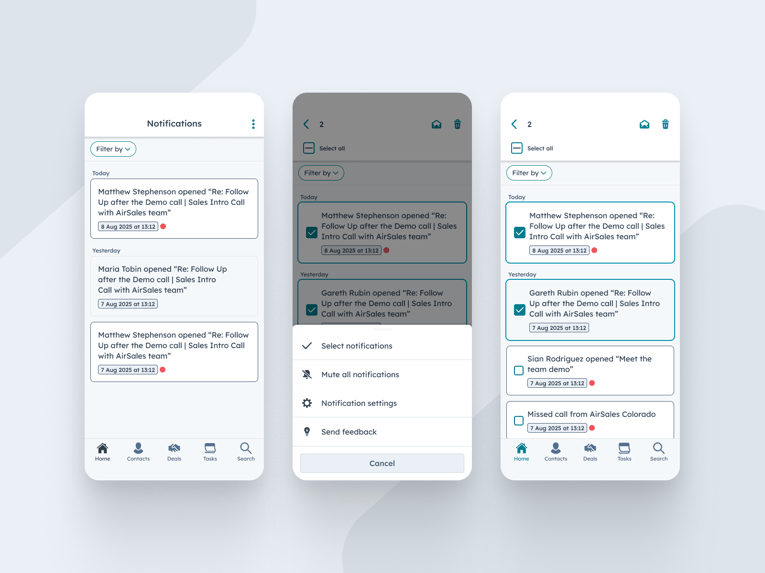
HubSpot mobile users can now manage their mobile notifications in the Notification Centre more efficiently by selecting one or multiple notifications to either mark as read or delete them in bulk.
Why does it matter?
Staying on top of notifications is crucial for mobile sales reps who rely on timely updates to move deals forward. With this update, reps gain greater control over their notification center, allowing them to quickly clear clutter and focus on the alerts that matter most. More control means more efficiency and less distraction while on the go.
19. Rule-based Automated Tracking for Intent Signals
What is it?
Want to automatically track your highest value accounts for intent signals? It's now even easier.
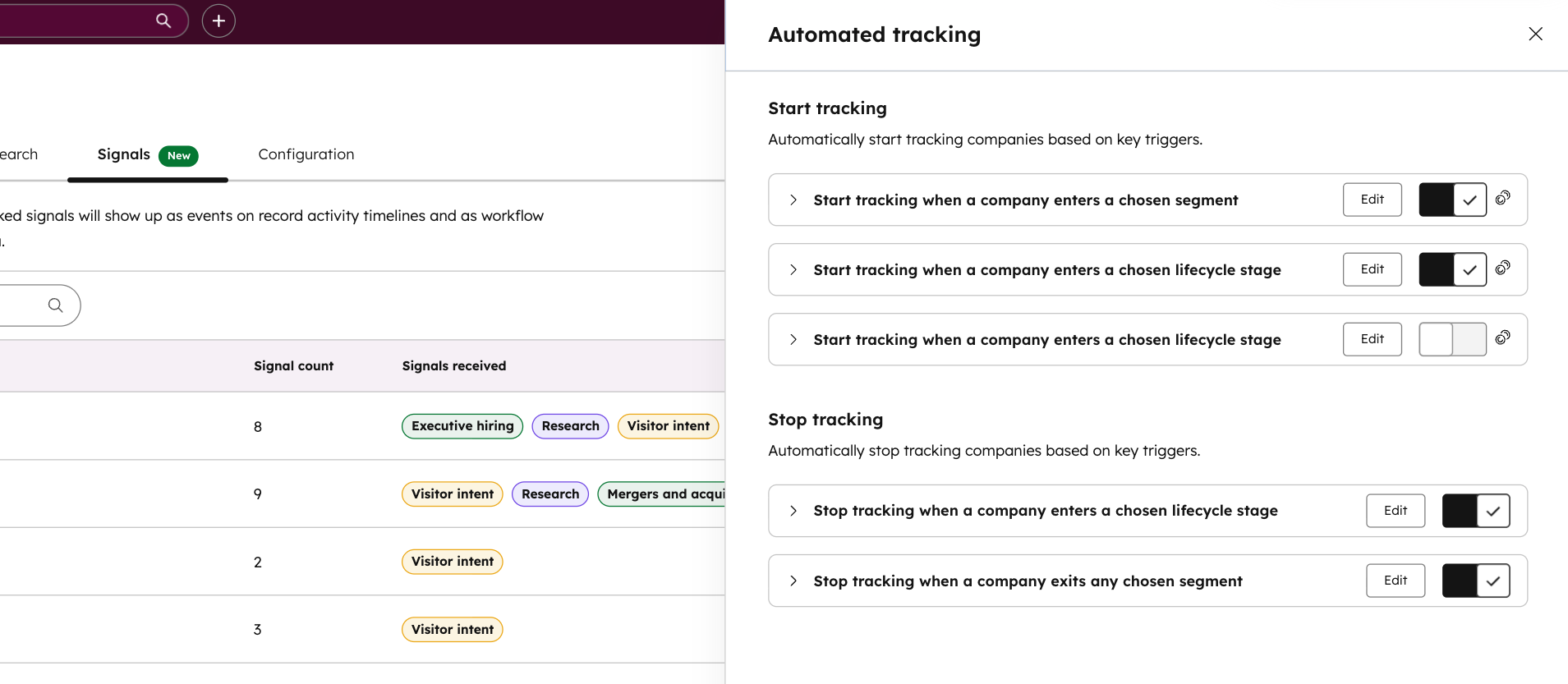
In addition to our existing workflow actions and auto-tracking features, simplified rule-based automated tracking now lets you manage your intent signals using simple toggles. Automatically start (or stop) tracking companies based on Target Account status, lifecycle stages, or segment membership.
Why does it matter?
Starting today, you can now do the following:
- Automate tracking based on key CRM data: Ensure your highest-priority accounts are always being monitored. Automatically start tracking the moment a company is marked as a Target Account or moves into a specific lifecycle stage (like Lead or MQL).
- Track by territory or team: Use segment membership to trigger tracking, making it easy to monitor accounts owned by specific reps or within certain regions.
- Streamline your operations: In addition to using workflow actions for complex logic, use these toggles for "set-and-forget" tracking that keeps your intent data focused on active prospects.
- Maintain database hygiene: Automatically stop tracking companies when they become a "Customer" or exit a priority segment, ensuring your credits are always used on the accounts that matter most.
20. Streamlined Association Management
What is it?
A simplified process for managing object associations in HubSpot's data model, including activating existing associations and creating new ones with custom objects. This update also hides deactivated associations from the associations view.
Why does it matter?
This update helps you:
- Quickly adapt your HubSpot data model to changing business needs
- Easily visualize and understand available association options
- Make informed decisions about data relationships
- Maintain a cleaner, more relevant view of your active associations
21. Remove specific values from multi-checkbox properties with the Workflows Edit Record action
What is it?
We’ve added a new option to the Edit Record workflow action that lets you remove specific values from a multi-checkbox property without clearing the entire field. You can now selectively subtract values from a list of selected options directly in workflows.
Why does it matter?
The Edit Record workflow action is one of the most powerful tools in workflows, giving you the ability to append, replace, or clear property values at scale.
Until now, removing just a few values from a multi-checkbox property meant clearing everything and rebuilding the list from scratch often with complex branching logic. That workaround was time-consuming, hard to maintain, and easy to get wrong.
With selective value removal, workflows are simpler, cleaner, and more efficient. This makes it so much easier to keep your CRM data accurate without unnecessary complexity.
22. Assignment Details
What is it?
AI-powered routing explanations help you understand exactly why a conversation or ticket was assigned to a specific team member. When you open the routing details, you’ll see a clear explanation of which routing rule fired, who was eligible at that moment, and how HubSpot made the final assignment — presented in simple, human-friendly language.
It turns routing from a “black box” into something transparent and easy to troubleshoot.
Why does it matter?
When assignments don’t land where you expect, it slows teams down and increases escalations. Support managers often need to know:
- Which routing rule matched?
- Was the agent available?
- Did capacity or skills filtering change the outcome?
- Why was one agent chosen over another?
Instead of digging through settings or recreating scenarios, you now get an immediate, accurate explanation of what happened. This makes it easier to:
- Diagnose misrouted tickets and conversations
- Train new team members on how routing decisions are made
- Adjust routing rules with confidence
- Understand real routing behavior during busy periods
23. Form Submissions on the Company Record
What is it?
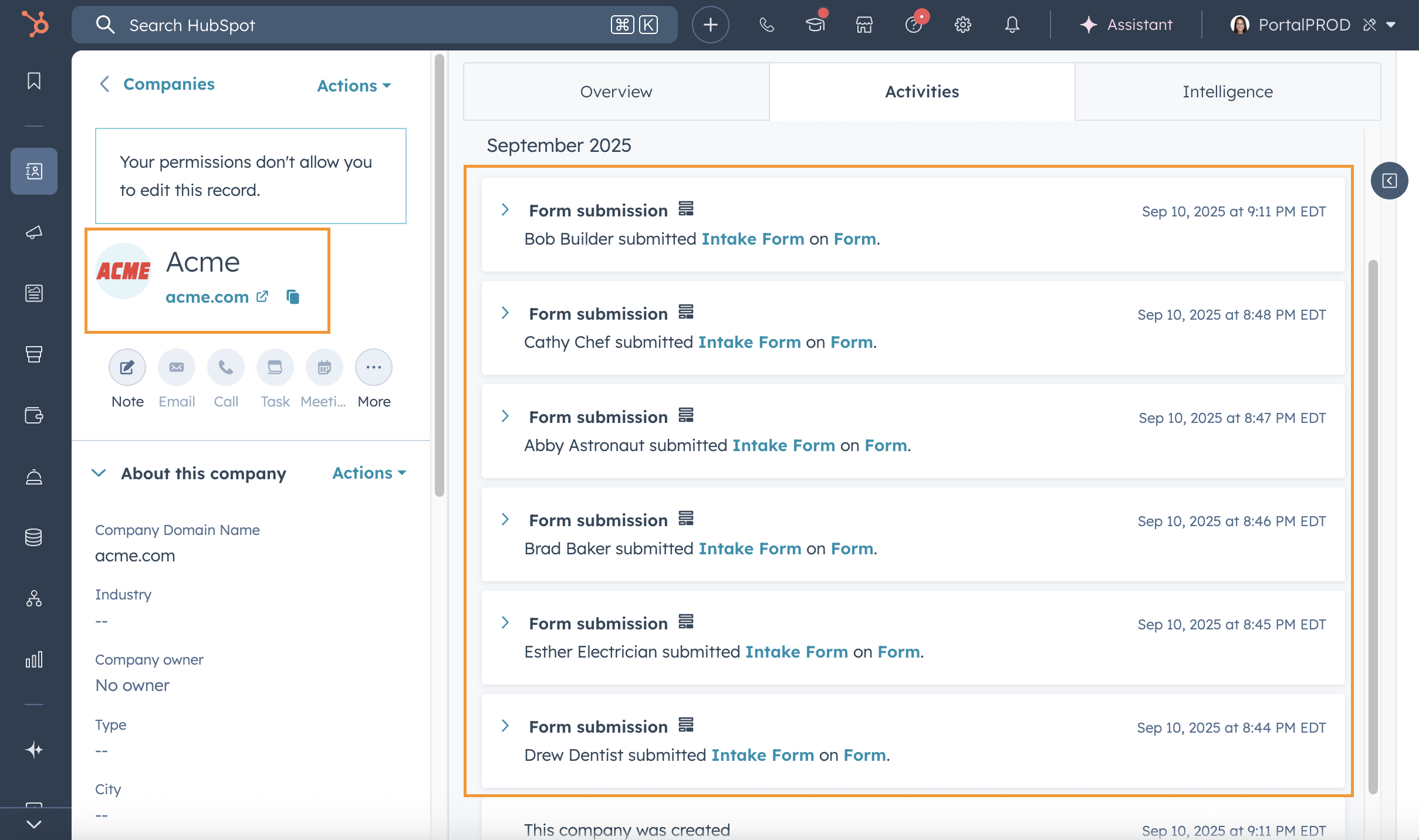
Company records now display form submissions from all associated contacts on the activity timeline.
Why does it matter?
When evaluating a company's engagement, you need visibility into all the touchpoints across the organization. Instead of checking individual contact records, you can now view all form submissions from associated contacts in one place, saving time and giving you a complete picture of company-level interest.
24. Pin Columns in the Line Item Editor
What is it?
You can now pin columns in the line item editor. When customizing your view using the Edit columns modal, you can choose how many columns to keep visible as you scroll horizontally.
Why does it matter?
Pinning makes it easier to work with wide tables. You can keep key fields like product name or SKU in view while scrolling through additional details like billing dates or tax rates. Each user’s pin settings are saved individually.
25. Intent Signal Compatibility with Reporting
What is it?
Ready to see the full impact of your intent signals?
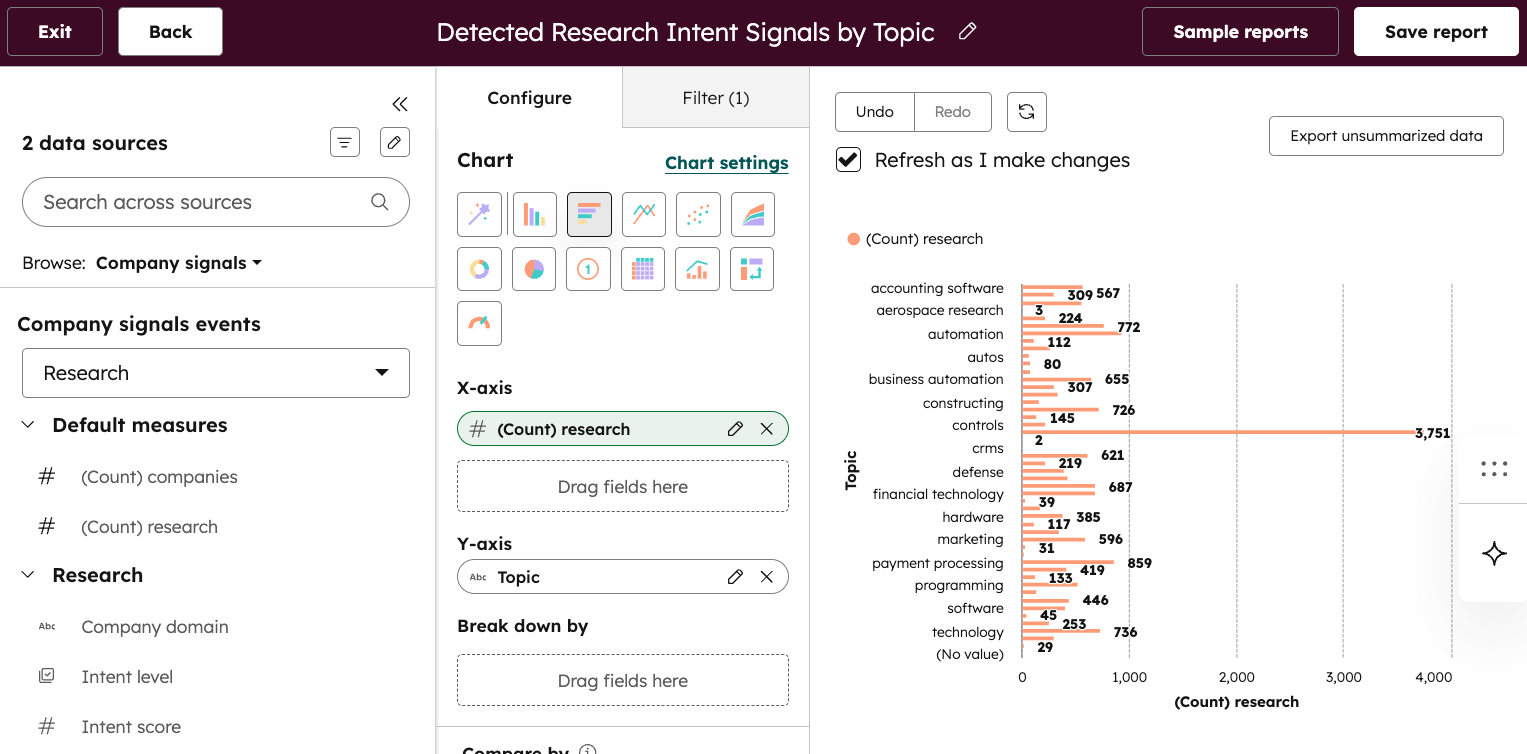
You can now access company and contact signal event data directly within the HubSpot custom report builder. Already available via key places like company activity timelines, workflows, segments, and lead scoring; now, signals can also be analyzed via reports to provide a deeper understanding of signal coverage and impact on the metrics that matter most to you.
Why does it matter?
Starting today, you can now do the following:
- Analyze Signal Coverage: Get a clear view of how many signals—and what specific types—you’ve detected for the companies you’re tracking. Use the intent signals active company property to filter for tracked companies and understand your signal density across both company and contact signal types.
- Measure ROI and Impact: Answer critical questions about how signals affect your bottom line. By cross-referencing signal events with key company values, you can see how specific signals correlate with key KPIs like meetings generated or accounts reaching "Close Won" status.
- Augment Existing Reports: Layer intent signal data over your existing reports to gain new insights. For example, ICP (Ideal Customer Profile) reports to identify which behaviors are most common among your top-tier accounts, or pipeline reports to see which signals might have the most positive effects on your funnel.
26. Agent run notification system
What is it?
Automated agent run notifications keep your team informed about agent activity without requiring constant manual checking.
When agents complete automated runs, encounter failures, or require tool approvals, relevant team members receive timely updates directly in their inbox.
Why does it matter?
This feature transforms how teams monitor and manage their automated agents:
Eliminates manual status checking — Team members no longer need to repeatedly check agent dashboards to see if automated runs have completed or require attention.
Accelerates response times — When agents need tool approvals or encounter issues, notifications ensure the right people can take action immediately rather than discovering problems hours later.
Supports flexible team structures — Whether agents are managed by individual owners or collaborative teams, the notification system adapts to your team's workflow by allowing specific users and entire teams to receive updates.
Maintains user control — Users can customize their notification preferences at the account level, ensuring they stay informed about what matters without notification overload.
27. Prompt-Based Assistant Builder
What is it?
The Prompt-Based Assistant Builder is an in-product setup support that helps you easily write strong, structured instructions when creating a Custom Assistant.
Instead of facing an intimidating blank “Prompt” field, now you can describe your goals in plain language and get robust instructions at the press of a button. The enhancer then rewrites your goals into a well-structured prompt that follows HubSpot’s best practices for clarity, tone, and behavior.
Why does it matter?
Formerly, customers had to complete the assistant builder from scratch, writing their own instructions, setting up inputs, and selecting tools from a recommended list. This was a time-consuming process, and often customers did not know how to get started with a blank slate.
With prompt-based assistant building, the customer's prompt is processed by our machine learning solution, and the assistant builder template is automatically populated with instructions, inputs, and tools. The customer should review the results, however, to ensure that the assistant is setup in the way that they intended.
28. Custom Views on Reports List and Dashboards List
What is it?
New custom views on the reports list page help you quickly find and access reports using personalized filters and pinned tabs.
Why does it matter?
As your report library grows, finding specific reports becomes challenging, leading to wasted time and inconsistent naming conventions. With custom views, you can:
- Organize reports and dashboards more efficiently
- Filter and retrieve relevant reports and dashboards faster
- Improve collaboration and reporting adoption across your team
29. Enhancements to Property Creation
What is it?
We’ve enhanced the property creation experience in HubSpot to make it more flexible and easier to use. When creating a property outside of Property Settings, you can now create the following types of properties:
- Calculation
- Rollup
- Property sync
This release includes improvements to make property creation feel more intuitive and seamless, whether you prefer to create properties manually or with AI.
Why does it matter?
As your CRM grows, setting up properties quickly, without losing context, becomes increasingly important.
With these enhancements, you can:
- Create any type of properties in areas outside of Property Settings—including calculations, rollups, and syncs
- Choose between manual or Breeze-assisted creation based on your needs
- Move between quick edits and deeper configuration without disrupting your workflow
The result is a smoother, more consistent property creation experience that saves time and adapts to how you work.
30. Goal Progress Reporting
What is it?
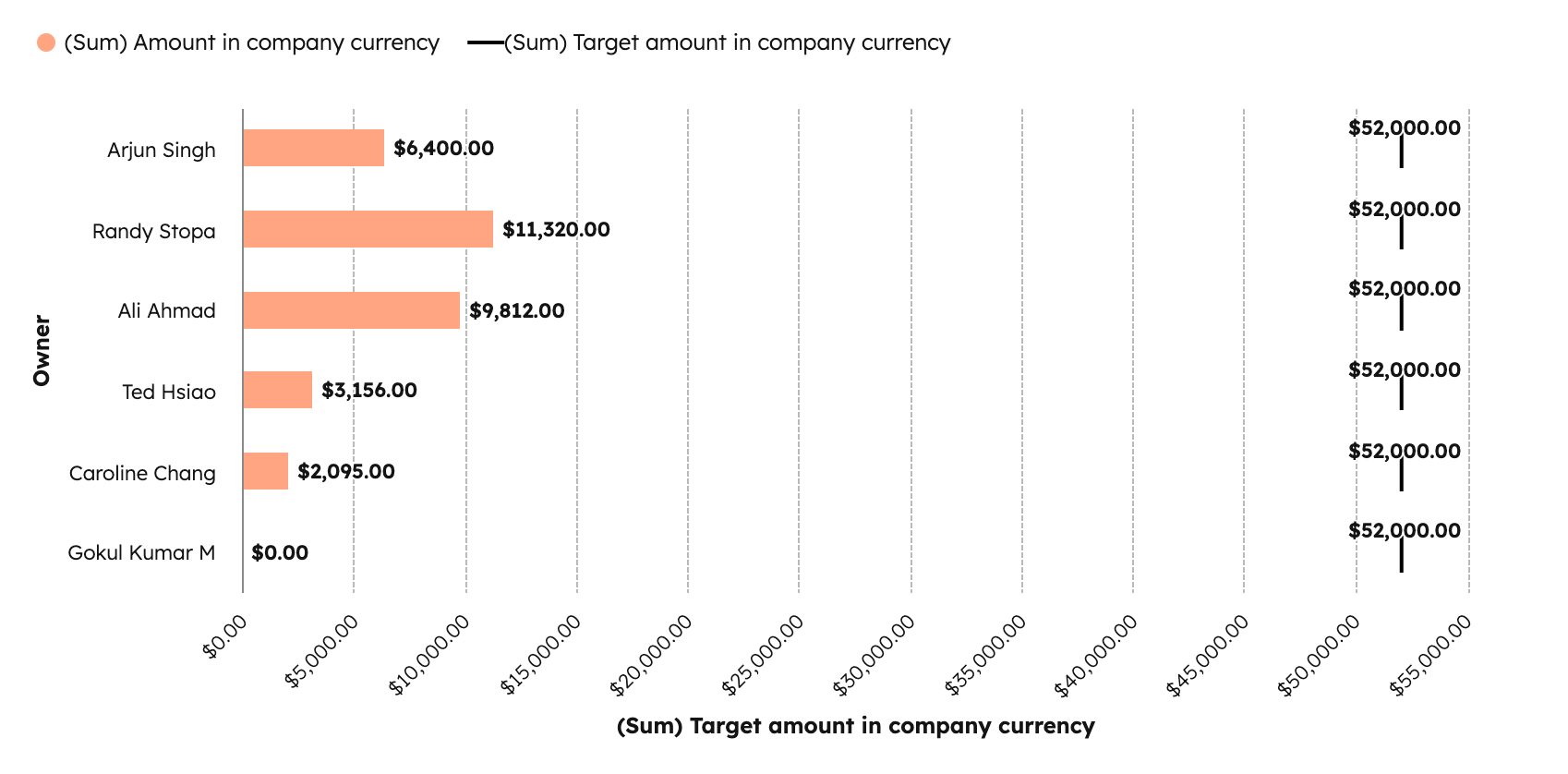
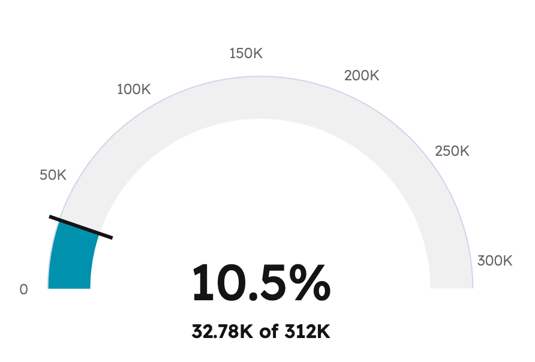
It is now easier to create new reports that show goal progress in HubSpot directly from the Goals app and add those reports to any dashboard. This change includes two new visualization styles:
- Progress mode for gauge reports
- Leaderboard mode for bar charts
Why does it matter?
Sales teams need to keep a constant pulse on how they are pacing toward their goals but struggle to answer this question with HubSpot reports. A lack of accessible goal reporting can lead to clunky workarounds, such as copy-pasting data into spreadsheets or visiting multiple tools in HubSpot. With this change, it’s easier to keep your data and tracking centralized in HubSpot.
31. Custom Event Occurrences Can Be Deleted
What is it?
Individual occurrences of custom events can now be deleted in the event management tool.
Why does it matter?
In order to accurately reflect your business and make well-informed decisions, it's key to be able to remove inaccurate data. Previously, if a custom event was sent by mistake or as a part of testing, there was no way to remove it from your CRM and relevant reports, segments, or workflows. With the ability to delete these, you can have more trust in your data.
32. Create associations to activities using workflows
What is it?
You can now use the Create association workflow action to create associations to activities. Activities included are Notes, Tasks, Meeting event, Call, Email, Communication, and Postal Mail.
Why does it matter?
Admins can replace manual, repetitive activity association work with native automation, reducing operational overhead and improving data consistency. This removes the need to rely on reps to remember to associate calls, meetings, or communications—an error-prone process that often leads to incomplete records. The result is more reliable, unified activity data across workflows, reporting, and automation.
33. Lifecycle Stage Conditional Property Logic
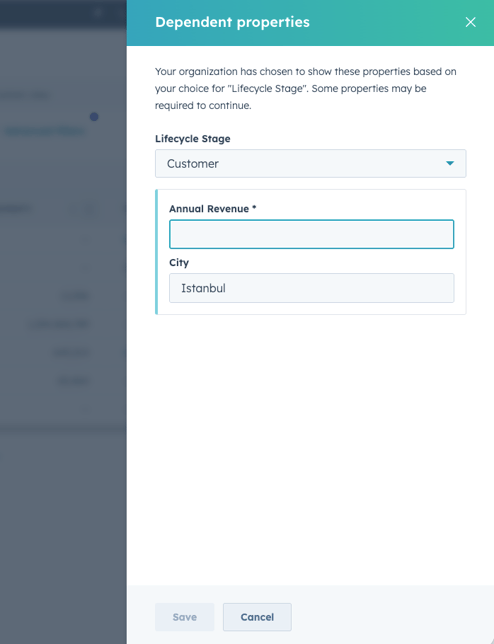
What is it?
Conditional property logic now supports contact and company lifecycle stages as controlling properties, letting you show or require specific fields when records reach certain stages in your process.
Why does it matter?
You can now enforce data quality at critical points in your sales and marketing process. When contacts or companies progress to specific lifecycle stages, you can automatically surface relevant fields and make them required before users can save changes.
For example, when a sales rep moves a contact from "Lead" to "MQL," you can require fields like "Qualification notes" or "Budget range" to appear and must be completed before the stage change saves. This ensures teams capture essential information at the right moments without manual reminders or post-facto data cleanup.
34. Contact Enrichment Coverage Expanded
What is it?
Contact enrichment coverage is now even better than before, thanks to smarter handling of data, and onboarding some additional data sources.
Why does it matter?
Customers have been asking us to improve our contact enrichment match rates, and we are delivering. We've taken steps to improve our contact coverage globally.
35. Scan and Redact Sensitive Data in CRM Activities
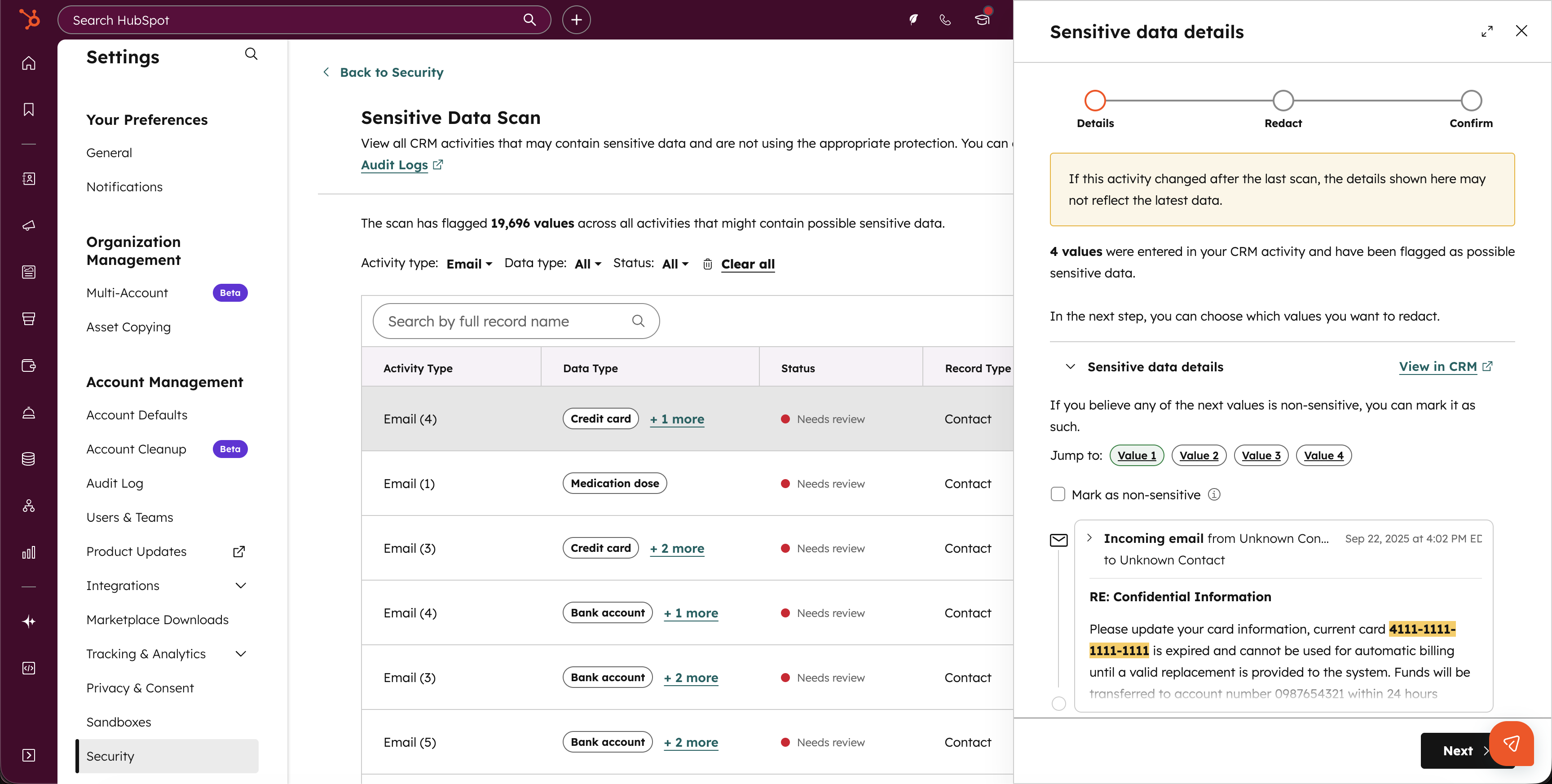
What is it?
The information present across your CRM Activities (notes, calls, tasks, , emails, meetings) can contain a wide range of data, from notes logged by your team members to emails received from customers. For those who may be handling sensitive data (financial data, health information, etc), you can now scan your account for the identification of Sensitive Data.
If you have activated Sensitive Data already, you can additionally choose to redact that information to permanently remove that data from your environment.
If you have not activated Sensitive Data and your scan yields results indicating you are storing sensitive data, it may be beneficial to activate Sensitive Data for additional layers of protection.
Why does it matter?
This feature helps organizations maintain data hygiene and reduce compliance risk by providing clarity around the data being stored across unstructured CRM Activities
36. Customer Agent can now use structured data to answer questions
What is it?
The Customer Agent can now read structured data to answer customer queries—fast and accurately.
Why does it matter?
Your most valuable information—inventory, pricing, SKUs—often lives in spreadsheets and tables. Now the Customer Agent can tap directly into that data to deliver sharper product and pricing answers, reduce back-and-forth, and convert more customers.
37. Expanded Custom Object Functionality in the UI
What is it?
New custom object creation options and improved deletion flow in HubSpot data model tools.
Why does it matter?
You can now:
- Create custom objects with more property types, more closely matching API capabilities
- Easily identify and remove custom object usages before deletion
- Manage your data model more efficiently without relying on developers

Beta
These updates are currently in the works and nearly ready to be released on your HubSpot Portal.
1. Segment membership history
What is it?
You can now view a detailed membership history log for your Segments. Membership history shows which records were added to or removed from a segment, when it happened, and what caused the change. For static segments, you can also add or remove records directly from this view.
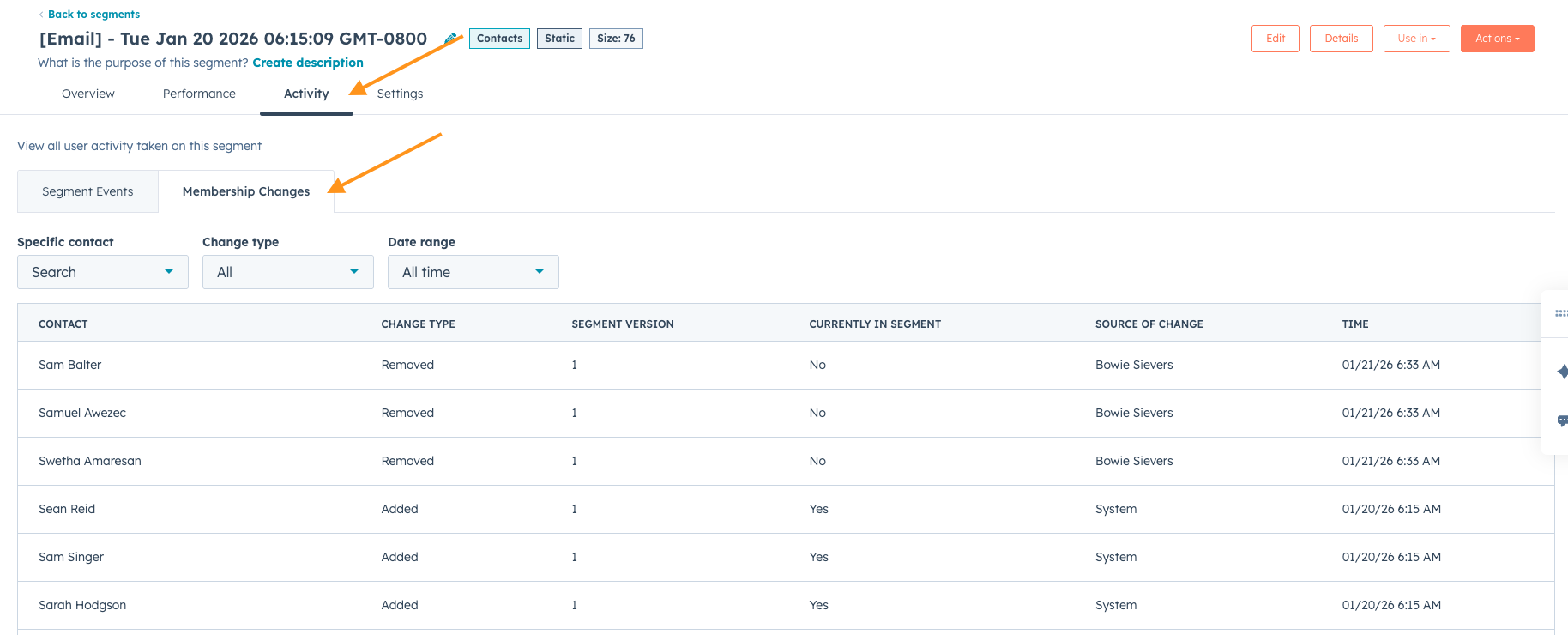
Why does it matter?
Membership history helps you troubleshoot unexpected changes to your segments. You can quickly see why a specific record was added to or removed from a segment, identify whether updates were triggered by automation, segment edits, or manual actions, so that you no longer need to guess how or why a segment changed.
2. Retroactive SLAs
What is it?
Currently, any new changes made to SLAs in the Help Desk are applied to new tickets only. This new feature gives admins the option to apply SLA changes to existing tickets. Teams can retroactively align in-flight tickets with their latest SLA configurations without manual intervention.
Why does it matter?
Customers expect the ability to configure SLA goals that apply to their current tickets, not just new ones. This allows them to establish new goals and immediately reflect them in active workflows, ensuring reporting accuracy and consistent expectations for agents and managers alike.
3. Personalization App Supports Website Pages
What is it?
The new Personalization app now supports website pages, bringing everything you need to create, manage, and measure personalized web experiences into one central place. Using Variants, you can quickly build audience specific versions of website pages without duplicating pages or manually adjusting individual modules.
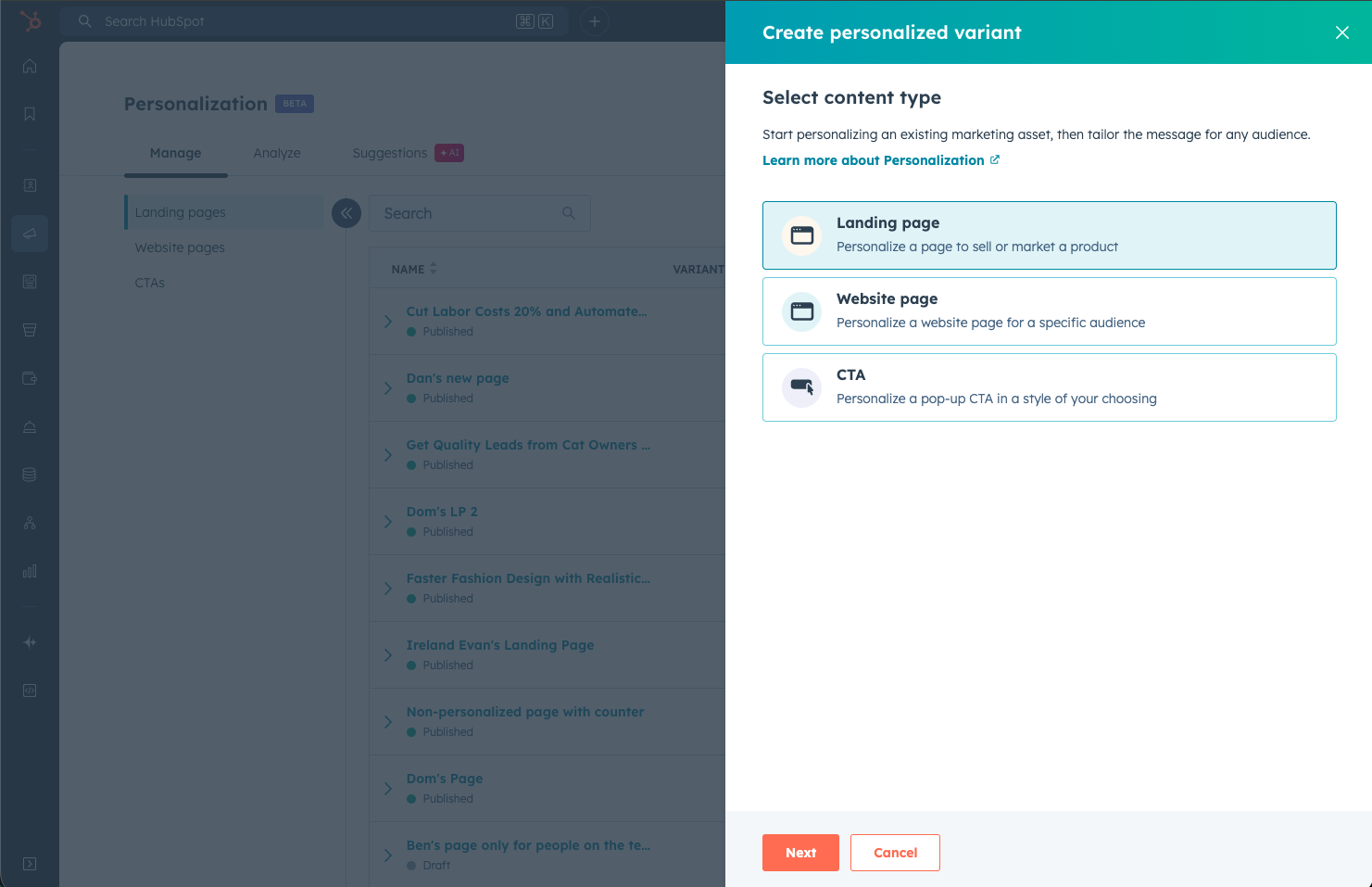
Whether you prefer for AI to do the heavy lifting or manually configure yourself, Personalization helps you deliver the right website experience to the right audience, faster.
Why does it matter?
Website personalization has traditionally been difficult to scale. Creating multiple versions of pages often meant copying pages, managing inconsistencies, and losing visibility into what was actually performing.
With Variants for website pages, you can create and manage personalized page experiences in one place, without duplication. Performance is tracked across all variants directly where you build them, making it easier to understand what is working and why.
4. Predicted Email Engagement in Segments
What is it?
See how a segment of contacts is predicted to perform in an email based on the historical engagement of the contacts.
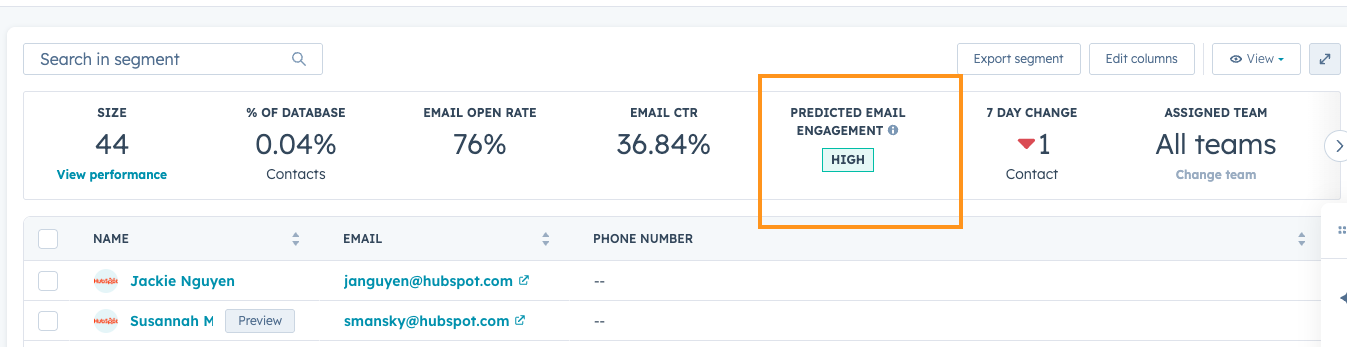
Why does it matter?
Email performance depends on your audience, not just content. Today, you might rely on guesswork or manually building out reports of past results to predict segment performance. Now, you can predict segment-level email performance before sending, so that you focus your efforts on high-potential segments.
5. Drag and drop and marquee select in File Manager tool
What is it?
You can now bulk select and move files more easily in the File Manager with new drag-and-drop and marquee selection tools. Select multiple files at once using your cursor or keyboard controls, then drag them into folders in one smooth motion.
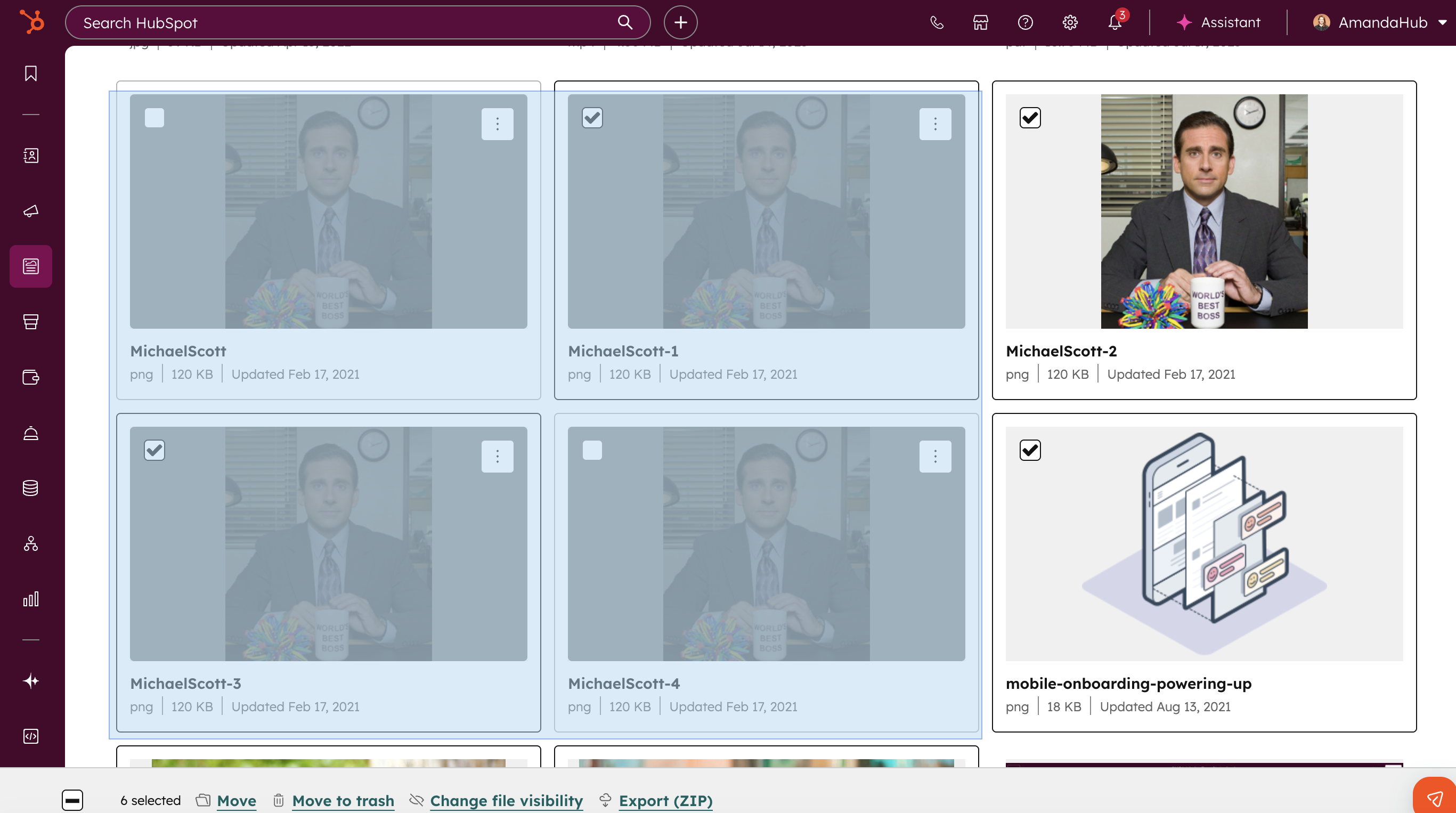
Why does it matter?
For content marketers managing large volumes of video files, every click counts. Previously, selecting and organizing multiple files required checking each item individually. With marquee select and multi-file drag-and-drop, organizing assets is faster and more intuitive, reducing friction in your workflow so you can stay focused on creative work.
6. Set default property values
What is it?
You can now set default values for properties in HubSpot. When creating or editing a property, admins can define a value that will automatically be applied whenever a new record is created.
Default property values are applied consistently across HubSpot—whether records are created manually, through workflows, or via APIs—so commonly used values are automatically set, saving users a step and keeping data consistent.
Why does it matter?
Many teams rely on the same values being set repeatedly when creating records. Without default values, this often leads to repetitive manual entry, inconsistent data, or complex workflows built just to fill in the blanks.
With default property values, you can:
- Save time by pre-filling commonly used values
- Reduce data gaps and “unknown” states
- Eliminate workflow workarounds used solely to initialize data
- Improve overall data quality and consistency from the moment a record is created
This makes record creation faster for end users and data management simpler for admins.
7. Map Visualization for CRM Index Pages
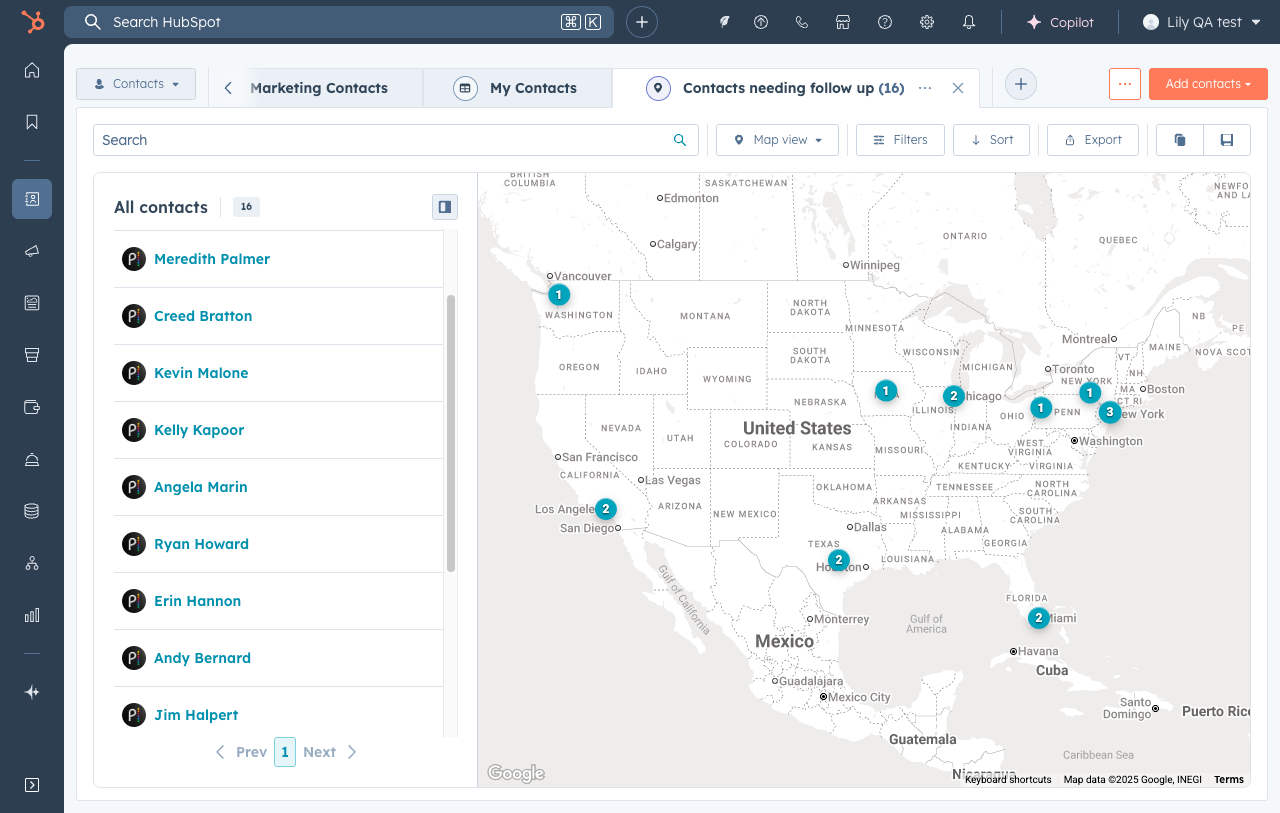
What is it?
Map view allows you to visualize your contacts and companies on an interactive map, helping you uncover location-based insights and make smarter decisions.
Why does it matter?
Location data often lives in spreadsheets or requires exporting to external mapping tools, making it difficult to connect geographic patterns to your sales and marketing activities. Map view solves this by bringing location context directly into your CRM workflow.
- Targeted outreach: Identify contacts near event locations and send targeted invitations
- Territory optimization: Understand customer concentration patterns and identify coverage gaps
- Regional analysis: Filter and analyze data by geographic region to uncover opportunities and trends
8. HubSpot MCP Server (Remote)
What is it?
You can now build and manage your own AI connectors to the (Beta) HubSpot Remote MCP (Model Context Protocol) Server through a streamlined self-service interface. Allowing you to bring HubSpot context wherever you work.
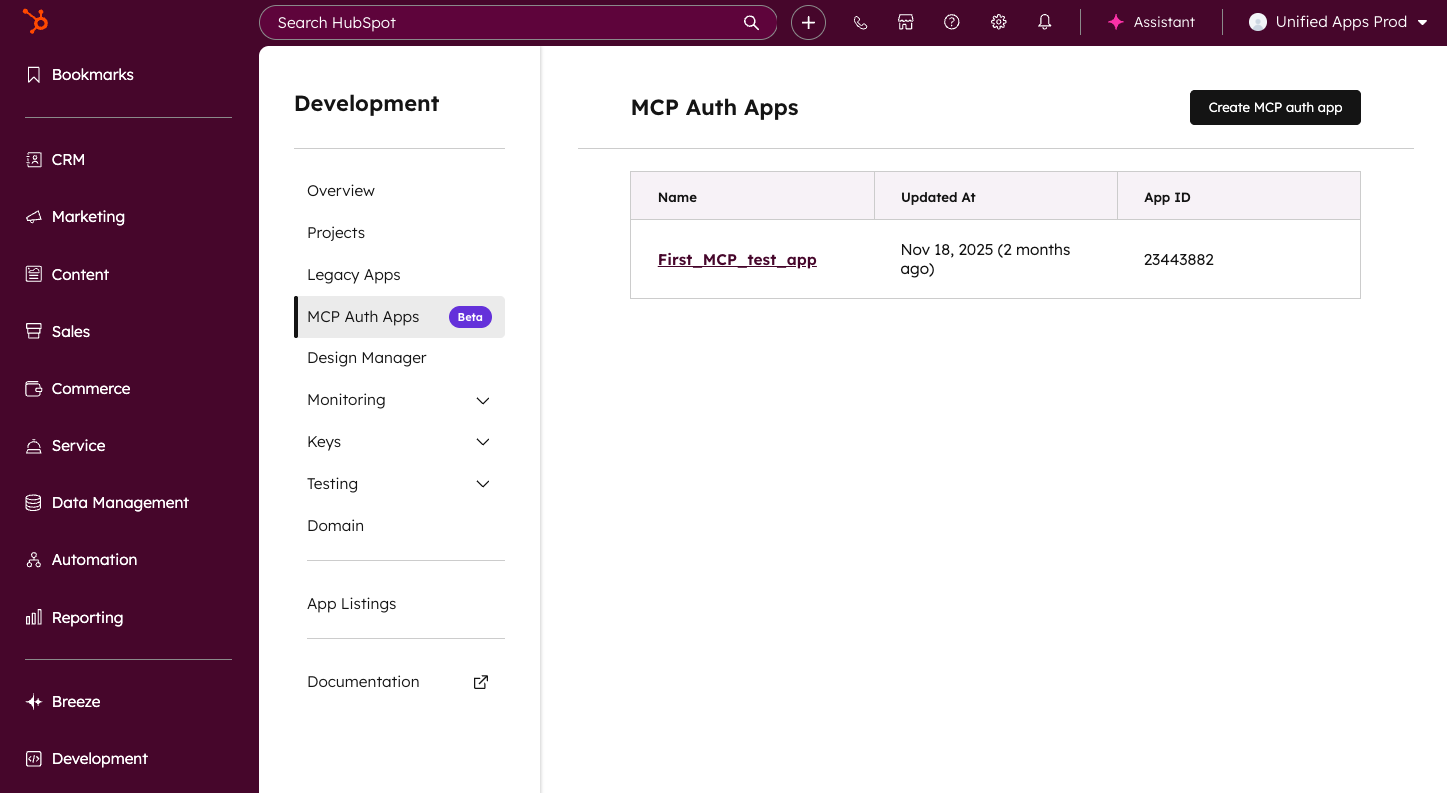
Why does it matter?
Partners and developers need a streamlined way to create and manage AI connectors independently, enabling them to access their HubSpot context across the surfaces where they already work. The (Beta) MCP Auth Apps UI makes it easier to get started and manage integrations between agentic platforms and HubSpot's (Beta) Remote MCP Server. End user permissions will also be managed automatically, providing customers with the flexibility to choose the data they want to share via the MCP server while eliminating the need for partners to manually configure.
9. Run Agent Workflows Action
What is it?
HubSpot Breeze Studio already makes it easy to hire, customize, and deploy AI-powered agents to help your business run more efficiently. But today, we’re taking that power to the next level.
Introducing the new “Run Agent” Workflow Action: a powerful way to orchestrate your AI agents directly within the Workflows app, alongside your CRM data and automation logic.
This new workflow actions lets you trigger an agent directly within a HubSpot workflow. You can configure which agent to run, what information it receives, and how its output feeds back into your HubSpot ecosystem - whether that’s updating a record, triggering a follow-up, or informing another step in your automation.
Why does it matter?
Until now, automating an agent was only possible through triggers in Breeze Studio - powerful, but somewhat limited in flexibility. The new workflow action takes agent automation to the next level by bringing it seamlessly into the Workflows app.
Now you can:
- Use any Workflows trigger to deploy your agents
- Orchestrate multiple agents together
- Pass outputs from an agent to any subsequent agents or automation actions
- Easily update your CRM data with the help of agents
- And so much more!
10. Updates to Starting & Viewing Multiple Conversations on a Ticket in Help Desk
What is it?
This set of updates includes two changes:
- An updated "tab" pattern for displaying multiple conversations on a single ticket in help desk.
- The option to start new conversations on an existing ticket in help desk.
Why does it matter?
Previously, support reps navigated multiple conversations on a single ticket through a dropdown option in the right sidebar. We received consistent feedback that this dropdown was hard to find and felt out-of-place. These changes make it easier for reps to stay organized and maintain visibility across various communication threads.
Additionally, support reps couldn't actually start additional conversations on existing tickets in help desk. To do this, they'd have to open the ticket record and navigate away from the workspace. This functionality helps reps save precious time when looping in 3rd parties, vendors, or other stakeholders on a support issue by allowing them to start new conversations on an existing ticket, without ever leaving help desk.
11. New AI image generation model: GPT 1.5
What is it?
We've upgraded our AI image generation model in HubSpot from GPT Image 1 to GPT Image 1.5. This update brings noticeable improvements in image quality and opens the door to exciting new capabilities in the near future.
Why does it matter?
For content marketers, high-quality visuals can make or break engagement. The shift to GPT-1.5 significantly enhances the sharpness, realism, and overall consistency of generated images, helping you create more visually appealing content directly within HubSpot. Whether you're crafting blog headers, social media graphics, or custom thumbnails, this upgrade ensures your visuals better match your brand and campaign goals.
Beyond quality, GPT-1.5 also gives us a stronger foundation to build on. This model supports more advanced image capabilities—like AI image editing—which we're planning to explore. That means greater creative flexibility and less reliance on external tools.
12. Support Multiple Main Teams for Full Functionality
What is it?
Users can now be fully functional members of multiple teams in HubSpot, with equal access to routing and workflows across all assigned teams.
Why does it matter?
Previously, users assigned to more than one team could only be full members of a single 'main' team, leading to reduced capabilities and workflow friction for those working across regions or functions.
The idea “Allow users to be ‘primary team members’ of more than one team” has collected 200+ upvotes, including 70+ replies and numerous comments over multiple years. This change removes artificial limitations, improving collaboration, and ticket coverage for organizations with flexible or matrixed team structures.
This update also ensures predictable and transparent routing behavior. Previously, many customers did not realize that “extra” team members were excluded from assignment pools, leading to confusion or inequitable workload distribution. By making all team members fully functional, teams can now rely on routing rules and workflow logic behaving consistently.
13. Improved Spam visibility & management in Forms
What is it?
We’ve made updates that improve how spam submissions are surfaced and understood across forms. These changes make existing spam information easier to find, interpret, and - most importantly - act on.
Updates include:
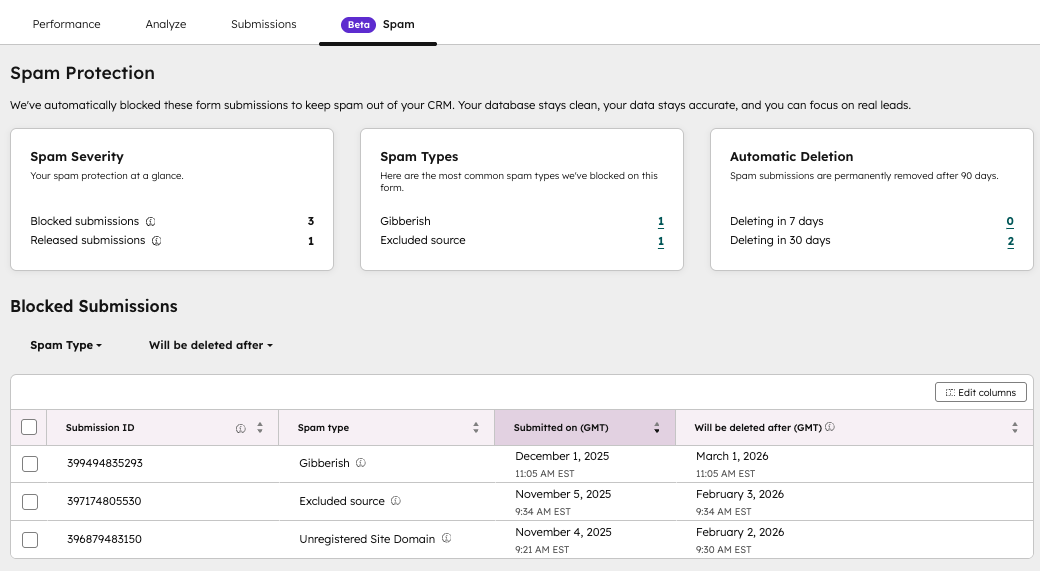
- A new Spam tab on each form that surfaces organized insights like spam severity, top spam types, and upcoming automatic deletions, along with a filtered list of blocked spam submissions and in-context actions to view, (bulk) release, or (bulk) delete.
- Easier access to spam protection settings, with Bot Filtering and reCAPTCHA now surfaced directly within each form’s details page.
- Easier access to spam submissions across all forms from the global Forms Analyze tab.
Why does it matter?
It’s been challenging to understand where spam shows up, how serious it is, and what actually needs your attention. Spam submissions haven't been easy to locate, making it confusing and time-consuming to review and clean up your data. These updates make spam easier to notice, interpret, and manage - reducing the time needed to triage submissions and improving clarity across the entire Forms experience.
14. Email workflows
What is it?
You can now create workflows based around the 1:1 email object.
Why does it matter?
With this change, you can now trigger automation based directly on events such as emails being created. Then, you can use workflow actions to create standard, automatic internal processes for email management.
15. HubSpot link previews (unfurls) in Slack
What is it?
When you share a HubSpot record link in Slack, you'll get context-rich, structured previews (unfurls) with no extra clicks required. What used to be just a static URL is now a snapshot of your CRM data conveniently visible within your Slack conversations.
With this improvement, key information will be automatically displayed when links to supported HubSpot objects are shared in Slack, giving your team immediate context and further unifying your CRM and communication platform.
Why does it matter?
More data. Fewer silos. This improvement brings more of your CRM insights from HubSpot directly where your team communications happen in Slack.
- Get critical CRM insights without leaving your conversations.
- Accelerate decision-making by providing key details right where discussions happen.
- Reduce cognitive load by reducing the need to switch between multiple tools.
- Keep everyone aligned with in-line context.
16. Sales Power Dialer now supports: Deals, Companies, and Leads
What is it?
The power dialer now supports Deals, Companies, and Leads. (Please note: Tasks are coming soon)
Why does it matter?
Set up your session:
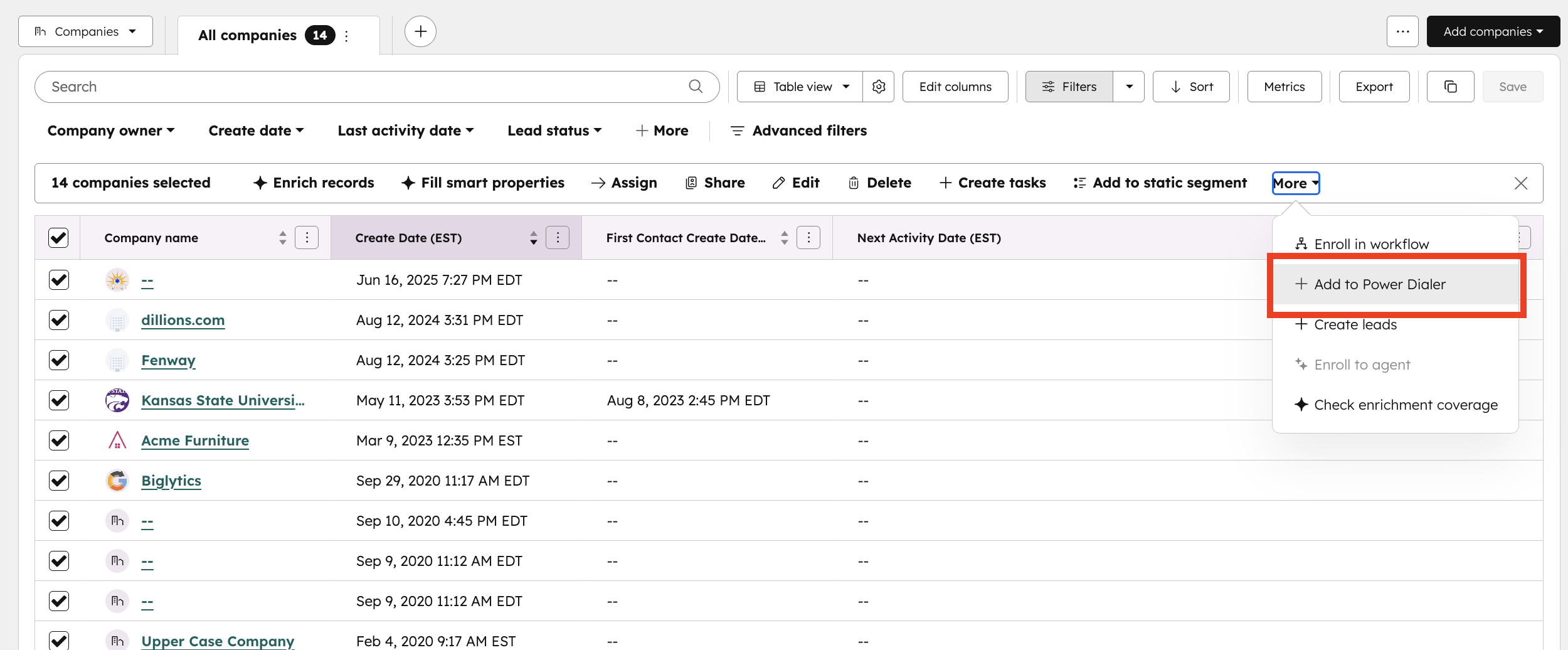
- Start by navigating to the desired index page and selecting the objects you'd like to call. Once selected click the more menu in the top right, and select Add to Power Dialer.
- Once the Power dialer is launched, you can:
- select your preferred phone number
- configure wrap up time after each call is made
- set a voicemail preference.
Dialing experience:
- Once you've confirmed your preferences, click Start Session to initiate your first call.
- After one call ends, your next will begin automatically after the wrap-up count down completes.
- You can access call notes, contact insights, and other tools directly in the dialer.
- You can pause or end your session using the controls at the bottom of the dialer.
17. Subtasks
What is it?
Subtasks allow you to break down tasks into smaller, more manageable steps within HubSpot.
Why does it matter?
Complex tasks often involve multiple steps to complete. Previously, you had to create separate tasks for each step, which didn't align with how you actually approach your work. Subtasks let you organize your work in HubSpot exactly as you think about it, making it easier to:
- Track progress on multi-step tasks
- Delegate specific steps to team members
- Ensure all parts of a complex task are completed
18. Chrome extension now supports Calling
What is it?
HubSpot calling users can now manage their calling connection through the HubSpot Chrome extension. This removes the need to keep a seperate browser window open.
Why does it matter?
Previously, users needed to keep a seperate calling window open to receive inbound calls or make outbound calls using the dialer. This update removes that friction by maintaining the calling connection seamlessly in the background through the Chrome extension.
19. Customizable Extended Sidebar for Customer Success Workspace
What is it?
Users see a persistent, customizable sidebar with comprehensive customer context and actions directly in the Customer Success Workspace.
Why does it matter?
User need
Customer success professionals often lose efficiency by switching to the record pages to access customer context. They also find that the default sidepanel is not relevant enough to be helpful and they need to be able to customize it.
Benefit
This feature lets users view and act on critical and specific customer information in one place, reducing workflow disruption and saving time.
20. Improved Users Table & Page
What is it?
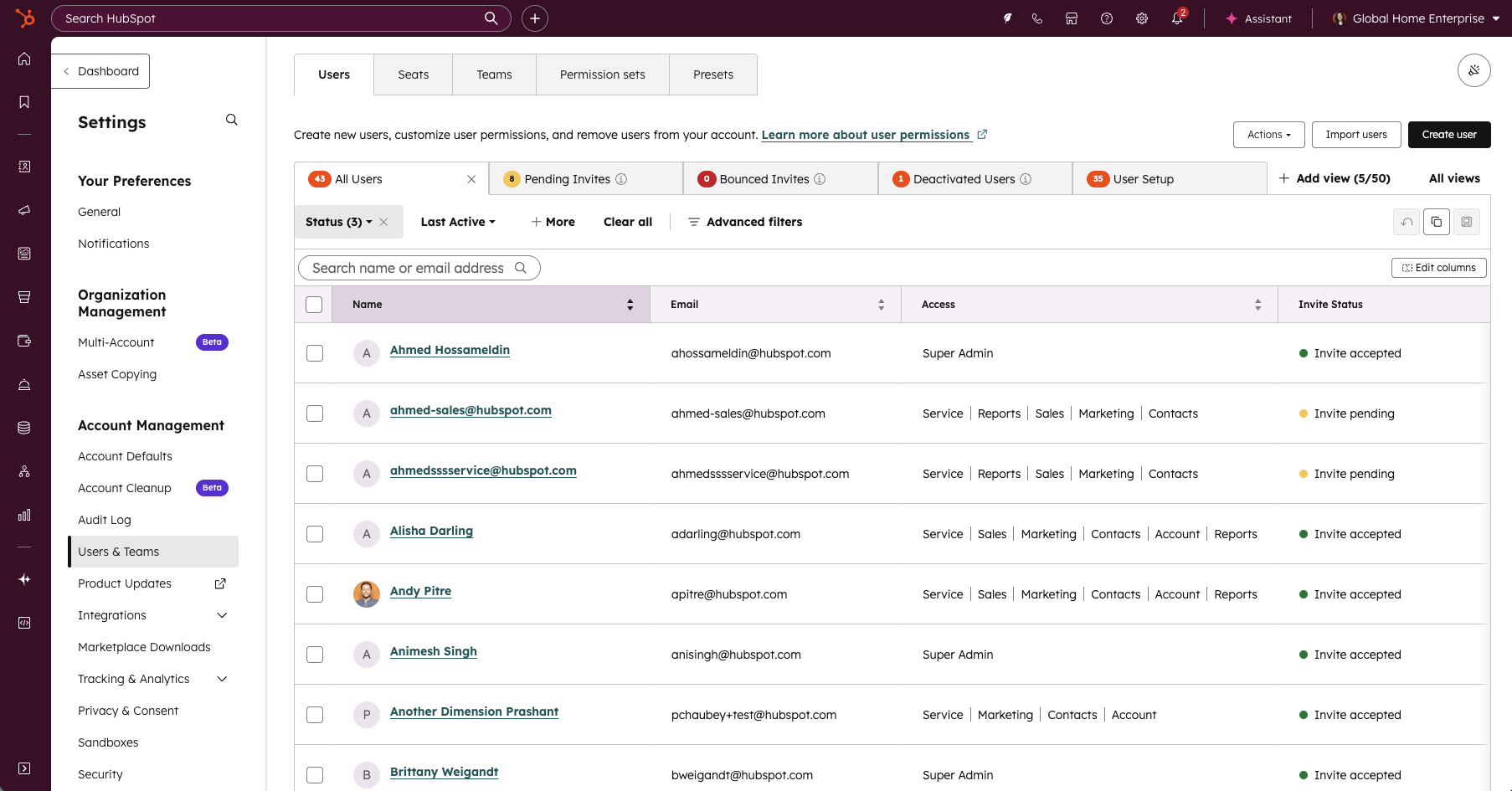
The Users page has been redesigned with modern data table functionality to streamline admin workflows and reduce friction in user management. Admins can now leverage inline editing and bulk operations to update user properties directly from the table without navigating away. The redesign introduces customizable and movable columns, saved custom views, and optimized default views with total user counts for quick reference, enhanced quick filters, and export filtered views.
Why does it matter?
Admins report that the prior Users page was slow, required deep navigation to complete simple tasks, and lacked editable columns, saved views, and bulk workflows needed for scaled organizations. Basic tasks, such as updating user properties, adjusting permissions, or filtering to monitor inactive or pending users, often required dozens of repetitive clicks, leading to frustration and operational inefficiency.
This redesign focuses on reducing administrative overhead and introducing predictable, modern table experiences that already exist elsewhere in the CRM.
21. Smart Data Capture Beta Ending: Transitioning to Smart Deal Progression
What is it?
Starting in late January, the Smart Data Capture beta will be closed. At that time, we’ll be launching a new private beta: Smart Deal Progression. If your portal meets eligibility requirements (Sales Hub Pro or Service Hub Pro), you’ll be automatically enrolled — no action required.
Why does it matter?
Smart Deal Progression is designed to help reps move deals forward more efficiently by turning conversation insights into real CRM updates and follow-up actions. It builds on Smart Data Capture’s functionality and adds new capabilities to support integrated post-meeting workflows.
22. Send an email to create a ticket in help desk
What is it?
Users can now send an outbound email to create a ticket in help desk.
Why does it matter?
Until now, the process of manually creating a ticket in help desk has slowed support reps down, with too many steps and too many clicks. In order to help their customers and meet their SLAs, reps need a fast and efficient way to create tickets on the fly. This update also addresses customer feedback requesting that tickets can be created in help desk from new outgoing emails, not just incoming messages.
23. Customer agent now handles all your front office conversations with Agent Goals & Lead Qualification
What is it?
The Customer Agent just got a major upgrade! Now, it can handle all your front office traffic—qualifying prospects, adding them to your CRM, and even booking meetings with your sales team.
Why does it matter?
Your website attracts everyone from loyal customers to curious prospects. While the Customer Agent has always been great at solving customer issues and engaging prospects, it didn’t turn those conversations into real growth—until now.
24. Configure unsubscribe links in email
What is it?
Configurable unsubscribe links let marketers control how an unsubscribe action is applied in emails. Instead of always removing a contact from all email communications, you can configure the link so that it only unsubscribes them from the specific subscription type tied to that email.
Why does it matter?
Marketers can control the unsubscribe experience choosing for contacts to either opt out of just one category of communication while staying subscribed to others; it can minimize users unsubscribing from all communications unintentionally.
25. Customize Your HubSpot Sales Toolbar in Gmail
What is it?
Customize the sales toolbar in Gmail to show only the tools you need, reducing clutter and fitting everything into a single row.
Why does it matter?
You can now tailor the toolbar to fit your workflow, reducing visual distractions and improving efficiency. By showing only the tools you use regularly, you'll:
- Reduce visual clutter in your compose window
- Keep all tools accessible in one row
- Focus on the features most relevant to your sales process
26. Add Line Items to Custom Objects
What is it?
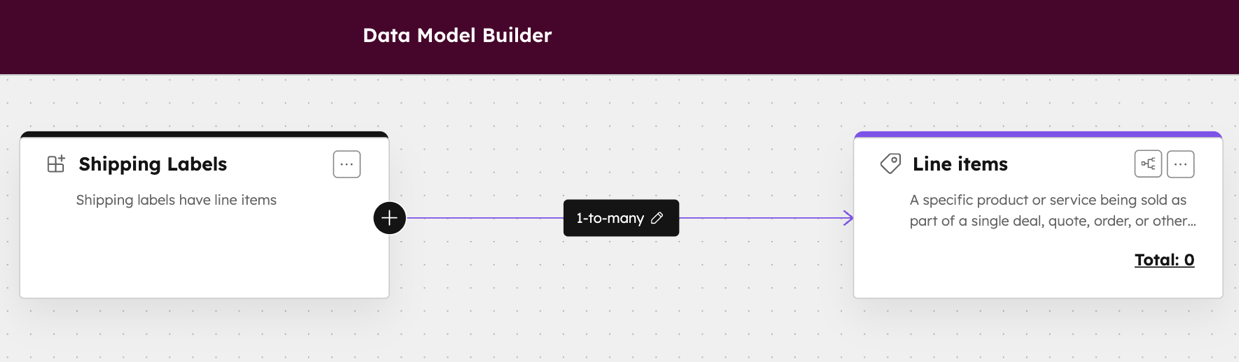
You can now use the Data Model Builder to create associations between Line Items and Custom Objects—no custom code or workarounds required.
Why does it matter?
With this update, it's easier to understand and configure the data that matters most to your business from a centralized location.
Line Items can be associated to custom objects. In the app the Line Items sidebar card provides an editor to add or edit Line Items for the custom object.
From the API new or existing line items can be associated to custom objects. This expands what it is possible to model with custom objects.
27. Forecast Read API
What is it?
Customers can now retrieve forecast submissions through a public, read-only Forecast Read API, and use the Retrieve Forecast Types API to understand which forecast types those submissions are associated with.
Why does it matter?
Teams that rely on external BI tools or data warehouses need reliable access to forecast data beyond the HubSpot UI. This API enables customers to export forecast submissions programmatically, join them with other data sources, and build their own reporting and analytics without tedious manual workarounds.
28. Branded Email Templates
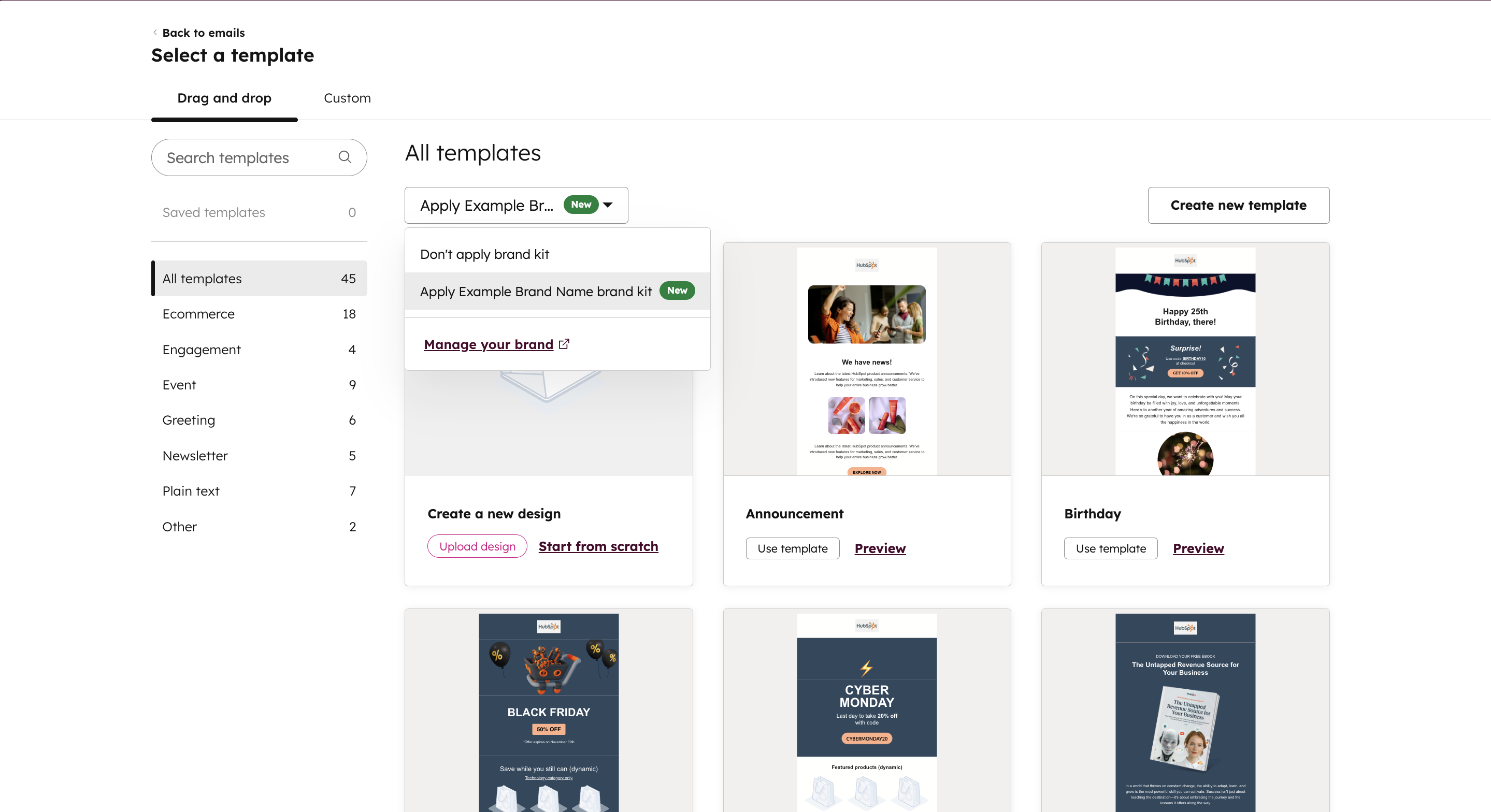
What is it?
The ability to apply your company's brand guidelines (such as logos and colors) to HubSpot's default Marketing Email templates, making it easier and faster to send on-brand emails.
Why does it matter?
Prior to this update, your options were to use generic templates that don't represent your brand or invest hours customizing every element to match your brand guidelines. With branded templates, you can now quickly create professional emails that match your brand identity—no manual customization needed. Simply apply your Brand Kit to any HubSpot template and start sending on-brand emails in minutes.
29. See number of emailable contacts in Segments
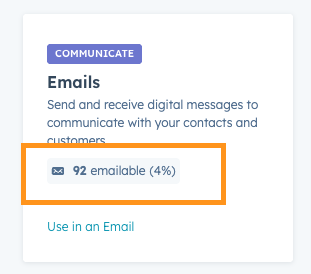
What is it?
View how many contacts in a segment are eligible to receive emails.
Why does it matter?
When creating email campaigns, you need to know how many contacts will actually receive your message, so that you can avoid a surprise if only a portion of your segment is reachable, and refine your segment for more effective email marketing. Prior to this update, you may spend time creating a segment only to find that certain contacts are not eligible to receive an email. Now, you can identify the emailable contacts in the segmentation process.
30. Assigned Teams Are Now Editable in Help Desk
What is it?
You can now edit a ticket’s Assigned Teams directly in the Help Desk workspace. This gives you more control over which teams are responsible for a ticket and where that ticket appears across team views and Spaces.
Assigned Teams can now be changed:
- From the About this ticket panel
- Inline from Help Desk table views
- Through workflows by using Rotate record to owner → Team only (not via Edit Record)
Only teams with at least one main team member with a Service seat will appear as options.
This update brings Assigned Teams in line with other core ticket properties, making it easier to keep ownership, visibility, and team workflows aligned as tickets move through your support process.
Why does it matter?
Assigned Teams determine where a ticket appears in Spaces, which views see the ticket, and which teams are expected to take action. Previously, this value could only be set automatically through routing. That meant:
- Tickets could appear in the wrong Spaces
- Ownership and team visibility could fall out of sync
- Admins had little ability to correct or reassign responsibility
With Assigned Teams now editable, you can:
- Correct misrouted tickets
- Reassign work between teams as priorities shift
- Ensure tickets appear in the right Spaces for visibility and collaboration
- Keep team workflows aligned as you scale
This gives support managers more flexibility and more confidence in how tickets flow through teams.
31. Data Agent: Web Research for Contacts
What is it?
Data agent can now browse the web to research contacts in your CRM and answer questions about them.
Why does it matter?
You can now quickly gather up-to-date information about your contacts without leaving HubSpot. This helps you:
- Prepare for meetings with the latest context about a contact's activities
- Identify new conversation starters based on recent publications or news mentions
- Understand a contact's career progression to tailor your outreach





.png)
-1.png)



.webp?width=98&height=94&name=HubSpot%20Elite%20Badge%20(2).webp)