-1.png)
Welcome to our HubSpot Product Spotlight for July. In this blog, we’ll explore some of the team's favourite HubSpot updates from the last month. Ready? Let’s dive in!
Now Live
These are all the new features live and ready to use in your HubSpot portal.
1. Customer agent can now show images inline in short answers
What is it?
Customer agent can now include images directly in short answers. When a visitor's question matches a knowledge source that contains images, the agent surfaces those images alongside the text — adapting to each channel's native format.
Why does it matter?
Customer agent has always answered in text. For businesses where knowledge is inherently visual — onboarding guides, product screenshots, troubleshooting flows, UI walkthroughs — that's a meaningful gap:
- A text-only response to "how do I set this up?" forces the visitor to find the visual themselves
- Visitors who can't follow a text-only explanation follow up or escalate, adding cost and friction
- Your knowledge base already has images — the agent should use them
Inline images let the agent deliver answers that match how your knowledge was written.
2. Sandbox Deploy Wizard: See deployable & non-deployable supported assets
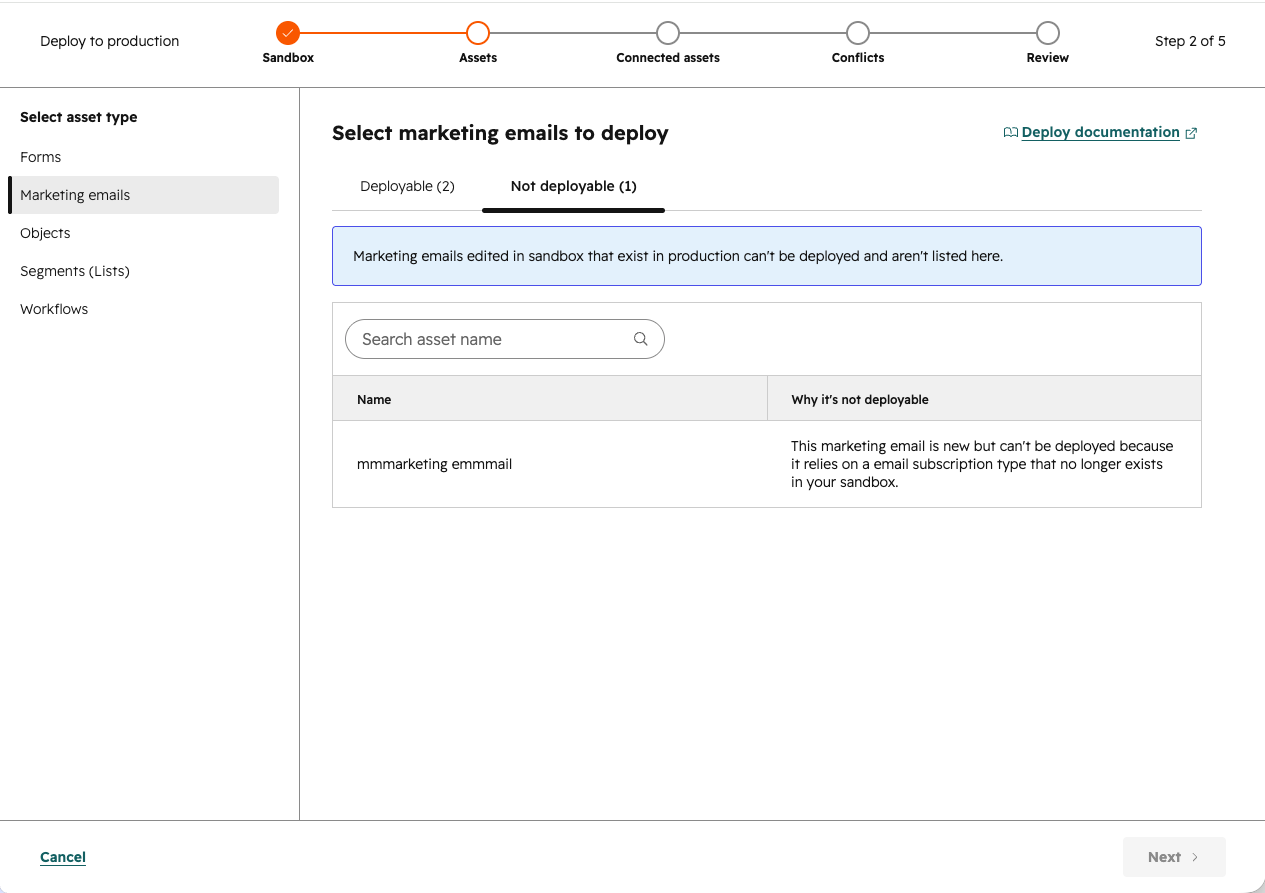
What is it?
The deploy wizard now shows all assets created in your sandbox, including ones that can't be deployed and why, so you can see the full picture before running a deploy. Why does it matter?
When you set up a deployment, you need to know whether your sandbox work is ready to move to production. Until now, the deploy wizard only surfaced assets that could be deployed, leaving you to wonder whether a new asset was missing or blocked from deployment without explanation.
With this update, you can see every new supported asset created in your sandbox and understand exactly why something isn't eligible for deployment.
3. Auto-association for Activities is Available for Additional Objects
What is it?
You can now configure automatic activity association settings for a new set of objects: Contracts, Orders, and Marketing Events.
Why does it matter?
This update gives admins the same control to change their activity logging defaults to match their business's unique processes for additional objects. This ensures that the relevant records reflect a complete and accurate activity history, reducing the need for manual associations or workarounds. Ultimately, this leads to cleaner data, better visibility into engagement, and more reliable reporting.
4. Location as Restriction: Make Card Location Optional
What is it?
Card location is now optional for HubSpot app cards. When no location is set, a card becomes eligible to appear on all supported surfaces, and admins can place it wherever makes sense.Why does it matter?
Previously, developers had to duplicate cards to display them on multiple surfaces, which added unnecessary work and clutter. Making location optional shifts placement control to admins and reduces developer overhead.
5. Sandboxes: Clearer Errors When Assets Fail to Copy
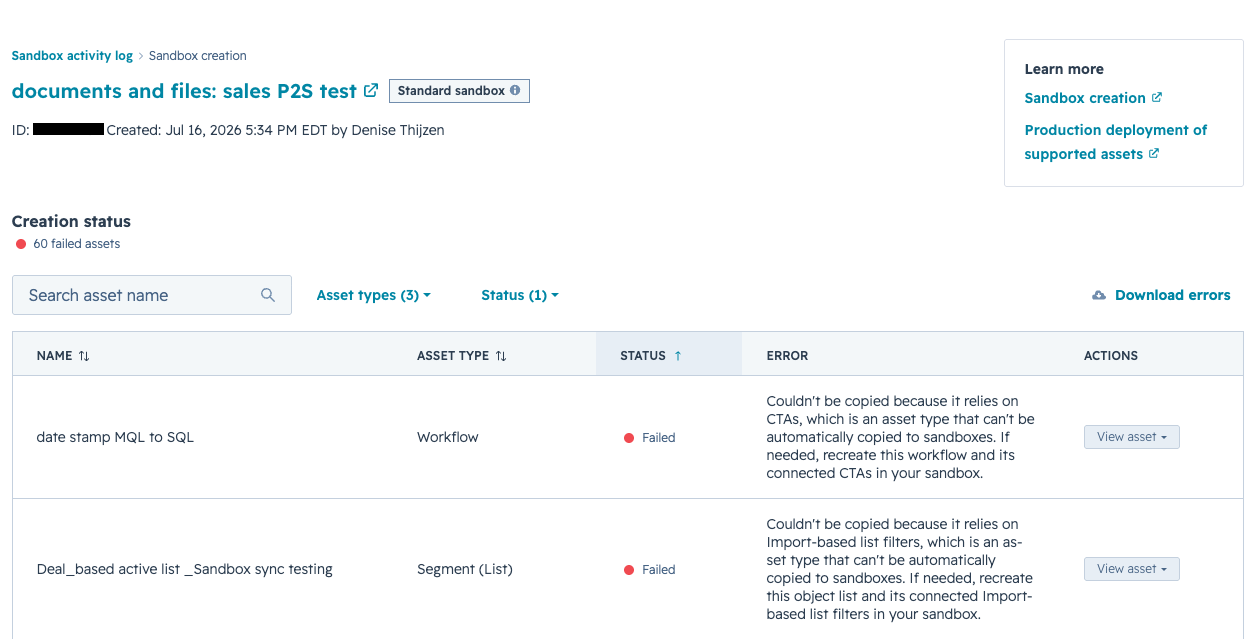
What is it?
When supported assets fail to copy during sandbox creation, errors now tell you exactly why.
You'll see the specific reason an asset couldn't be copied, whether it relies on an unsupported asset type, a dependency that no longer exists in production, or a combination of both, along with clear next steps for what to do about it.
Why does it matter?
When assets fail to copy to a sandbox, the previous error messages were not always clear. With these improvements guesswork is reduced so users can spend less time debugging asset copy failures.
6. Workflow Templates in the Marketplace
What is it?
Workflow templates are now available in HubSpot Marketplace. Browse and use pre-built templates based on common workflow patterns to get started faster.
Why does it matter?
Building workflows from scratch takes time. Templates give you a ready-made starting point based on proven patterns, so you can customize for your needs and move on.7. AEO Citation Tracking
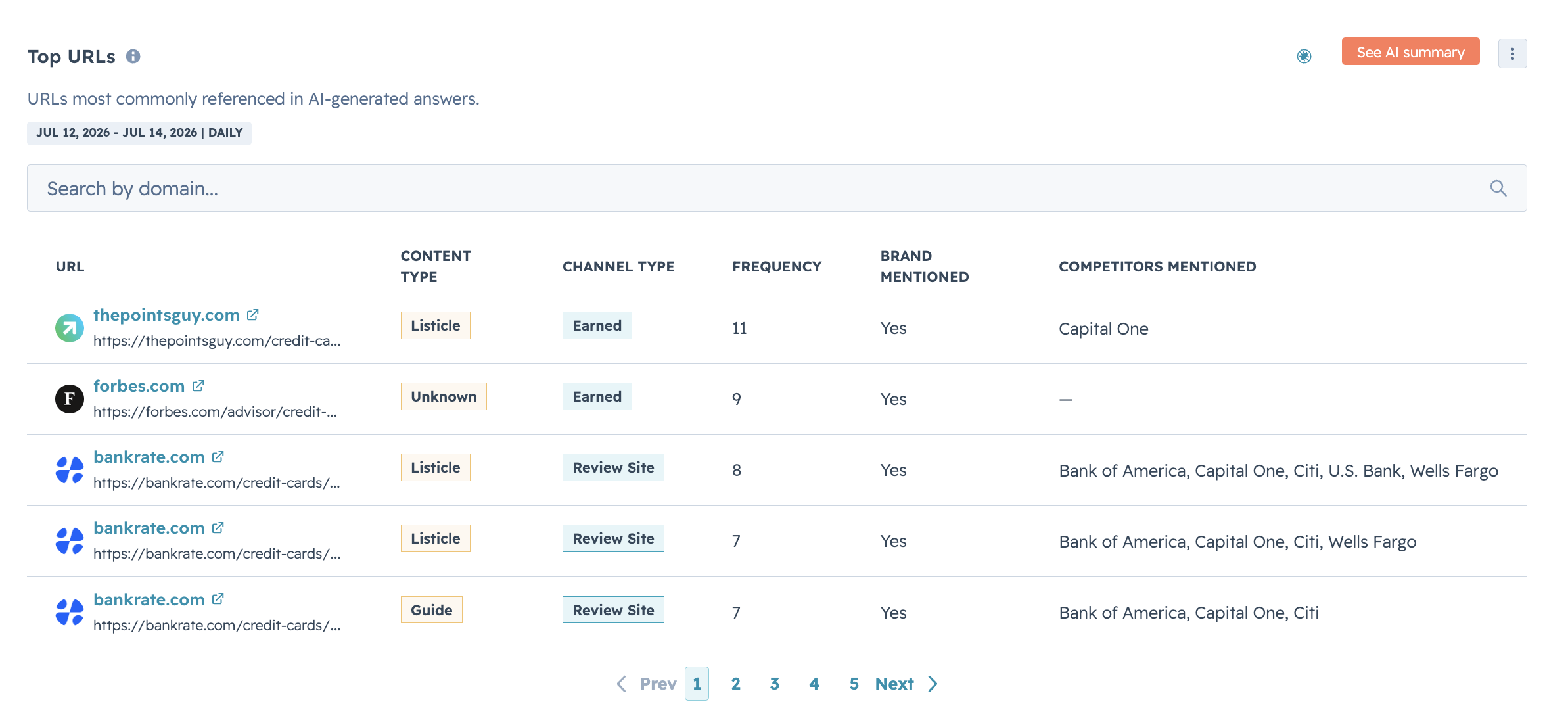
What is it?
The citation table in HubSpot's AEO Citations tab has been expanded and redesigned to give you a clearer, more complete view of how your brand appears in AI-generated answers. The table now takes up the full screen and includes three new additions: a Content Type column, a Brand Mentioned column, and a search function.
Why does it matter?
The citation table existed before, but it was tucked into the bottom right of the Citations tab, making it easy to miss and hard to work with. Two specific gaps made it harder to act on citation insights:
- Hidden placement: The table was difficult to find and too small to scan quickly, so most of the citation data went unreviewed.
- Missing context: Without source type or brand mention status as columns, you couldn't easily tell which citations came from which kind of source, or whether your brand was actually named when it was cited.
- No way to filter: With no search capability, finding a specific URL in a long citation list required scanning the entire table manually.
8. Customer Agent Status Property
What is it?
Knowing where a ticket stands in the Customer Agent → human handoff has been hard to track. We're fixing that with four new statuses on the Customer Agent Status property — so your team always knows whether CA is handling a ticket, a handoff is waiting on a human, or a rep is already on it.
Here's what each status means:
- Pending — CA is actively handling the ticket, no human needed
- Awaiting Human Assignment — CA has triggered a handoff, but no human has been assigned yet
- Handed Off — CA has handed off and a human rep is now assigned
- None — CA was never involved in this ticket
Why does it matter?
As you run more Customer Agents in help desk, the handoff between CA and human reps has become a critical moment. Today it's hard to know which tickets need human attention, which are stalled without an assignee, and which CA is still actively handling. This creates delays, gaps in ownership, and limited visibility for managers. The new statuses give teams a clear, high-signal way to understand CA's role on any ticket — so handoffs are faster and ownership gaps are caught immediately.
9. Use CRM contact data directly in your Customer Agent actions
What is it?
You can now map CRM contact properties directly to API request parameters in Customer Agent actions. When a visitor is identified, the agent can automatically pull in values from the contact record and include them in outgoing API calls—no manual wiring.
Why does it matter?
- Stop asking customers for information you already have in HubSpot.
- Eliminate custom middleware or glue code just to pass CRM data to external APIs.
- Build smoother, more personal experiences with less engineering work.
10. Unpublish a form
What is it?
You can now unpublish your HubSpot forms.
Why does it matter?
Until now, once a HubSpot form was published, it stayed live - even after a campaign ended, an event filled up, or an offer expired. This led to manual work, wasted time, messy data and reliance on third-party tools.
Unpublishing gives you a simple way to pause forms when they’re no longer relevant, so you stay in control and keep your data clean.
11. Data Studio: Column Summary, Data Gaps, Column Improvements & 1:Many Rollups
What is it?
We're introducing a set of improvements to the Data Studio builder that make it easier to shape, summarize, and complete your data — all without leaving the builder. These include:
- a column summary that displays aggregate summaries (sum, average, min, max, and more) at the bottom of your dataset table
- fill in data gaps, which lets you enrich incomplete records directly within the builder using HubSpot's company and contact data or Data Agent
- column improvements that make it simpler to add and manage columns when a source is already connected
- 1:many rollups, which allow you to aggregate data across one-to-many relationships right in the Data Studio builder
Why does it matter?
The Data Studio builder is where users spend most of their time shaping data, and every time they have to leave to summarize, complete, or rework it, that's friction that adds up. These improvements are about reducing some of that friction.
- The column summary gives a quick sense of your data at a glance, without exporting or building a report.
- Fill in data gaps lets you complete records without leaving the builder.
- Column improvements make it easier to iterate when working with already-connected sources.
- And 1:many rollups bring a commonly requested aggregation pattern into the builder, so you don't need a workaround to get the view you need.
Together these improvements make it easier to do more of your prep work in one place, so the dataset you save is one you can feel good about acting on.
12. Run Agent Workflows Action
What is it?
The “Run Agent” Workflow Action is a powerful way to orchestrate your AI agents directly within the Workflows app, alongside your CRM data and automation logic.
This new workflow actions lets you trigger an agent directly within a HubSpot workflow. You can:
- Configure which agent to run
- What information it receives
- How its output feeds back into your HubSpot ecosystem - whether that’s updating a record, triggering a follow-up, or informing another step in your automation.
Why does it matter?
Until now, automating an agent was only possible through triggers in Breeze Studio - powerful, but somewhat limited in flexibility. The new workflow action takes agent automation to the next level by bringing it seamlessly into the Workflows app.
Now you can:
- Use any Workflows trigger to deploy your agents
- Orchestrate multiple agents together
- Pass outputs from an agent to any subsequent agents or automation actions
- Easily update your CRM data with the help of agents
13. Use Custom Event properties in Email Personalization Tokens
What is it?
You can now use custom event properties as personalization tokens in automated marketing emails and workflows, pulling in event-specific data to personalize content for each contact.Why does it matter?
Custom events capture rich behavioral data — but until now, that data couldn't be easily used to personalize email content. This closes the gap between what you know about a contact's activity and what you can say to them.
With this, you can:
- Reference specific event details in email copy (e.g., the product a contact viewed, the name of the video they watched, or the plan they're on)
- Trigger automated emails from workflows that surface relevant event property values inline
- Create more precise, context-aware messaging without manual segmentation workarounds
14. AI Remove Filler Words in Video Editor
What is it?
You can now automatically detect and remove filler words like "um," "uh," and "ah" from your videos using the video clip editor.
Why does it matter?
Re-recording video just to clean up filler words takes time. With this feature, you can use your first take and remove filler words directly in the editor, so you spend less time recording and more time publishing polished, professional content.
15. Centralized Data Model Management
What is it?
A unified table and graph view for managing your entire data model — objects, properties, associations, and conditional logic — from one, easy to use place.
Why does it matter?
Managing your data model used to mean jumping between multiple settings pages with no consistent picture of how objects, properties, and associations connect. By centralizing your data model in one spot, you get a single place to see and manage your entire Smart CRM structure, whether you're auditing a complex configuration or making a quick edit to a property group.
16. Instagram Direct Message File Attachments in Social Inbox
What is it?
When replying to Instagram Direct Messages in HubSpot's social inbox, you can now send images, audio files, PDFs, and videos directly from HubSpot.
Why does it matter?
Instagram DMs are a natural channel for customer questions and sales conversations. When someone asks how a product works, a short video or PDF spec sheet answers the question better than a text reply ever could. Before this, sending anything other than text meant leaving HubSpot and replying directly in the Instagram app. Now you can send any supported file type from HubSpot's social inbox without switching tools.
17. Bulk accept formatting issues
What is it?
You can now accept or reject your formatting issue suggestions in bulk instead of one at a time. New Accept all and Reject all buttons let you act on an entire filtered set of suggestions at once, whether that's all name formatting issues, all capitalization fixes, or any other combination you've filtered to.
A confirmation modal shows you exactly how many changes and records will be affected before anything happens.
Why does it matter?
Reviewing formatting suggestions one by one is time-consuming, especially when you have hundreds or thousands of pending fixes waiting for your approval.
- Clear a backlog of formatting issues in seconds instead of clicking through them individually.
- Filter to a specific field group or issue type and approve just those fixes, without touching anything else.
- See a precise count of changes and affected records before committing, so there are no surprises.
- Stay in control: bulk actions respect your current filter state, so only what's visible gets updated.
18. New video sharing menu
What is it?
Our newly redesigned video share menu brings every sharing option for a video into one place. From the video details page or directly from a video tile or list row, you can copy a share link, grab an embed code, download the file, post to social, change who can view the video, set the hosted domain, or set an expiration without bouncing between screens.
Why does it matter?
Sharing a video in HubSpot used to mean hunting through different parts of the product for different actions. The share page link lived in one place, the embed code in another, social posting had its own flow, and visibility settings sat alongside unrelated configurations. If you just want to send a video to a colleague or grab an embed for a landing page, it required more clicks and context switching than it should have.
The new video share menu fixes that. Link, embed, download, social, visibility, domain, and expiration are all in one consolidated menu so you can share from wherever you happen to be working.
19. Automatic Activity Association Settings for Leads
What is it?
You can now configure automatic activity association settings for the Lead object.
Why does it matter?
This update gives admins the same control to change their activity logging defaults to match their business's unique processes for the lead object. This ensures that the relevant records reflect a complete and accurate activity history, reducing the need for manual associations or workarounds. Ultimately, this leads to cleaner data, better visibility into engagement, and more reliable reporting.
20. AI-powered Filing Agent for Workflows
What is it?
An AI-powered filing agent in account cleanup that analyzes your unfiled workflows and suggests how to organize them into folders so you can review, adjust, and apply the changes in a few clicks.
Why does it matter?
Accounts with large numbers of workflows often have a backlog of unfiled assets that's easy to ignore and time-consuming to address manually. This agent does the analysis for you: it reads workflow names and descriptions, groups them into suggested folders, and lets you act on those suggestions without touching each workflow individually.
21. WhatsApp in Marketing Studio
What is it?
You can now connect your WhatsApp messages to a campaign - so you can view, edit and monitor performance like any other asset directly from Studio.
Why does it matter?
Adding WhatsApp to Marketing Hub gave marketers access to one of the world's most widely used messaging channels, enabling them to engage customers where they're already active. By bringing WhatsApp into Studio, marketers can create more cohesive, omnichannel campaigns, increase engagement with timely and personalized conversations, and deliver a more seamless customer experience—all while managing their marketing efforts from a single place.
22. Improved Attachments in the Help Desk Thread View
What is it?
Help desk users can now find inline screenshots surfaced as attachment tiles in the message footer, alongside existing file attachments, within the thread view.
Why does it matter?
Inline images can get lost in long email threads, causing reps to miss important visual context needed to resolve tickets. This change gives users a consistent, predictable place to find all images and files for each message, reducing time spent scrolling and improving accuracy when referencing customer-provided screenshots.
23. Breeze AI Powered CTAs in Assign Notification Emails
What is it?
Breeze AI Powered CTAs in Assign Notification Emails enables dynamic, context-aware next-step buttons in task assignment emails.
Assignees now receive notification emails with AI-generated call-to-action buttons that link directly to the relevant record and open a sidebar with context-specific prompts.
Why does it matter?
Users often struggle to identify the most relevant next step after receiving task assignment emails, causing delays and missed actions. Embedding AI-powered CTAs directly in notification emails helps assignees act faster by surfacing the optimal next step for each context.24. Automatic Associations for Meetings
What is it?
Meetings created in HubSpot or synced into HubSpot now follow the automatic association rules you set.
Why does it matter?
Previously, only meetings created directly in HubSpot through the CRM followed automatic associations. Meetings created via scheduling pages and synced through external calendars (meetings not created directly in HubSpot), followed HubSpot's default activity associations.
Now, any meeting that appears in HubSpot (either created via the CRM, scheduling pages, or calendar sync) will follow the automatic association rules that you set.
Beta
These updates are currently in the works and nearly ready to be released on your HubSpot Portal.
1. Sequence Task Associations
What is it?
Tasks created by sequences will now automatically associate with contacts, companies, deals, and other objects — following the automatic activity association settings you've already configured in your account.
Why does it matter?
Previously, tasks created by sequences were only associated with the enrolled contact. This meant reps had to manually associate tasks with other records, creating extra friction and inconsistency.
2. Conversation Routing fallback to Customer Agent
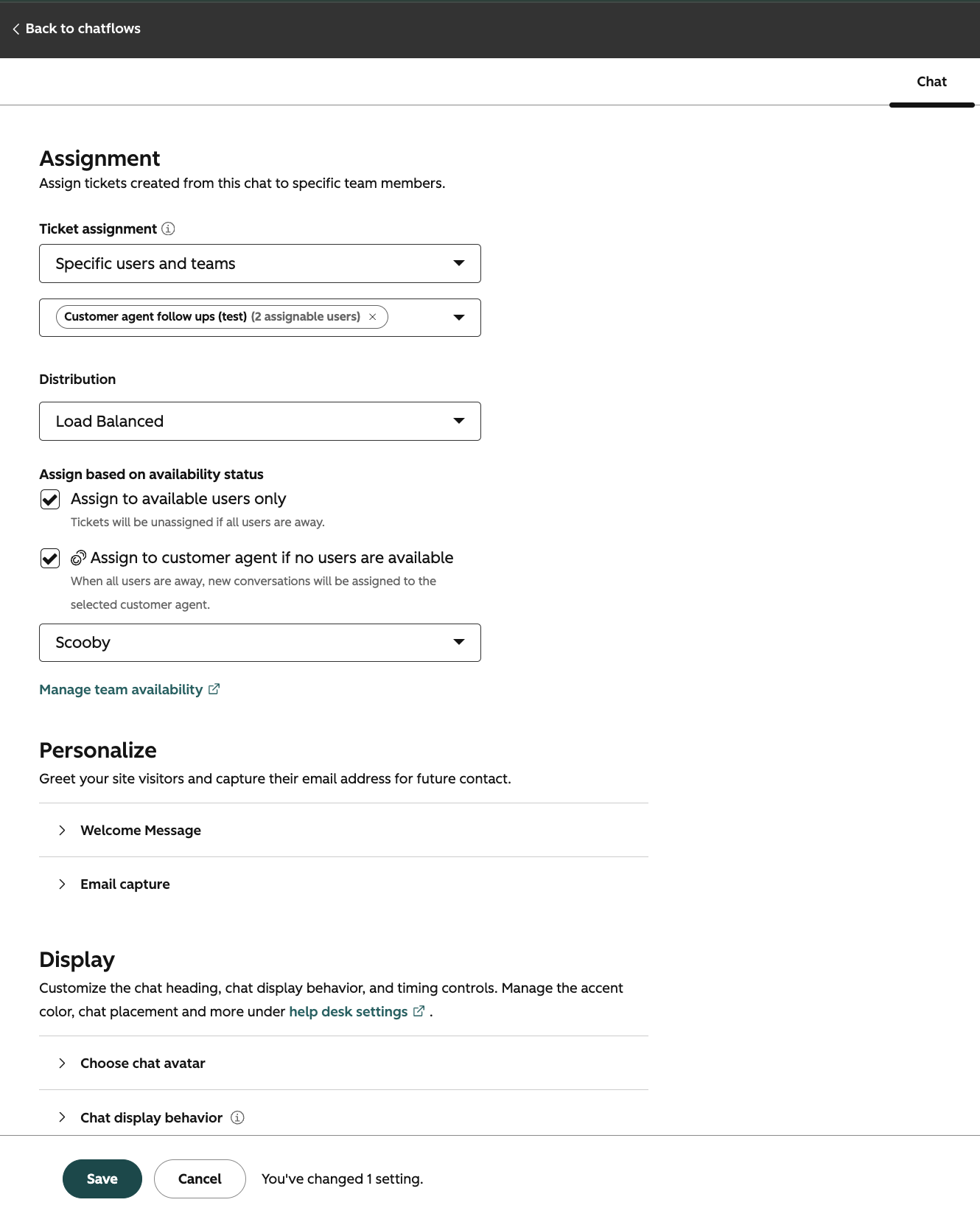
What is it?
When all human agents are unavailable or at capacity, incoming conversations are automatically assigned to the configured Customer Agent, ensuring no conversations remain unassigned.
Why does it matter?
Customers face delays and missed SLAs when conversations sit unassigned because no human agents are available. Customers wanted a safer way to deploy Customer Agent and keep their customers engaged with their business. This provides a way for Customer Agent to help begin the conversation and triage customer needs when human agents are unavailable and at capacity.
This change ensures customers receive prompt help from the Customer Agent, reducing wait times and making it safer for admins to deploy Customer Agent Assistance as a fallback.
3. Configurable Social Account Expiration Notifications
What is it?
Admins can now choose who receives social account expiration notifications, instead of every portal admin getting notified.Why does it matter?
When a connected social account is about to expire, HubSpot sends re-authentication notifications. Until now, every portal admin received these notifications, even executives who are admins for legal or compliance reasons and have no ability to reconnect the account. On portals with many admins and multiple connected accounts, this created a steady stream of notifications most recipients couldn't act on.
4. Meet Agent Builder: custom agents made for your business
What is it?
Agent Builder includes custom agents you build for your business, and a new automation canvas that connects agents, actions, and triggers in one place.
Build agents tailored to your business using your own instructions, tools, and knowledge, on the customer data already in your CRM. Connect them to workflows to trigger automation, follow up with contacts, and take action on records at scale.
Why does it matter?
Custom agents let you build AI that works the way your business does. No code required. By giving you full control over what the agent knows, how it behaves, and where it acts, custom agents transform AI from a helpful add-on into a scalable advantage for your entire front office. And with Breeze Assistant, you don't have to start from scratch. Just describe what you need and it builds the agent for you based of your intent.
5. Sandbox creation now copies team based CRM views
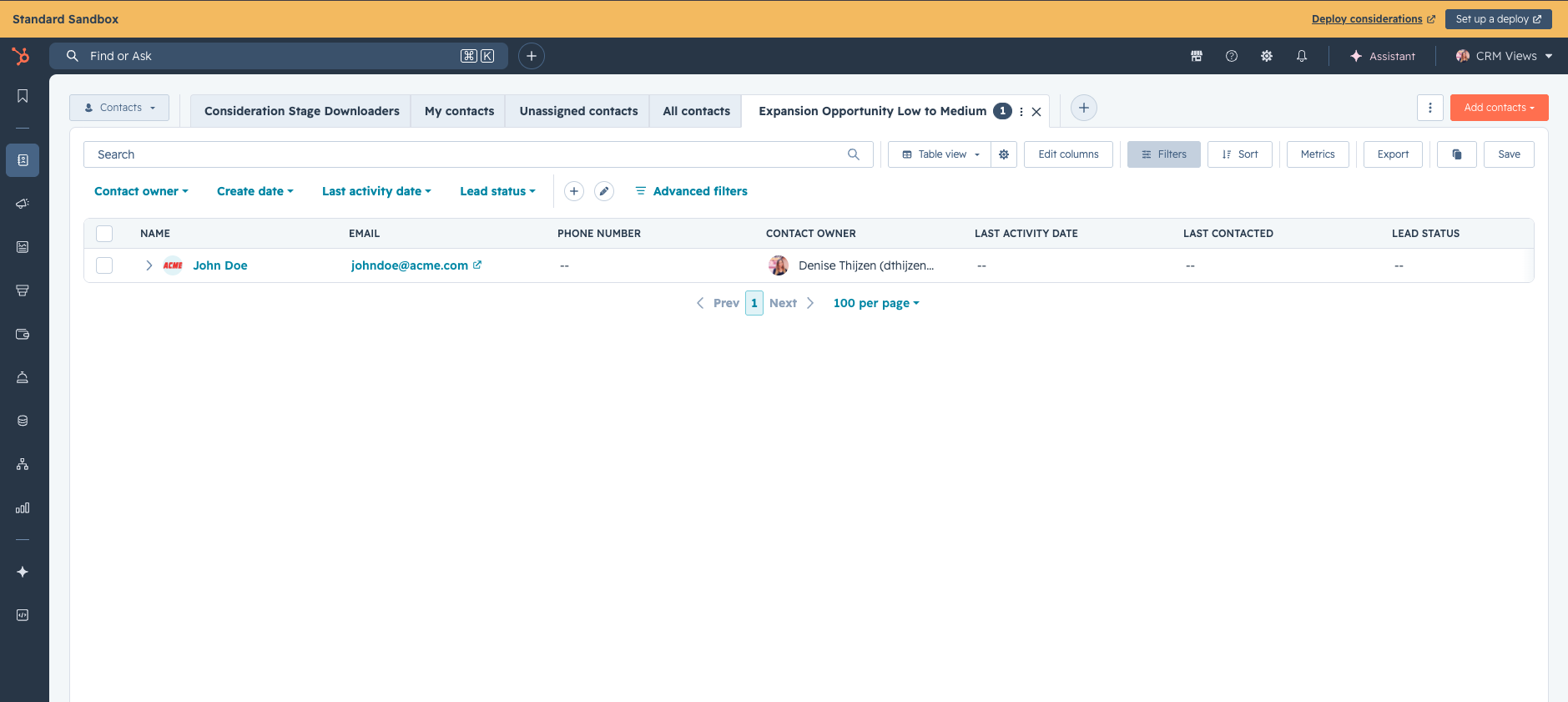
What is it?
When you create a sandbox, team based and shared CRM views across contacts, companies, deals, tickets, and custom objects are copied from production.
Why does it matter?
Saved views define what your reps see on the records index page, which filters surface the right contacts or deals, and how managers operationalize playbooks across their team. Without these views, your sandbox doesn't reflect how your team actually uses HubSpot, making it hard to test changes realistically, train new hires, or validate your reps end-to-end workflows without disrupting them in your production account.
Previously, before testing could begin in a Sandbox, you had to manually recreate team views whenever you created a new sandbox. Now your sandbox starts with the same CRM view setup your team relies on in production, supporting realistic user acceptance testing.
6. Describe it. Breeze Assistant builds it in Agent Builder.
What is it?
Breeze Assistant now helps you build inside Agent Builder. Describe what you want to create in plain language, and Breeze Assistant configures custom agents and agentic automation for you, using the customer data already in your CRM.
Why does it matter?
Starting from a blank canvas is one of the biggest barriers to building. You have to know what tools you need, how to configure them, and where your data lives before you can get anything running. Breeze Assistant removes that barrier. You describe the outcome you want, and it handles the setup, pulling from the knowledge and customer context already in your portal.
7. Meet Agent Builder: a new way to build automations
What is it?
Agent Builder includes a new automation canvas that connects agents, actions, and triggers in one place, and custom agents you build for your business.
Why does it matter?
HubSpot's legacy workflows were built for a CRM-first world, where automation meant enrolling a contact or company into a sequence of steps. That model worked well, and still does for a lot of use cases.
But automation has gotten bigger than CRM enrollment. Businesses now need to trigger processes on a schedule, respond to external events via webhooks, react to third-party integrations, and increasingly, orchestrate AI agents alongside traditional steps. An enrollment-centric trigger model wasn't built for any of that.
Agent Builder's automation canvas is.
By decoupling triggers from CRM enrollment, Agent Builder's workflows open up a much wider surface area for what automation can do. Because it shares a canvas with Agent Builder's agentic capabilities, the same automation that sends a follow-up email can also hand off to an agent, wait for a result, and continue, all in one app.
8. Meet Agent Hub: one place to run your AI team
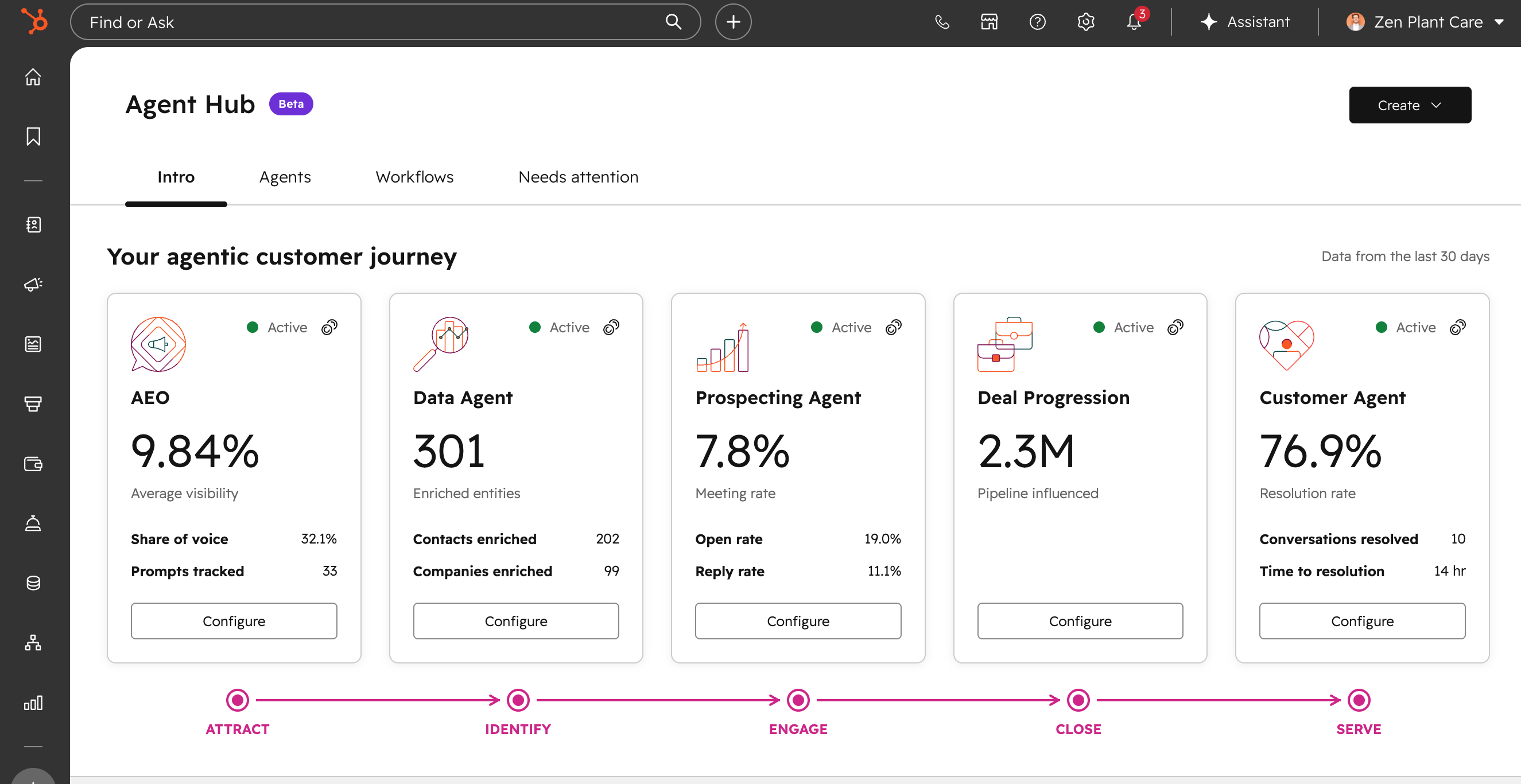
What is it?
Agent Hub is here, giving you one place to see every agent organized by the outcomes they drive, build new ones, and automate the work in between.
It brings every agent running your go-to-market into one place, organized around the outcomes they drive: build demand, win deals, delight customers, and scale growth.
Why does it matter?
HubSpot's agents are already working across your go-to-market. Agent Hub brings them together so you can see everything they're doing, understand the outcomes they're driving, and build what's next, all in one place.
9. Your Slack CRM card just got smarter
What is it?
The Slack card on your CRM records now shows an AI-generated summary of your linked channel's conversation, powered by Breeze.Why does it matter?
Your CRM record is most useful when it reflects the full picture of what's happening — including what's being discussed in Slack. Previously, the Slack card showed basic channel details like the channel name, members, and associated activity types. With this update, the Slack card now includes an AI-generated summary of your linked channel's conversation, so you can get more critical context on the record page, without leaving HubSpot.
10. Data Sources API for Data Studio
What is it?
A public API that lets developers create, manage, and ingest data into HubSpot Data Studio programmatically — no UI required. Two datasource types are supported:
- FILE — upload a CSV, XLS, XLSX, or TSV file to create a datasource
- JSON — define a schema and push structured data directly via API, with an incremental
data-pushendpoint for ongoing updates
All operations are accessible via standard OAuth.
Link to API doc here: https://developers.hubspot.com/docs/api-reference/2026-09-beta/data-studio/datasource-ingestion/guide
Full API surface:
|
|
|
|
|
|
|
|
|
|
|
|
|
|
Why does it matter?
This API unlocks a more flexible, developer-friendly pathway for getting tabular data into HubSpot's Data Studio without needing to commit to CRM objects.
The CRM Imports API has strict requirements: data must map to CRM objects, and there's no incremental update path. Developers who want to push raw or custom data — not CRM records — are left without a clean option.
The Data Source Ingestion API is schema-agnostic. Data doesn't need to map to any HubSpot object type. Developers define the schema, ingest data via file upload or JSON, and it lands in Data Studio immediately available for datasets, reports, and activation across segments, workflows, and lists.
The data-push endpoint enables lightweight, ongoing ingestion for recurring data updates (partner enrichment feeds, operational snapshots, agent-generated outputs) without managing file uploads each time.
11. Cross-object Filtering on CRM Index Pages
What is it?
You can now filter records on index pages based on properties from their associated objects. For example, you can filter contacts by deal properties, companies by ticket properties, or any primary record by its related object data.
Why does it matter?
You need to see how your data connects to understand your business. Previously, answering questions like, "Which companies have subscriptions up for renewal?" required manual data exports or building lists and reports. Now you can filter directly on index pages (e.g. Contacts, Companies, Deals, Tasks; etc.) to identify sales opportunities, monitor performance, and take action in real-time without switching apps or exporting data.
12. Column Freezing for pivot tables
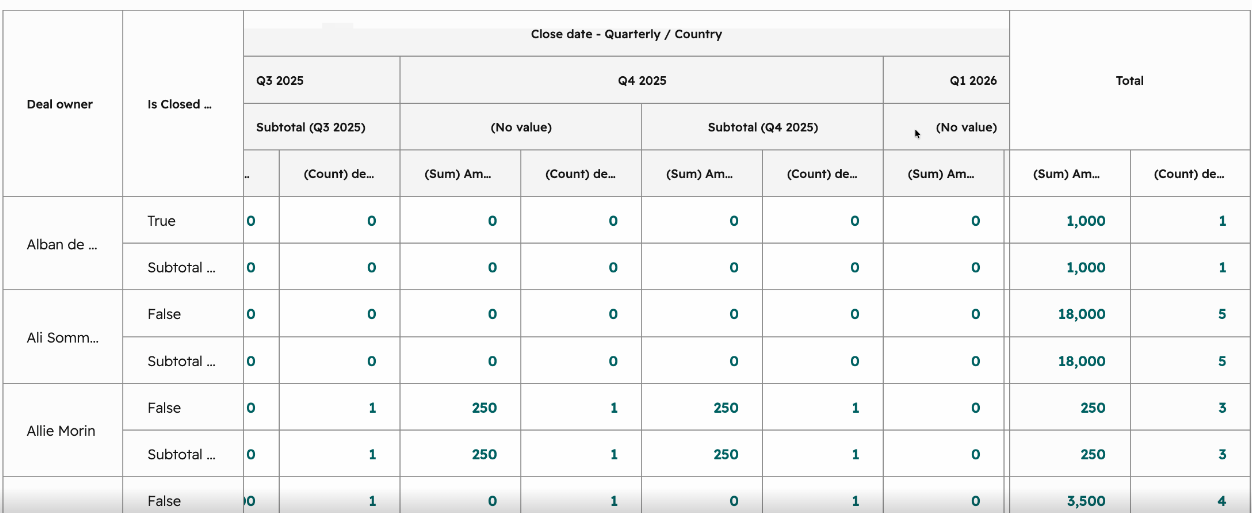
What is it?
Pivot tables will now default to having columns frozen. This includes both the columns on the left hand side of the pivot table and the Totals columns on the right hand side of the pivot table. This means that scrolling horizontally on the pivot table will always freeze and keep these columns in view.
Why does it matter?
Pivot tables can have a lot of columns and as you scroll horizontally, you can lose reference of the values that you see, not knowing which value on the pivot tables is tied to which column. This creates hard readability issues for pivot tables. With the columns frozen now, scrolling horizontally through the pivot tables should still allow for better readability and understanding of pivot tables.
13. Column-Level Filtering
What is it?
You can now filter records by clicking directly on column headers in CRM tables.
Why does it matter?
Filtering your CRM data is now faster and more intuitive. Previously, you had to open a separate menu and search for properties to create filters. Now you can filter directly from column headers using a familiar spreadsheet-style interaction, making it quicker to manage your pipeline, update deals, or organize contacts.
14. Meetings calendar in the main navigation
What is it?
View and action on all your past and upcoming meetings via the new meetings calendar available in your main navigation.
Why does it matter?
The meetings calendar was previously only available in the Sales Workspace and the Customer Success space. Now, all users can see their schedule in HubSpot.
15. Call Recording Settings per User/Team
What is it?
Admins can configure call recording at the user or team level, controlling which users or teams have recording enabled.
Why does it matter?
Recording requirements vary by role and customer type. Per user and per team controls let admins apply the right recording configuration to the right people without a single blanket setting.
16. Single Sign On: Support for Multiple Identity Providers in Single Account
What is it?
You can now configure single sign-on (SSO) in HubSpot to support multiple identity providers (IDPs) within a single account.
Why does it matter?
If your organization manages employees across multiple IDPs, HubSpot's previous limit of one IDP per account was limiting, requiring workarounds or leaving some users unable to authenticate through SSO. With support for multiple IDPs, admins can now configure HubSpot to match how their organization manages identity, without compromise.
17. Image Editor
What is it?
You can now make quick edits to images you generate with AI Image Generation (crop, resize, rotate, flip, add a text overlay, or place your logo) without leaving HubSpot.
Why does it matter?
AI-generated images rarely come out publish-ready. Text is often garbled, proportions may be off for the platform you're posting to, and there's no easy way to brand the image with your logo. Until now, that meant downloading the image and finishing it in an external tool before you could use it. With the editor available directly from the AI Image Generation output, you can go from generated image to publish-ready asset without switching tools or breaking your workflow.
18. FileUpload & FileViewer for UI Extensions
What is it?
FileUpload and FileViewer are new UI extensions components that let you add file upload and display capabilities to your app cards. Files are stored in a per-app folder in HubSpot's file manager (/app_{appName}_{appId}), and uploaded files can optionally be attached to CRM records.
Why does it matter?
Until now, there was no way to handle files within UI extensions — you couldn't collect or display attachments directly in app cards, which forced workarounds or pushed file interactions outside the HubSpot UI entirely. FileUpload and FileViewer close that gap, keeping file-dependent apps fully in-context on the CRM record.
19. Team Email signature Improvements
What is it?
Team email signatures are now more visible, more personal, and more flexible across CRM, Inbox, and Help Desk. You can preview your signature before sending, personalize it with richer details like profile picture and meeting links, and choose between your personal and team signature when sending.
Why does it matter?
Previously, signatures were inconsistent and hard to control. You couldn't always see what signature would be sent, team signatures lacked the personal touch reps wanted, and there was no way to switch between a personal and team signature. These gaps made outbound email feel impersonal and unpredictable, and made it harder for admins to maintain a consistent brand at scale.
20. Payment Links API
What is it?
Developers and partners can now programmatically create, retrieve, update, and manage HubSpot payment links via a public API.
Why does it matter?
Manual creation of payment links limits merchants with large or complex product catalogs, prevents dynamic shopping-cart experiences, and forces businesses to use external platforms, fragmenting their workflows and data. Providing a public API removes these bottlenecks, enabling scalable, automated commerce and integration with third-party tools.
21. Switch off tracking per Marketing Email
What is it?
The ability to override your global Marketing Email open and click tracking settings for individual Marketing Emails directly in the email editor, giving you granular control over tracking on a per-email basis.
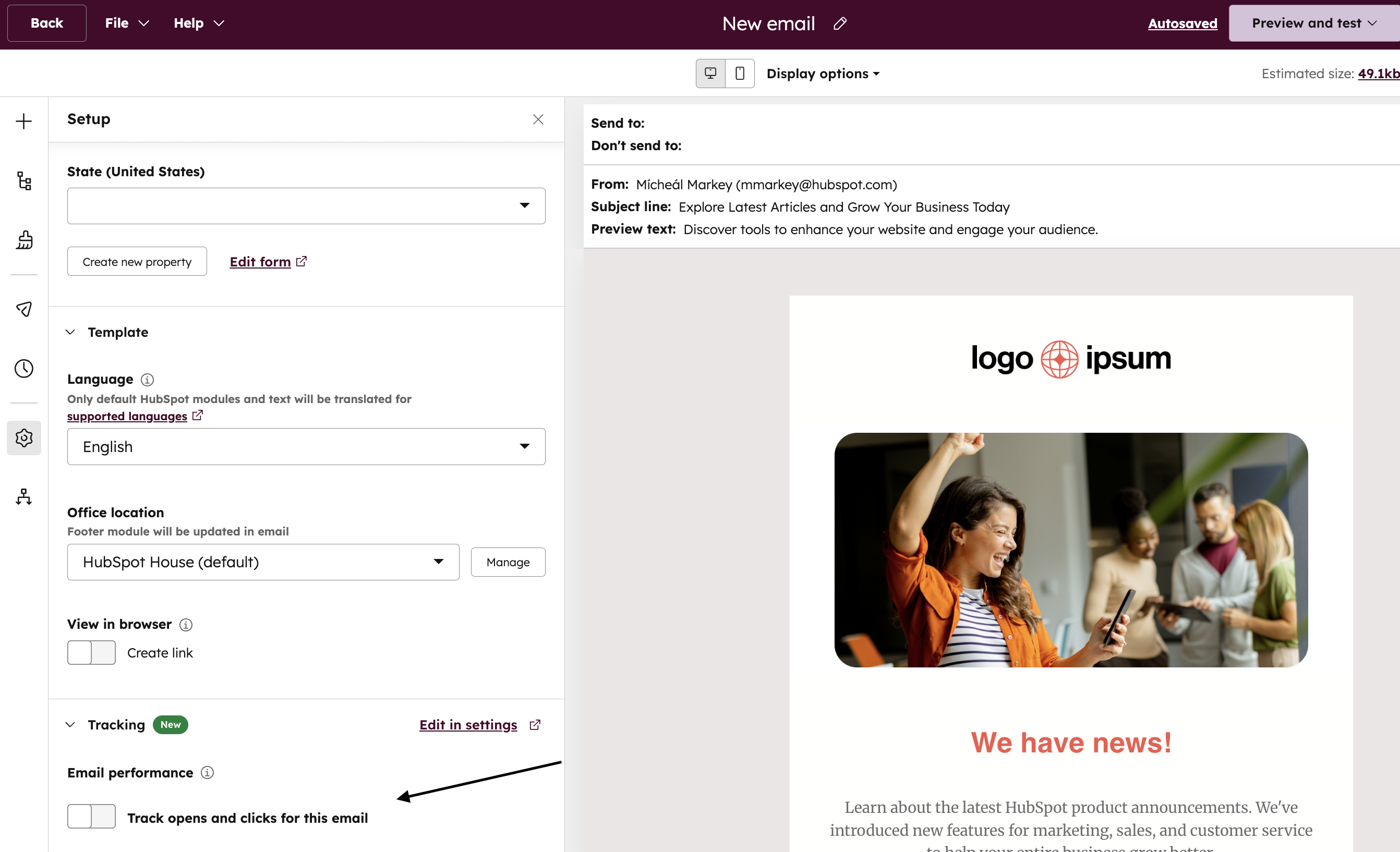
Why does it matter?
While HubSpot's global Marketing Email tracking settings (found in Settings > Marketing > Email > Tracking) provide account-wide defaults for your Marketing Email opens and clicks, some emails require different tracking configurations. This flexibility matters because:
- Admin governance: Marketing admins decide which users on their team can override tracking on a per-email basis via the new "Override Marketing Email Tracking Settings" user permission. The permission is off by default.
- Privacy-sensitive communications: Certain emails (like internal updates, partner communications, or privacy-focused campaigns) may require tracking to be disabled even when it's enabled globally.
- Testing flexibility: Marketers can now disable tracking for test campaigns or internal communications without affecting the rest of their Marketing Email analytics.
- Reduce friction: Previously, changing your email tracking settings required updating global account settings (affecting all emails) or wasn't possible at all. This eliminates the need to toggle account-level settings repeatedly.
-1.png)





.webp?width=98&height=94&name=HubSpot%20Elite%20Badge%20(2).webp)