-1.png)
Welcome to our HubSpot Product Spotlight for May. In this blog, we’ll explore some of the team's favourite HubSpot updates from the last month. Ready? Let’s dive in!
Now Live
These are all the new features live and ready to use in your HubSpot portal.
1. Advanced data visualizations in Breeze Assistant
What is it?
Breeze Assistant can now generate rich, flexible data visualizations — charts and graphs — directly in the conversation. Ask for a chart in natural language and Breeze produces it on the fly: you can specify multiple axes and data series, add annotations and commentary overlaid directly on the chart, and control visual details like colors, legends, and titles — all conversationally, through follow-up messages. Charts can draw on CRM data from your portal and can be blended with external data from Breeze’s web search or a spreadsheet you upload.
Why does it matter?
Data visualization in Breeze is now a genuinely creative, iterative experience. You’re not locked into a fixed chart format — you can describe exactly what you want, refine it turn by turn, and layer in commentary that gives the chart context right where it lives. For analyses that go beyond standard report types — arbitrary target lines, custom period comparisons, combined CRM and external data — Breeze can produce them inline without leaving the conversation.
2. Create and iterate on documents in Breeze Assistant
What is it?
Breeze Assistant can now create rich artifacts — documents, email drafts, and custom HTML pages — in a dedicated canvas panel that opens alongside the chat. When Breeze generates an artifact, the canvas opens automatically and stays open as a persistent workspace for viewing and refining the output.
Why does it matter?
Today, complex outputs like a pipeline report or email draft are buried in the chat thread — each refinement pushes the previous version off-screen. Canvas mode gives users a fixed surface to build and iterate on deliverables through conversation, without losing context between turns.
3. Breeze Assistant now asks focused clarifying questions
What is it?
When Breeze Assistant needs a key piece of information before it can give a useful answer — like how your team defines "stalled" or which output format you want — it now pauses and surfaces a focused question card directly in the chat. You pick from predefined options or type your own answer, and Breeze Assitant continues immediately.
Why does it matter?
Without this, Breeze could silently guess at business definitions (producing confidently wrong output) or ask multiple clarifying questions as a wall of text before attempting anything — both rated poorly in usability research. A single, interactive question card gets the needed context in one click and keeps the conversation moving.
4. useCrmSearch Hook for UI Extensions
What is it?
useCrmSearch is a new React hook for UI extensions that lets you run CRM search directly from app cards and app pages. You can now use free-text queries and structured filter groups to run CRM searches across any object type (contacts, companies, deals, tickets, and custom objects) with pagination and property formatting built in Why does it matter?
Until now, UI extensions could only fetch data from a known record (useCrmProperties) or its associated records (useAssociations), both scoped to the current record context. By bringing flexible search and filtering to UI extensions, useCrmSearch opens up app experiences that previously required workarounds. Now you can:
- Build new app experiences: Power document generators, reporting dashboards, and cross-object lookup tools natively in UI extensions.
- Skip external infrastructure: Authorization is handled internally via the backend proxy, so you don't need external API calls or custom backends.
- Write less code: Built-in property formatting and cursor-based pagination reduce boilerplate.
5. Access Marketing Campaigns, Blogs, Landing pages, and Teams from ChatGPT
What is it?
With the HubSpot connector for ChatGPT, you can now access HubSpot marketing campaign data and team context directly from ChatGPT. Analyze marketing performance, spot trends, and plan next steps without leaving your AI workflow.
This update includes access to more context including:
Marketing and Content:
- Campaigns and campaign metrics
- Landing pages, website pages, and blog posts
Teams & Users:
- Team memberships, direct reports, and reporting structures
- User roles, job titles, and seat assignments across your organization
Why does it matter?
If you're already using ChatGPT for planning, analysis, or content ideation, you can now ask ChatGPT questions about your HubSpot marketing data and organizational context in plain language, and get answers instantly.
With the HubSpot connector for ChatGPT, your marketing campaigns, performance metrics, and published content are accessible right where you're already doing your thinking. Spend less time pulling data and more time acting on it.
6. Company Recommendations in Prospecting Agent Daily Digest
What is it?
The prospecting agent daily digest now includes company recommendations. When the agent identifies a buying signal for a company you're tracking, it surfaces that company along with suggested contacts in your digest email.
Why does it matter?
Previously, buying signals surfaced by the prospecting agent were only visible inside the app, making it easy to miss time-sensitive opportunities. Now the agent delivers those signals to your inbox proactively, so you can review and act without having to check the app.7. Context Home
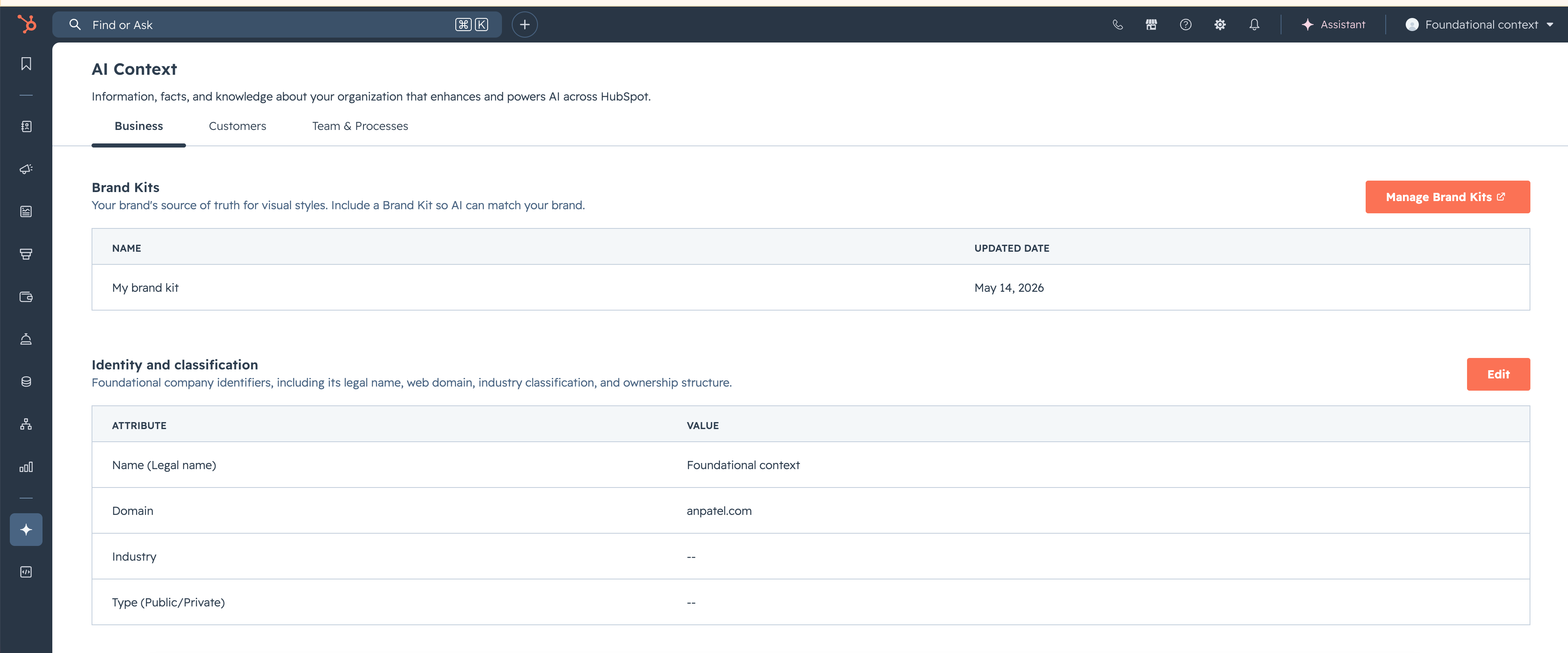
What is it?
Context Home is the new centralized place for context replacing the former AI Data Sources under AI Settings. Customers can now view & manage all the context HubSpot has on their business in one location.
Why does it matter?
Context Home makes it easier for customers to understand, update, and maintain the context that powers HubSpot AI so teams can stay aligned and take action with confidence.
8. Create, Edit, and Analyze Products in Breeze Assistant
What is it?
Users can now analyze, create, and edit products directly through Breeze Assistant in the sidebar. Instead of manually digging through records to understand how a product drives or impacts revenue, users can ask Breeze to do it for them conversationally, including for more complex pricing mechanisms such as tiered pricing.
Why does it matter?
Products are at the heart of every deal and quote, but building them correctly, understanding how they are configured, and how making changes will impact a deal or quote can be time-consuming, especially for newer reps or complex product catalogs. This feature removes that friction by letting users analyze, create, and modify products through natural conversation with Breeze. Reps spend less time on manual data entry and more time selling, while also gaining confidence that their line items are accurate because Breeze can explain exactly what each item represents, how pricing was calculated, and why it's included on the deal.
9. TikTok Lead Syncing
What is it?
Lead syncing is a data sync from an ad network into HubSpot. When a person fills out a lead generation form on TikTok (called a TikTok Instant Form), HubSpot automatically creates or updates a contact in your CRM with the information they submitted.
Read more in the TikTok Ads App Marketplace listing: https://ecosystem.hubspot.com/marketplace/listing/tiktok-ads
Why does it matter?
TikTok lead generation ads let users fill out a form directly within TikTok without ever visiting your website. Without lead syncing, these leads stay trapped in TikTok's platform & your team would need to manually export and import them, causing delays and lost opportunities.
Speed-to-lead is critical: the faster you follow up with a lead, the higher the conversion rate. By automatically syncing TikTok leads into HubSpot in real-time, your team can immediately engage with them through workflows, sequences, and sales follow-ups.
10. TikTok Ad Conversion Events
What is it?
You can now create ad conversion events for TikTok to send conversion data from your HubSpot CRM back to TikTok via the TikTok Events API.
Once set up, HubSpot will automatically send conversion signals to TikTok when key events occur in your CRM — such as a contact's lifecycle stage changing or a form being submitted. TikTok's algorithm then uses this data to find more people like your best-converting leads, improving ad targeting and campaign performance over time.
Read more in the TikTok Ads App Marketplace listing: https://ecosystem.hubspot.com/marketplace/listing/tiktok-ads
Why does it matter?
TikTok's ad algorithm needs conversion data to optimize campaign delivery. Without it, TikTok can only optimize on surface-level engagement metrics like clicks and views, rather than actual business outcomes like leads becoming customers.
By sending conversion data back to TikTok, you're telling TikTok's AI: "This person became a high-quality lead — go find more people exactly like them." This creates a reinforcing loop: better conversion data leads to better ad targeting, which leads to more effective campaigns and higher ROI.
11. Create and refine email in Breeze Assistant
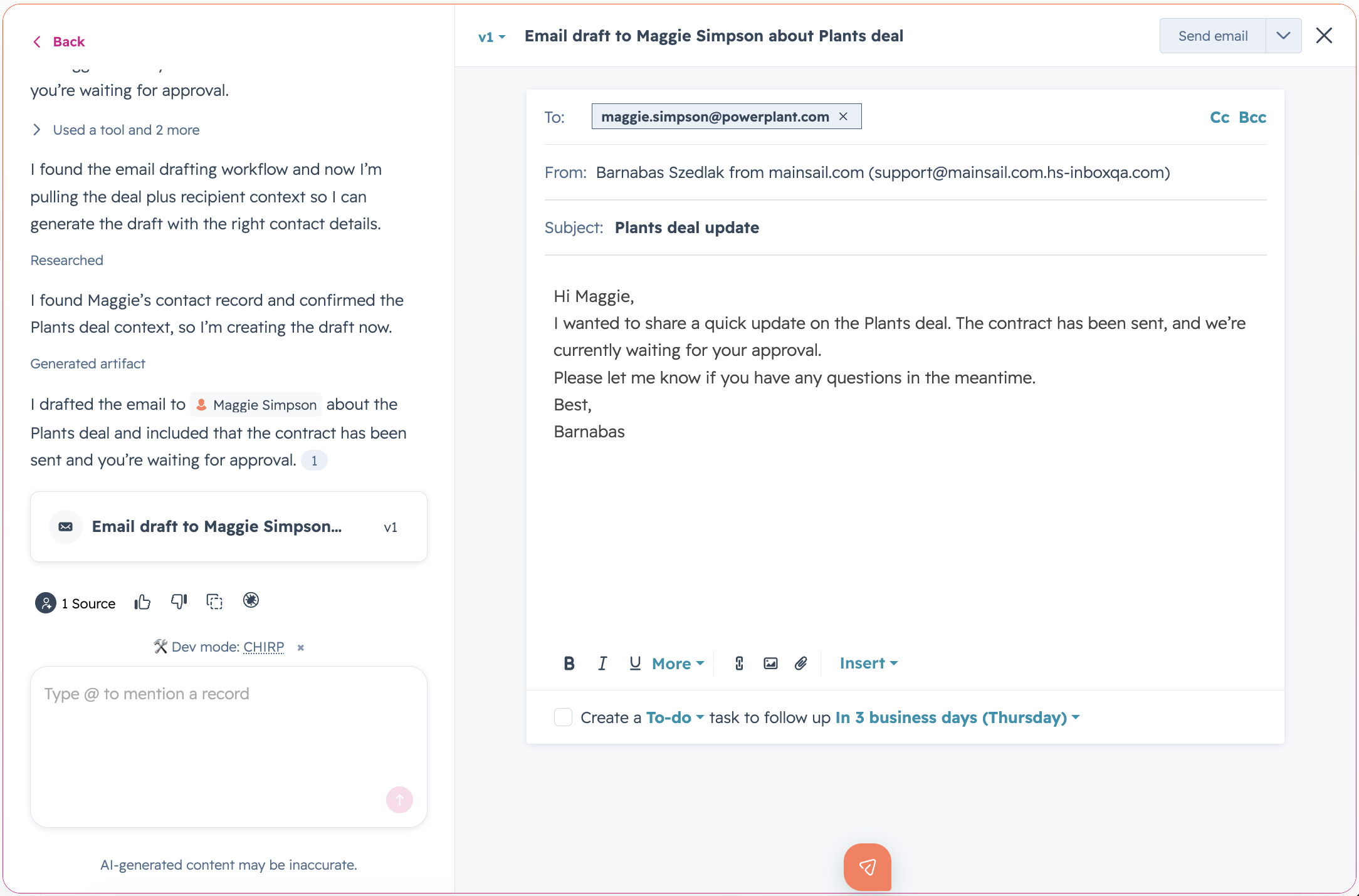
What is it?
Breeze Assistant can now create email drafts that can be opened in a dedicated canvas panel alongside the chat. Once opened, the canvas becomes a persistent workspace where users can review, refine, copy, or send the email directly from Breeze.
Why does it matter?
Today, email drafts generated by Breeze Assistant are embedded directly in the chat thread, making longer editing and refinement workflows harder to manage. As users iterate on an email, previous versions move out of view and it becomes more difficult to review and refine the draft across multiple turns.
Breeze Canvas gives users a dedicated workspace to review and refine email drafts through conversation or direct editing before sending, making iterative editing easier without losing context between turns.
12. Slack App: Customize HubSpot Link Previews
What is it?
The Slack app for HubSpot now lets you control what information appears when HubSpot links are shared in Slack. You can also edit CRM properties directly from the preview without leaving the conversation.
Why does it matter?
Teams frequently share HubSpot links in Slack to collaborate quickly. Until now, until now, those link previews were static and showed a fixed set of properties.
Now, you can tailor link previews (unfurls) to show only the properties that matter to your team, keeping conversations focused and data appropriate for the audience.
13. Pipeline-Specific Object Tags
What is it?
You can now create object tags that apply only to specific pipeline stages, so tags automatically appear based on where a record is in your pipeline.Why does it matter?
Previously, object tags applied across an entire pipeline regardless of stage. Now you can target tags to specific stages, keeping your board and table views cleaner and ensuring tags are only visible where they're relevant.
14. Associate one blog post to many campaigns
What is it?
You can now add the same blog post to more than one campaign at the same time.
This is in addition to the already supported Marketing email and landing pages.
Why does it matter?
Previously, each asset could belong to only one campaign at a time. To reuse an asset, you'd have to clone it - leading to complex version control and management. Now, a single shared asset can contribute attributed revenue and influenced contacts across every campaign it’s part of.
This change:
- Eliminates asset cloning and simplifies campaign setup
- Improves reporting visibility across shared assets
- Preserves attribution accuracy using existing models (e.g., first-touch, last-touch)
15. Associate one SMS message to many campaigns
What is it?
You can now add the same SMS message to more than one campaign at the same time.
Why does it matter?
Previously, each asset could belong to only one campaign at a time. To reuse an asset, you'd have to clone it - leading to complex version control and management. Now, a single shared asset can contribute attributed revenue and influenced contacts across every campaign it’s part of.
This change:
- Eliminates asset cloning and simplifies campaign setup
- Improves reporting visibility across shared assets
- Preserves attribution accuracy using existing models (e.g., first-touch, last-touch)
16. Listings in Global Search
What is it?
You can now search for Listings directly from HubSpot's global search bar — right alongside contacts, companies, deals, and more.
Why does it matter?
In HubSpot, Listings are a CRM object used to store property records — units to be bought, sold, or rented — managed by real estate teams alongside Contacts, Companies, and Deals. Making Listings searchable means you can quickly find and reference property information across your connected tools — all within HubSpot.
17. Multiple Stored Payment Methods
What is it?
Buyers can now store multiple payment methods. Previously, a contact could only store one payment method.
You can now select from multiple payment methods per contact to charge in the Invoices and Subscriptions editors.
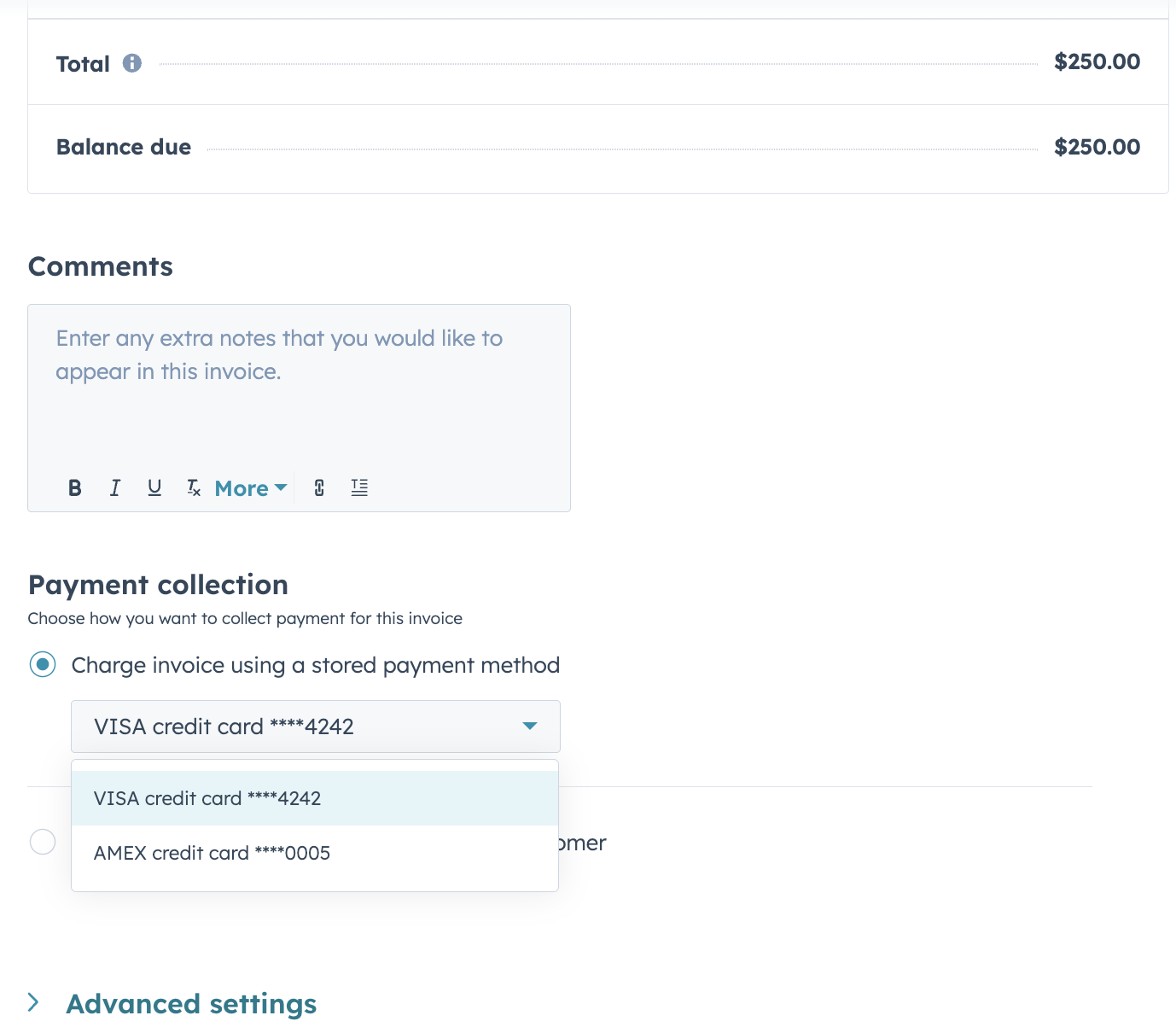
Why does it matter?
Buyers often need to use different payment methods, such as a credit card for lower-dollar transactions and ACH for higher-dollar transactions. Previously, only one payment method per contact could be stored, causing workflow friction and payment errors.
Supporting multiple payment methods enables you to use the appropriate payment method for each transaction, reducing errors and improving operational flexibility.
18. Workflow action to change contact participant state for a marketing event
What is it?
You can now use a workflow action to automatically update a contact's participation state to Registered, Attended, or Cancelled for manually created marketing events in HubSpot.
Why does it matter?
Previously, you could only use workflows to mark contacts as Registered for a marketing event. If you wanted to track attendance or cancellations, you had to update participation states manually or build external workarounds.
Now you can automate the entire participation journey—from registration through attendance or cancellation. You can keep your event data accurate and up to date without manual effort, whether you're confirming attendance after an event or tracking cancellations.
19. Use Breeze Assistant to create, update, and test custom code workflow actions
What is it?
Breeze Assistant can now write, test, and iterate on custom code workflow actions for you. Describe what you want the action to do in plain language, and Breeze generates the full code with inputs, logic, and outputs, ready for you to review, edit, and save. Previously, Breeze Assistant was limited to assembling workflow actions from HubSpot's existing standard actions or available third-party app actions.
Why does it matter?
Custom code actions are the most flexible piece of HubSpot automation, but have also required knowing JavaScript/Python, the custom code action structure, and being comfortable working with the runtime and any libraries you wanted to use. Now, custom code actions can be spun up by describing what you want.
20. Stage Calculated Properties Available for Custom Objects
What is it?
Custom objects now have stage calculated properties that automatically track how records move through pipeline stages.
Six new properties are now available for custom objects:
- Date entered {stage id}
- Date exited {stage id}
- Latest time in {stage id}
- Cumulative time in {stage id}
- Time in current stage
- Date entered current stage
Why does it matter?
With this update, you can now:
- Gain deeper insights into how long custom objects spend in each stage
- Identify bottlenecks in your custom object processes and pipelines
- Automate actions based on time spent in a stage
21. Onboarding Plans
What is it?
Customer success teams can now plan, execute, and track onboarding and success projects with structured tasks, milestones, and reporting in HubSpot.
Why does it matter?
User need
Customer success teams struggle with fragmented, inconsistent onboarding and success workflows spread across multiple tools and objects.
Benefit
This project enables teams to manage onboarding and success plans in a single location, giving clear visibility into status, risks, and progress across all customers, and supporting scalable, repeatable processes.
22. Send SurveyMonkey surveys with automatic contact attribution
What is it?
You can now embed SurveyMonkey surveys into HubSpot marketing emails and automatically match responses to the right contact record — no extra email field required.
Why does it matter?
Previously, attributing SurveyMonkey responses to HubSpot contacts meant asking respondents for their email address on every survey — adding friction, creating room for error, and cluttering your forms. Now, a custom variable on your survey URL identifies the contact automatically, so responses are attributed to the right record without any extra effort on your end or your respondents'.
23. Mobile List Views Now Mirror Your Desktop Table Views
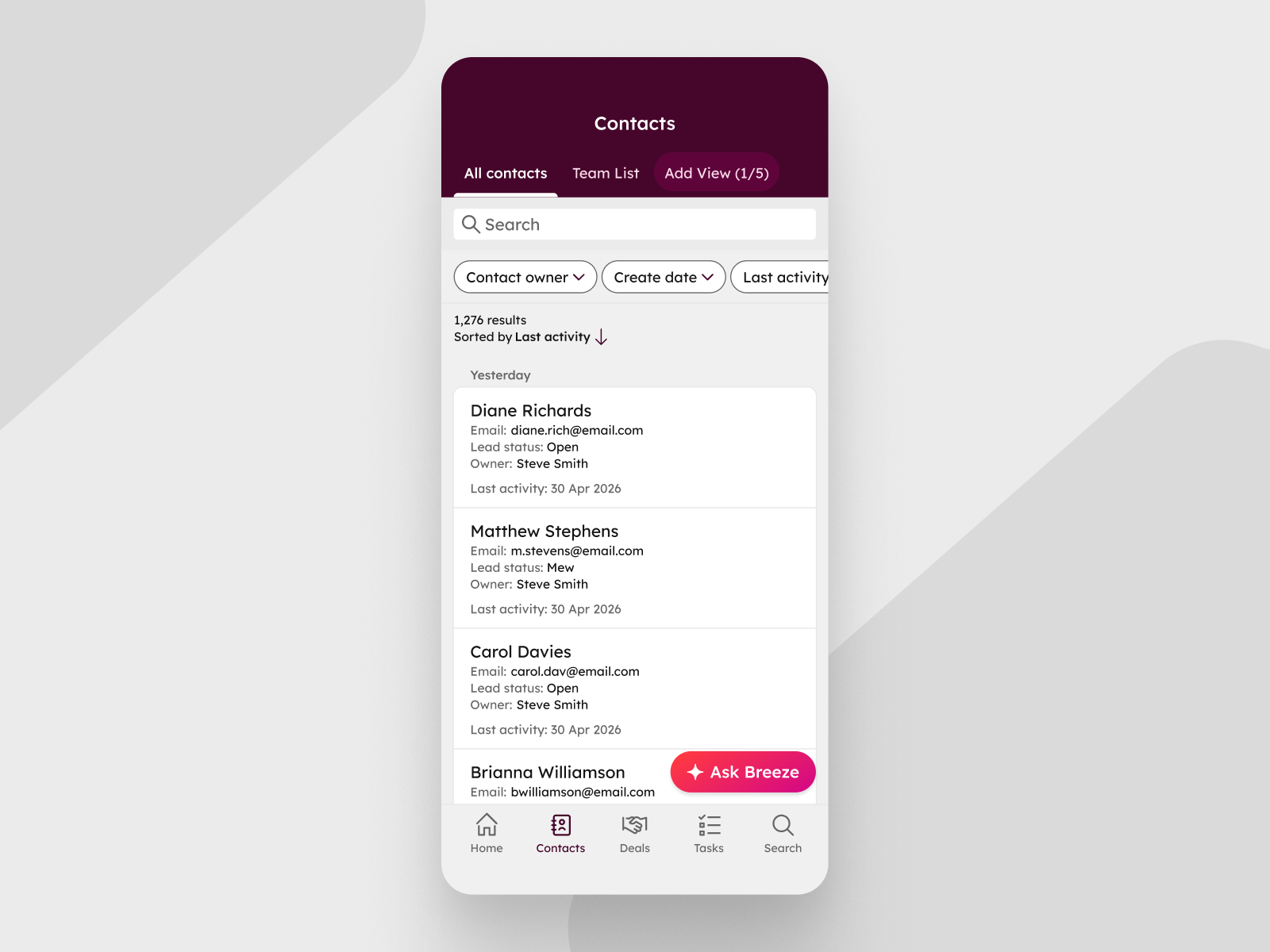
What is it?
Mobile list views in the HubSpot app now display the same properties you've configured in the corresponding desktop table view, up to 20 properties, starting from the left.
Why does it matter?
Until now, mobile list views showed a fixed set of properties with no way to customize what appeared, which meant the data you configured on desktop didn't carry over when you switched to your phone. Now, when you open a list view on mobile, you see the same properties in the same order as the matching desktop table view. You can scan deal amounts, close dates, custom priority fields, or whatever matters most to you, without having to tap into individual records.24. An easier way to define lead qualification criteria in Customer Agent
What is it?
An easier way to define lead qualification criteria in Customer Agent using HubSpot's native CRM filter UI — the same filter experience used across the rest of the platform. Instead of typing free-text criteria, admins can now select CRM properties, operators, and values with structured inputs.
Why does it matter?
The previous criteria setup was text-based, which made it easy to configure incorrectly. CRM Filters bring structure and precision to qualification criteria — so the agent qualifies leads based on exact CRM property matches. This directly improves qualification accuracy and reliability.
25. Breeze Assistant can now access Campaign data
What is it?
Breeze Assistant now answers questions about your campaign's goals, performance metrics, assets, and budget directly within Breeze.
Why does it matter?
Previously, you had to switch between multiple tabs and reports to understand campaign performance or asset readiness. Now, all key campaign data is available in one conversation, saving time and keeping you focused on strategy.26. One-Click Approval Reminder
What is it?
You can now send a reminder notification to approvers directly from the Approvals panel using the bell icon — no need to chase them down in a separate channel.
Why does it matter?
One-Click Approval Reminder helps teams unblock work when approvals get stuck. Instead of tracking down approvers in separate channels, requesters can nudge them directly from the Approvals panel, keeping reviews moving and reducing delays to publishing or sending.
27. Customer Portal Experience Update
What is it?
We’re introducing an updated Customer Portal experience with a refreshed design and several usability improvements.
As part of this update, the portal is now powered by HubSpot’s CMS, which lays the foundation for improved theming and branding flexibility over time.
In this release, you’ll also see enhancements like improved search, sorting and filtering, and full conversation visibility—making it easier for customers to find and manage their information.
Why does it matter?
This update improves the Customer Portal experience today with a more modern, usable interface and foundational enhancements.
By moving the portal onto HubSpot’s CMS, we’re also establishing a more scalable foundation that will support greater customization and branding flexibility over time.
This shift lays the groundwork for future self-service experiences across HubSpot, expanding beyond ticket management to support additional customer use cases in a more unified way.
28. Custom Refund Reasons
What is it?
You can now create custom refund reasons giving you valuable data to understand what is causing refunds.
Why does it matter?
The ability to assign custom reasons to refunds helps reduce revenue loss by allowing you to identify and address the root causes of refunds.
29. PDFs as attachments in Customer Agent
What is it?
Visitors can now attach PDF files directly within a Customer Agent conversation.
Why does it matter?
Customers often need to share a document to get the right help, a warranty, a contract, or a form. Without attachment support, they had to switch to email or describe the document in text, which created friction and led to context loss. PDF attachments let the conversation stay in one place, with full context available from the start.
30. Customized CRM Object Names Now Match in the Mobile App
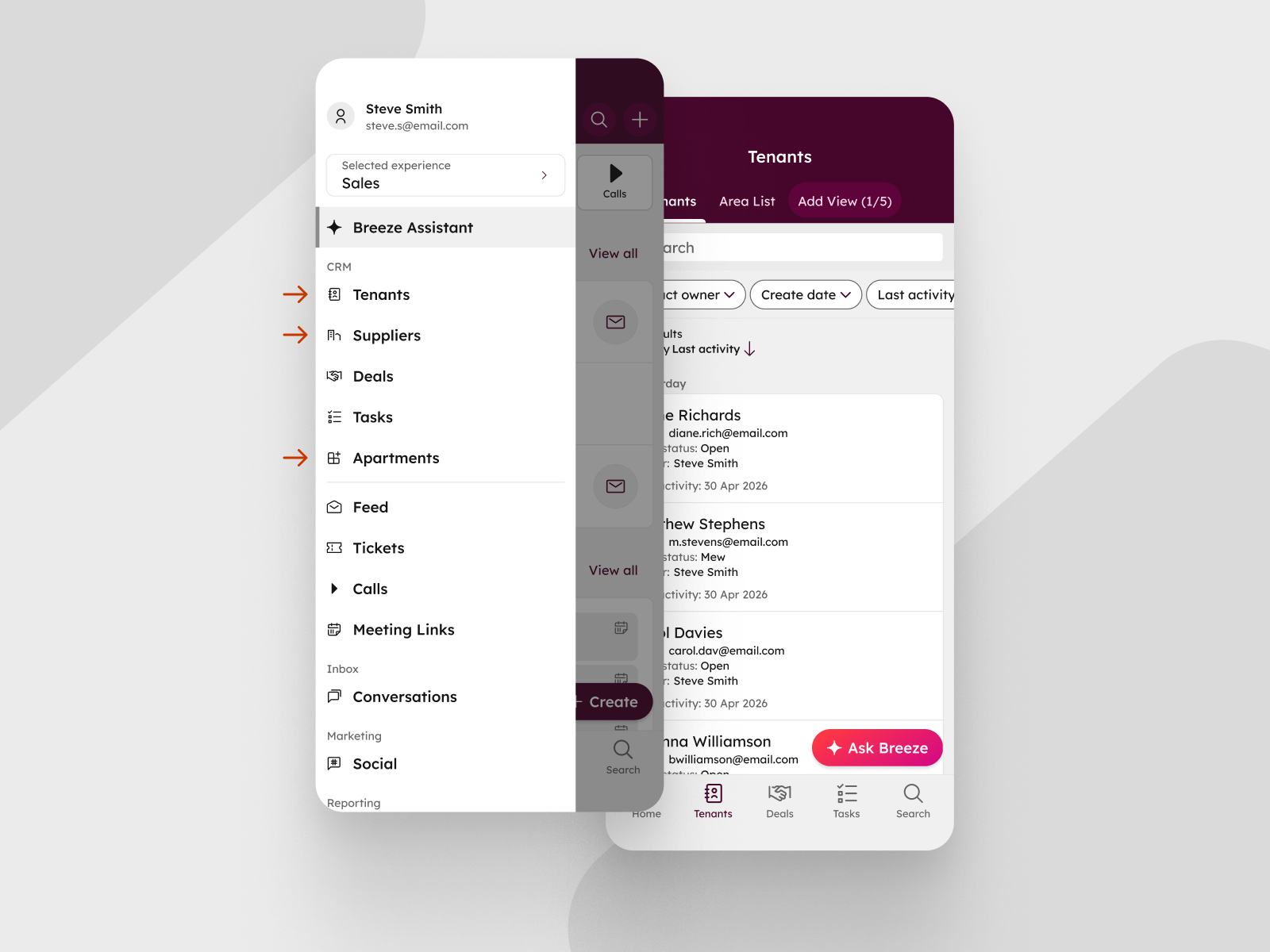
What is it?
Custom names that admins set for default CRM objects on desktop now appear everywhere in the HubSpot mobile app: in navigation, record headers, associations, and related property labels.
Why does it matter?
Many teams rename their CRM objects to match how their business actually talks — for example, "Opportunities" instead of Deals, "Students" instead of Contacts. Until now, those custom names only applied on desktop. Reps opening the mobile app would see HubSpot's default labels, forcing them to mentally translate between two vocabularies every time they switched devices.
With this update, admins rename objects once and reps see the same language everywhere they work, ensuring business continuity and encouraging adoption.

Beta
These updates are currently in the works and nearly ready to be released on your HubSpot Portal.
1. Customizable Analyze tabs
What is it?
You can now customize the Analyze tab by replacing the default dashboard with your own, adding or removing reports, editing report settings, and rearranging the layout. This is supported in multiple places in HubSpot, details below. Watch this video for a walk-through.
Why does it matter?
The default Analyze tab may not reflect the metrics your team tracks day-to-day, which means you end up switching to separate dashboards to find the data you need. Now you can tailor the Analyze tab to show the reports most relevant to your goals, keeping your reporting and your workflow in the same place.
2. Admin-configured default views in Segments
What is it?
Admins can now set a default view for their teams for specific segments or across all segments globally.
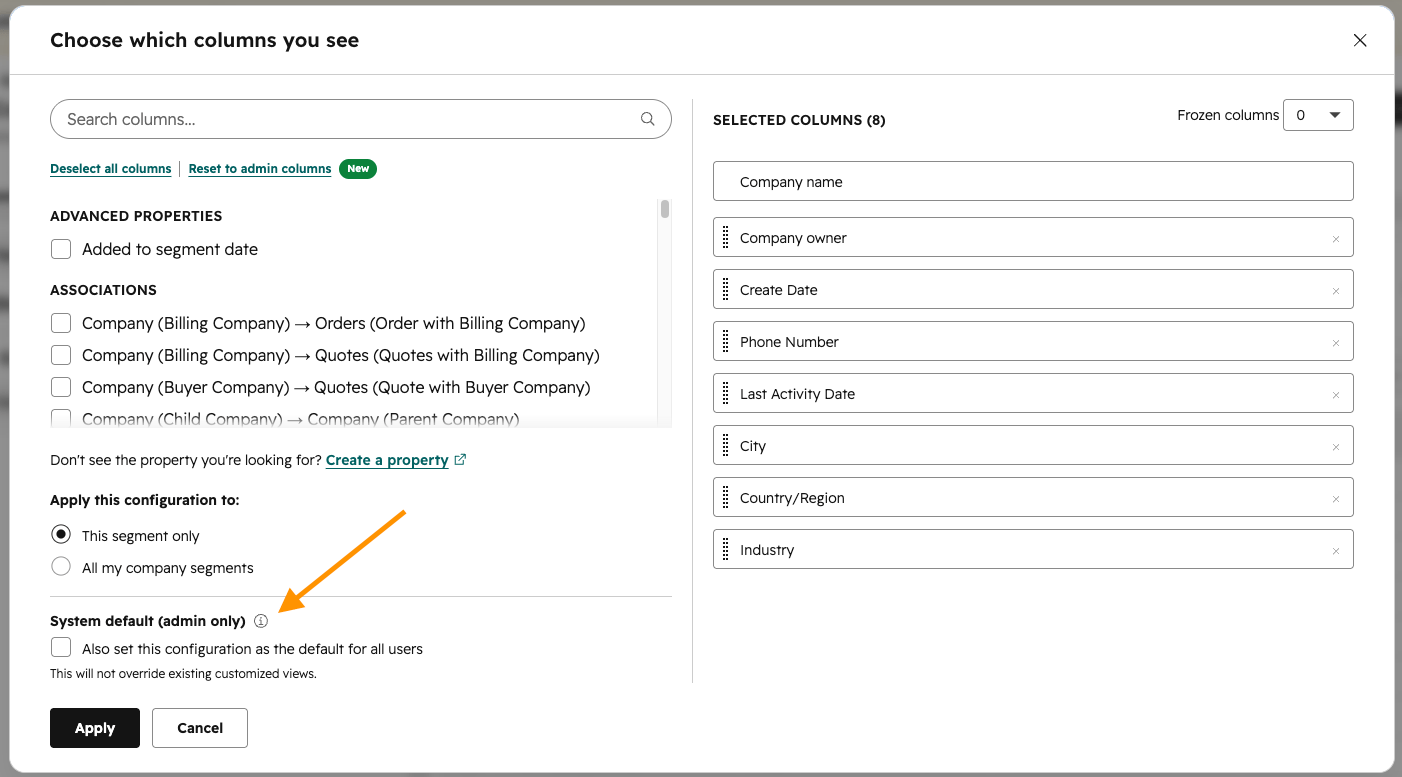
Why does it matter?
Today, segment column selections are user-specific, which creates inconsistent views across teams and friction when sharing segments. With admin-defined default views, teams can standardize how segments are displayed so everyone sees the most relevant columns and properties by default, improving collaboration, consistency, and efficiency.
3. Customizable Search Results Display
What is it?
You can now select and reorder the properties that display on contacts, companies, deals, tickets, and custom objects in your global search results.Why does it matter?
The properties that display in search results have historically been uniform across all users and portals. The customizable search results display will enable you to individually edit the properties that appear on results for contacts, companies, deals, tickets, and custom objects, making it easier to identify the right record in search and gather information quickly.
4. Run Agent Workflows Action
What is it?
The “Run Agent” Workflow Action is a powerful way to orchestrate your AI agents directly within the Workflows app, alongside your CRM data and automation logic.
This new workflow actions lets you trigger an agent directly within a HubSpot workflow. You can:
- Configure which agent to run
- What information it receives
- How its output feeds back into your HubSpot ecosystem - whether that’s updating a record, triggering a follow-up, or informing another step in your automation.
Why does it matter?
Until now, automating an agent was only possible through triggers in Breeze Studio - powerful, but somewhat limited in flexibility. The new workflow action takes agent automation to the next level by bringing it seamlessly into the Workflows app.
Now you can:
- Use any Workflows trigger to deploy your agents
- Orchestrate multiple agents together
- Pass outputs from an agent to any subsequent agents or automation actions
- Easily update your CRM data with the help of agents
5. Centralized Data Model Management
What is it?
A unified table and graph view for managing your entire data model — objects, properties, associations, and conditional logic — from one, easy to use place.
Why does it matter?
Managing your data model used to mean jumping between multiple settings pages with no consistent picture of how objects, properties, and associations connect. By centralizing your data model in one spot, you get a single place to see and manage your entire Smart CRM structure, whether you're auditing a complex configuration or making a quick edit to a property group.
6. Playbooks Now Supported in Sandboxes
What is it?
When you create a new sandbox, playbooks from your production portal are automatically copied over, including their content and recommendation settings.
Why does it matter?
You can now test and confirm playbook configurations in a sandbox before using them in production. This helps you catch issues early and ensures your sandbox environment accurately reflects your production setup, reducing the risk of surprises during live customer interactions.
7. Dashboard PDF Exports Look like Dashboards
What is it?
You can now export dashboards to PDF in a format that retains the full dashboard layout, including all charts and tables as displayed on screen, with titles, dates, and filter context included.
Scheduled report exports sent via email also use this improved format.
Why does it matter?
Previously, PDFs of dashboards lacked the context that layouts and formatting provide. Now, an exported PDF of your dashboard will match the layout you see in-app, making it easier to communicate and share your data with stakeholders.
8. HubSpot Capital Financing for Commerce Hub Payments Customers
What is it?
Commerce Hub customers using HubSpot payments or Stripe payment processing in the US and UK can now access financing directly within HubSpot based on their payment history, providing fast and easy access to working capital.
Why does it matter?
Small and medium businesses often struggle with cash flow gaps due to revenue volatility and delayed receivables, making it difficult to pay bills and expenses on time.
With HubSpot Capital (powered by Stripe), payments customers now have access to apply for capital financing directly in HubSpot to bridge these gaps and invest in growth. Unlike traditional bank loans that are time-consuming to apply for and receive, customers are automatically pre-qualified based on their transaction history and can receive funding in 1-2 business days if they’re approved.
9. Manage Stage Calculated Properties by Pipeline
What is it?
You can now control which pipelines and pipeline stages generate stage calculated properties (SCPs). By default, SCPs are disabled for new custom pipelines and stages but can be enabled anytime. A new usage tracker lets you monitor your SCP count against the 4,500 property limit per object type.
As part of this release, we've also updated the pipelines experience in Global Settings, making it easier to manage all of your pipelines and their configurations in one place.
Why does it matter?
Previously, SCPs were automatically created for every pipeline and stage, which could add hundreds or thousands of properties to your account whether you needed them or not. Now you can enable SCPs only for the pipelines and stages you actually use in records, views, workflows, or reports. This reduces property clutter throughout your account, making it easier to find the properties you need. The new SCP usage tracker helps you monitor how many SCPs you're using and how close you are to the 4,500 limit per object type, so you can manage your properties more effectively.
10. New Recommendation Categories in the AEO Tool
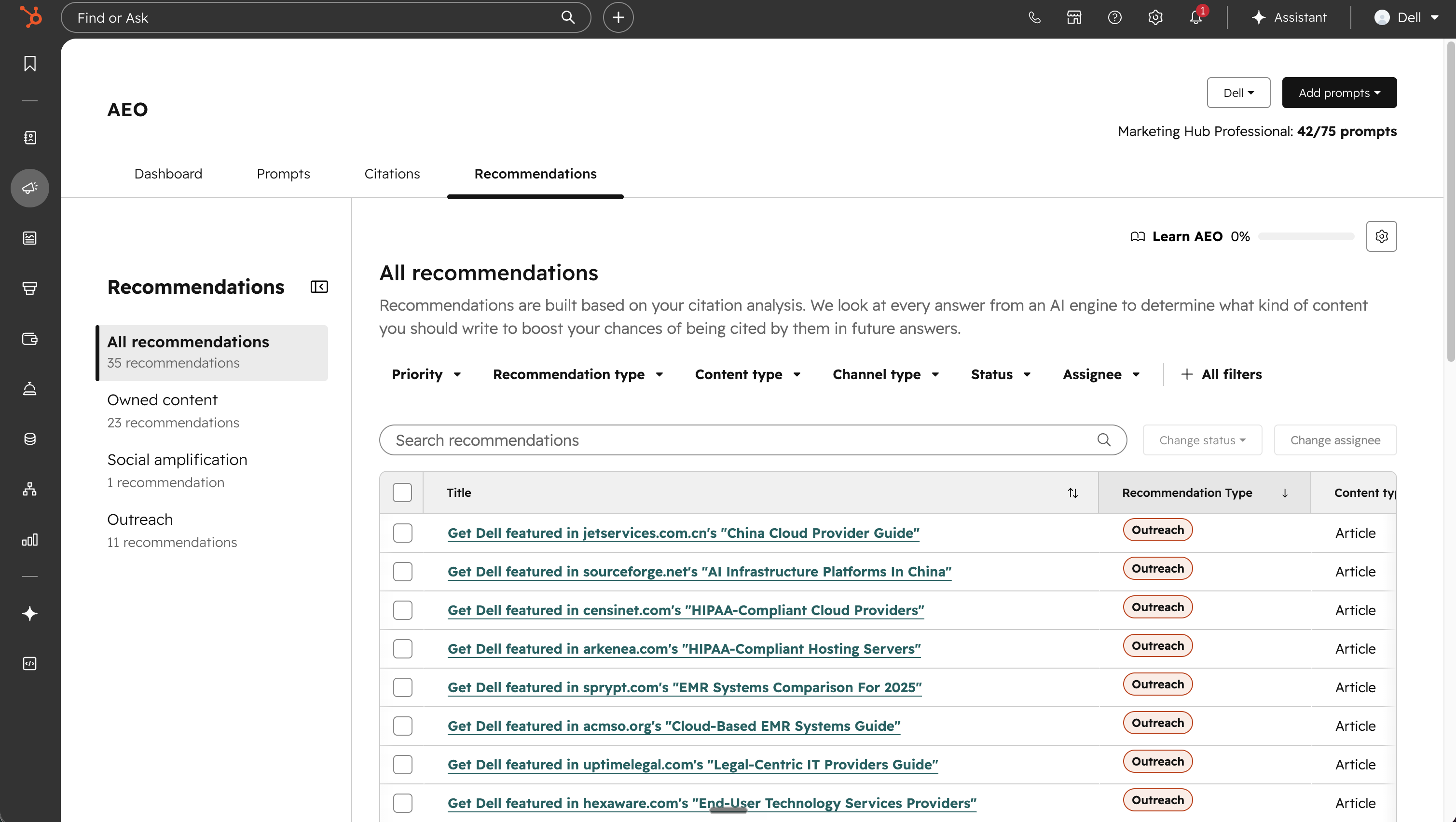
What is it?
Three new recommendation categories are now available in the AEO tool: Social, Video, and Outreach. Each one turns your citation and visibility data into specific actions you can take to improve how often your brand appears in AI-generated answers.
Why does it matter?
Knowing your brand's visibility score is only half the picture. These new categories help close the gap by turning citation and visibility trends into concrete next steps across three of the channels that influence AI responses most:
- Social: the conversations and posts AI systems pull from on Reddit and LinkedIn
- Video: the YouTube content AI systems increasingly cite, typically for product and how-to queries
- Outreach: the third-party publishers and affiliate sites that shape how AI describes your category
Instead of guessing where to invest, your team gets a prioritized list of actions tied to where your brand is not being mentioned today.
11. Personalization Token Support in Rules-Based Chatflows Welcome Messages
What is it?
You can now customize your live chat bot’s welcome message using CRM data!
Instead of waiting until later in the conversation, you can insert personalization tokens like first name, company name, or recent activity directly into the initial greeting.
When a visitor is recognized (via tracking cookies), the personalization token automatically renders with their information. If they aren’t recognized, your configured default values kick in so the greeting still feels natural and complete.
This means you can greet people with messages like: “Hi , got any questions?”
Why does it matter?
First impressions shape the entire conversation. A generic “Hi there” doesn’t reflect what you already know, but a personalized welcome instantly makes the experience feel relevant and intentional.
With this update, you can:
- Create more human, context-aware experiences from the first touchpoint
- Increase engagement by acknowledging who someone is or what they’ve done
- Instead of starting every conversation from zero, you can meet people where they are, with the right message, at the right moment.
12. New Help desk routing rule: Use assignment workflow
What is it?
You can now choose “Use assignment workflow” as a routing option in Help Desk, allowing incoming tickets to be routed directly into a workflow that manages assignment logic.
This gives you a more flexible way to handle complex routing scenarios by using workflows as the central place for assignment decisions.
Why does it matter?
Many teams already rely on workflows to manage routing because their needs go beyond simple assignment rules.
Things like:
- VIP vs. standard customer routing
- Language or region-based assignment
- Conditional Customer Agent vs. human handoffs
- Multi-step routing and data enrichment logic
Until now, this often required workarounds like:
- Leaving items unassigned and picking them up in workflows
- Duplicating logic across channels and workflows
- Reconstructing routing behavior across multiple tools
With Use assignment workflow, you can:
- Handle complex, multi-step routing more reliably
- Clearly define which workflow owns routing decisions
- Increase confidence in how assignments are made
13. Customer Agent suggested questions update
What is it?
HubSpot now show suggested questions at the right moment: when a visitor has demonstrated clear intent to start a conversation. The experience is cleaner, and the prompts are more useful in context.
Why does it matter?
When a visitor opens the Live Chat widget for the first time, Customer Agent displays a suggested question directly inside the chat. The suggestion appears below the agent’s greeting, giving the visitor an easy way to get started.
Suggested questions are no longer shown on hover or as an overlay on the page before the chat is opened.
14. New folder tree view in File Manager
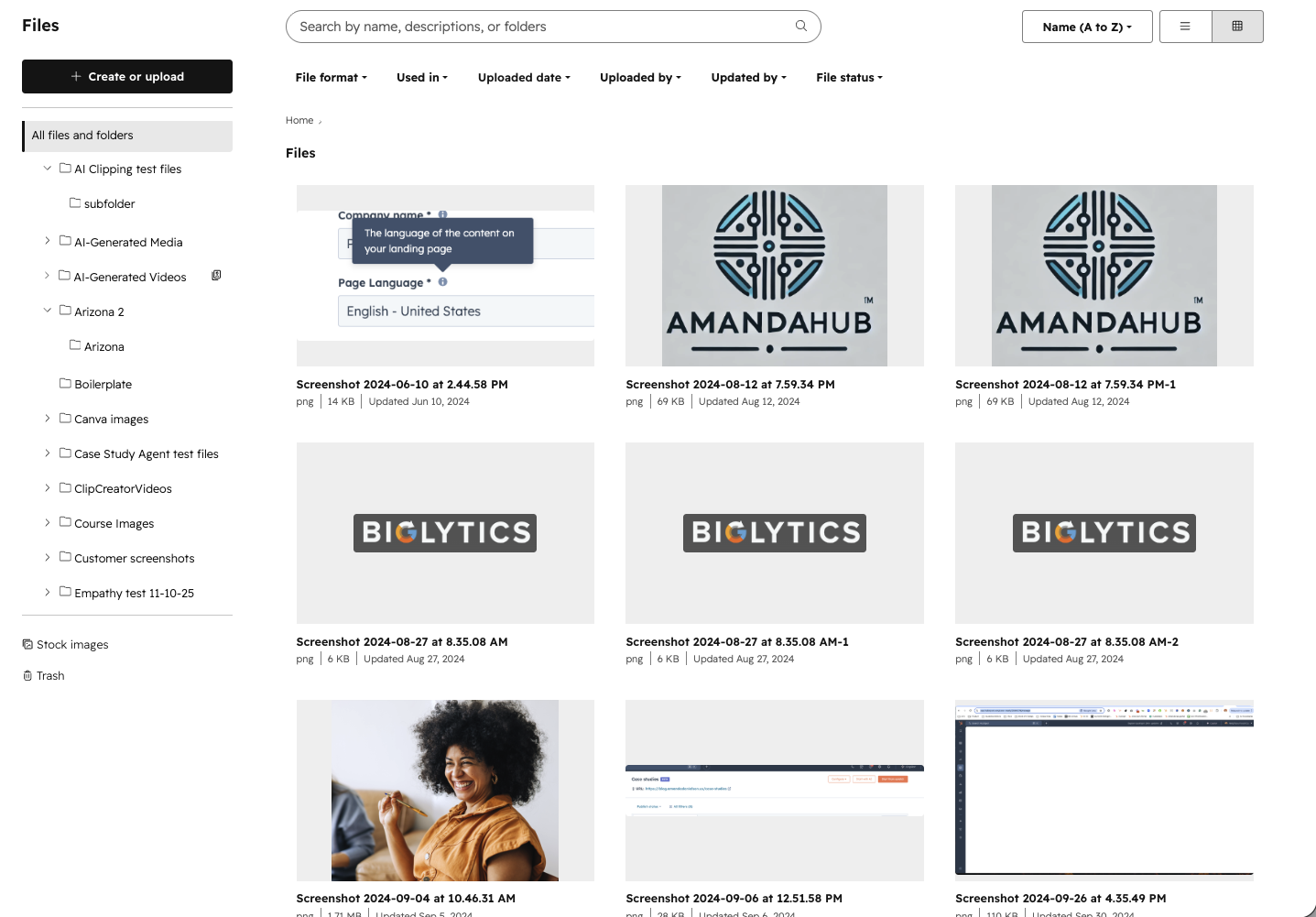
What is it?
A new folder tree view in the file manager that displays all files and folders in a clear, hierarchical structure. It lets you expand and collapse folders, see nested content at a glance, and move assets between folders via drag and drop or marquee select with familiar interactions.
HubSpot also consolidated the previous upload/folder create options that used to be in the upper right of the File manager into a single Create or upload button on the left above the file tree.
Why does it matter?
Managing large libraries of files can quickly become difficult when folder structures are deep or scattered. The folder tree gives you a single, organized view of your entire file system, making it easier to find, group, and maintain assets without losing context.
For HubSpot admins or users working with high volumes of files, this means less time spent searching and reorganizing, and more time focused on creating and publishing content. The improved structure also reduces errors when moving or nesting files across campaigns and projects.
15. Help Desk Board Layout Redesign
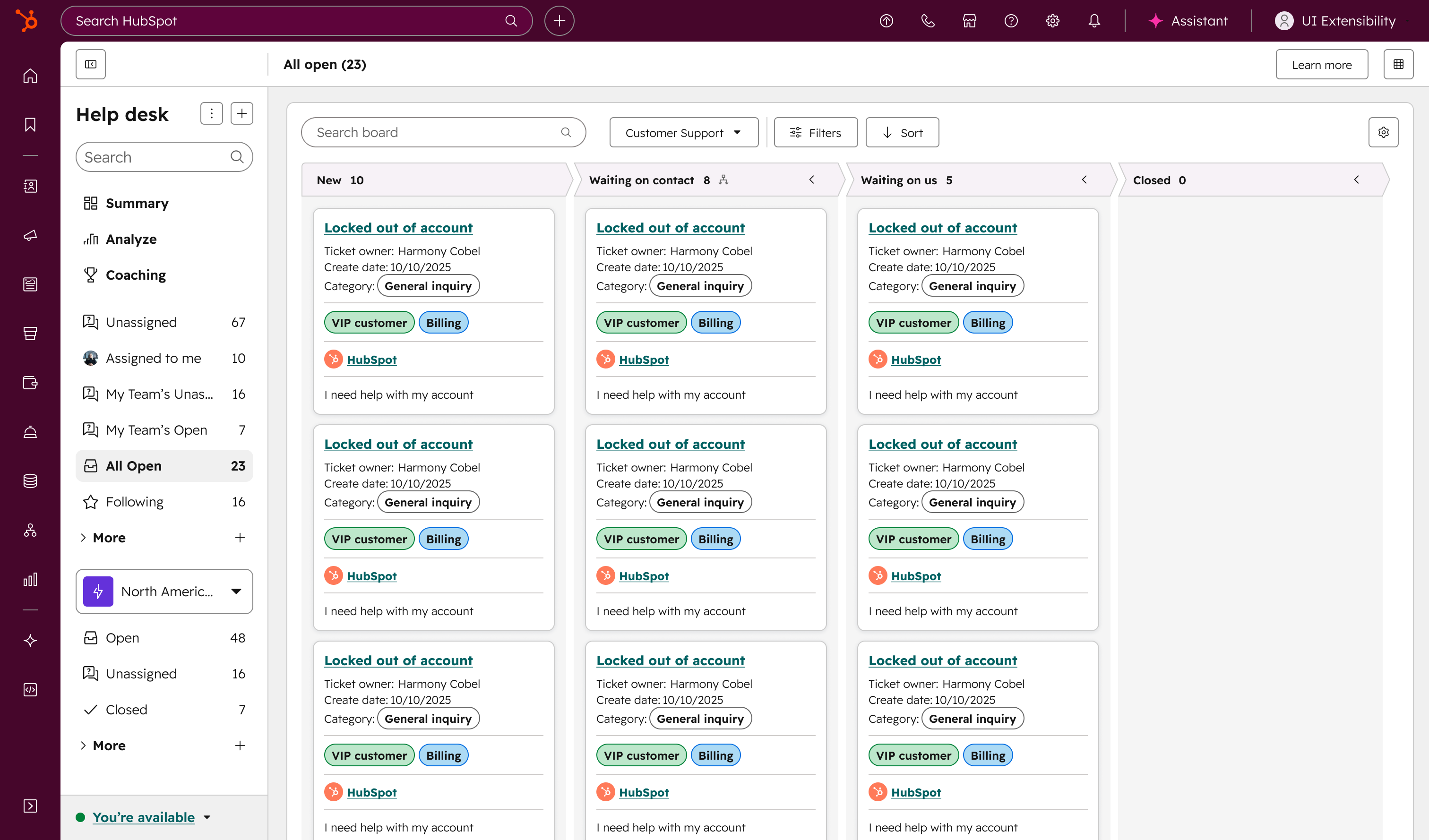
What is it?
HubSpot have redesigned the help desk board to bring it in line with the CRM board experience you already know. The updated board features a refreshed look and capabilities — including real-time updates and customizable board cards — consistent with how boards work across HubSpot, but built for the speed of reactive support.
Why does it matter?
Your support team moves fast, and your tools should too. This update means fewer surprises when switching between boards, a more polished and intuitive experience, and access to features that were previously only available on CRM boards. Whether you're triaging and prioritizing tickets or monitoring your pipelines, the help desk board now feels familiar and works more powerfully.

-1.png)





.webp?width=98&height=94&name=HubSpot%20Elite%20Badge%20(2).webp)