-1.png)
Welcome to our HubSpot Product Spotlight for April. In this blog, we’ll explore some of the team's favourite HubSpot updates from the last month. Ready? Let’s dive in!
Now Live
These are all the new features live and ready to use in your HubSpot portal.
1. New Unstructured Engagement Signals for Buyer Intent
What is it?
Conversational intent, now structured and actionable. HubSpot have added new Unstructured engagement signals to the Intent Signals platform that automatically extract insights like Budget and Deal Timing from your calls, emails, and notes.
Why does it matter?
High-value signals are often trapped in unstructured conversations, making them impossible to use for automation or reporting. Now, these insights are automatically converted into company-level signals that you can use to:
- Alert sales reps the moment a prospect mentions they have budget.
- Enroll companies in workflows based on specific deal timing mentions.
- Refine your scoring by incorporating real-world conversational data.
2. Client Secret Rotation Now Available
What is it?
You can now rotate your app’s client secret directly in HubSpot without submitting a support ticket. Respond to a potential compromise by regenerating a new secret in minutes.
Why does it matter?
If a client secret is leaked, an attacker could use it to generate valid OAuth API tokens for any customer who has installed your app, for as long as that secret remains active. Being able to rotate your secret immediately — without waiting on a support ticket — lets you shut down that risk the moment you become aware of it.
3. Real messages no longer lost to spam
What is it?
HubSpot now automatically moves conversations out of spam when a legitimate message comes in. This situation previously could occur when a rep starts a conversation with a contact, the contact's vacation auto-responder sends back a message that gets the conversation marked as spam, and later the contact responds to their own auto-responder with a real message.
Why does it matter?
Customers won't wonder why you never responded — and reps won't waste time digging through the spam folder looking for real messages.
4. Association actions are available for a new set of Marketing & Commerce objects
What is it?
You can now use association actions in workflows based on the following set of objects
- Contract, Credit Memo, Invoice, Order, Payment, Subscription
- Marketing Event, Campaign
The same set of objects can be worked on as the target in the
- Object to associate to in Create association action, and
- Associated object in Apply, Update and Remove association labels actions
Why does it matter?
Expanding the supported object types allows more of your manual, repetitive data-management tasks to be automated so you can reduce manual effort, improve data consistency, and build more scalable, reliable processes that better reflects your business.
5. Legacy Channel-Based Handoff Routing in Customer Agent
What is it?
HubSpot are sunsetting legacy channel-level handoff routing in Customer Agent. After April 27, 2026, portals still using legacy handoffs will be auto-migrated to Global Handoff — a single, agent-level handoff configuration.
This affects two groups:
- Rules Based Bot users — portals using the Rule Based Bot "Send to Customer Agent" module with a
fallbackRoutingRulestill configured. These portals have been seeing an in-app deprecation warning banner for several months. - Inbox users with multiple channels — portals using legacy handoffs with multiple inbox channels configured with different routing rules per channel. Because Global Handoff operates at the agent level (not the channel level), their per-channel routing rules will not carry over automatically. These portals need to manually configure conversation-based routing within Global Handoff to preserve their setup.
Portals not using the "Send to Customer Agent" module, or those with a single channel, are not impacted.
Why does it matter?
For impacted portals, auto-migration without action may result in conversations routing incorrectly or to the wrong team. Portals with complex per-channel routing setups are most at risk.
6. Sales Workspace Has Been Updated: Here's What Changed
What is it?
Your sales workspace has been updated today to work directly with your Smart CRM. The workspace's custom-built interfaces like the Prospects tab, Deals tab, and task playlists have been replaced with native CRM index pages.
Why does it matter?
The sales workspace and your Smart CRM were two separate systems. That meant configuring views twice, training reps on two interfaces, and missing out on new Smart CRM features until they were custom-rebuilt for the workspace. This update brings them together: one setup, one interface, one experience that stays current automatically.7. Legacy CRM Card Migration Tool
What is it?
A new migration tool that lets you, app developers, replace Legacy CRM Cards with App Cards built on UI Extensions, without any action from your customers. Using the new migrate views API endpoint, you can update customers' views to hide the Legacy CRM Card and display the new App Card in its place. App Cards are built with React and powered by HubSpot's UI extension capabilities, offering a richer and more flexible experience for your customers.
Why does it matter?
Legacy CRM Cards are being sunset on October 31, 2026. If you don't migrate, your customers' views could break or cards could disappear entirely. This tool gives you a developer-controlled path to replace legacy cards seamlessly, ensuring no adverse impact to your customers.
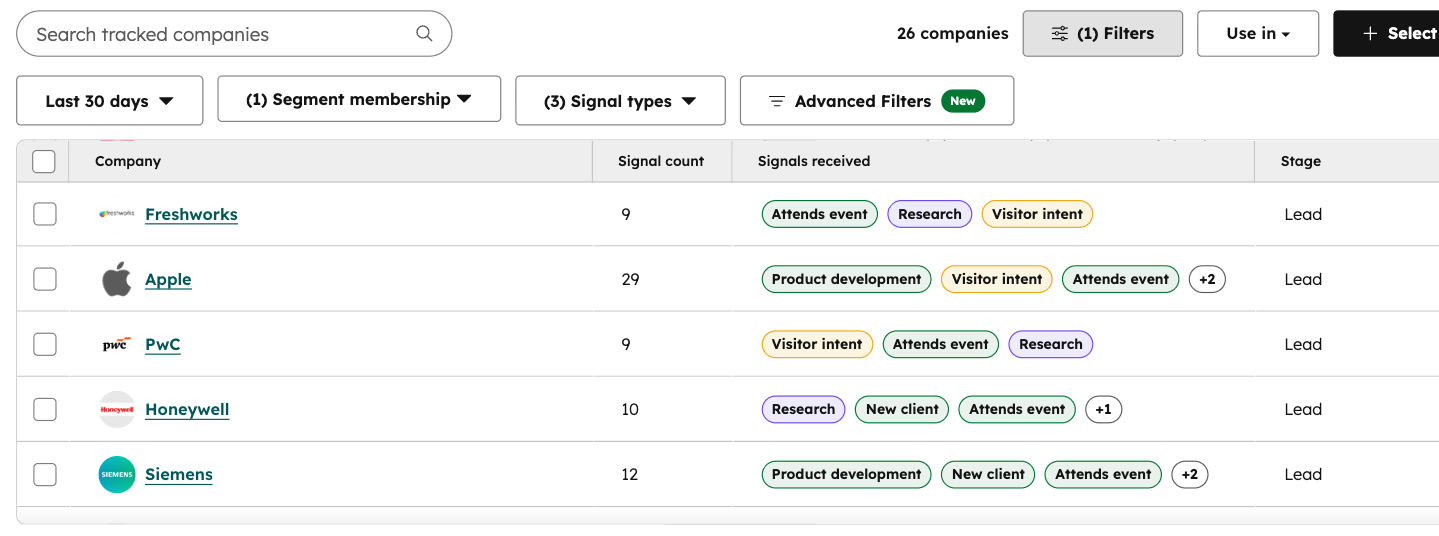
8. 3 New Company News Signals: Attends Event, Product Development, and Client Signing
What is it?
We’re adding three brand-new company news signals to help you pinpoint the perfect moment to engage your high-value accounts.
Starting today, you can track when companies attend events, kick off new product development, or sign new clients. These signals act as the ultimate conversation starters, giving your sales and marketing teams timely, relevant reasons to reach out.
Why does it matter?
These new signals unlock powerful new ways to personalize your sales and marketing motions:
- Engage around events: Know when a company is attending, speaking at, or hosting an industry event. It’s the perfect "in" to reach out, offer a personalized "congrats" on a speaking slot, or explain why your solution is relevant to that specific event's themes.
- Accelerate momentum: When a company starts developing a new product or service, they often need new resources, software, or consulting to make that launch successful. Strike while the iron is hot and offer your services to help them scale their new offering efficiently.
- Support new biz growth: When an account signs a major new client, they may need additional support or tools to serve that client effectively. Use this signal to send a personalized congratulations and start a conversation about how you can help them be a world-class vendor to their new partner.
9. Earliest and Latest Date Rollup Properties
What is it?
You can now create rollup properties that find the earliest or latest date across associated records. Two new rollup types, Earliest date and Latest date, appear in the rollup type dropdown when you want to work with date fields.
Why does it matter?
Date-based rollups open up a whole category of insights that previously required manual work or workarounds. A few ways you can use them:
- Sales managers can roll up the nearest upcoming deal close date across all deals on a company to prioritize accounts that need attention this week.
- Customer success teams can surface the latest ticket activity date across associated tickets to identify accounts that have gone quiet.
- RevOps teams can track the earliest contract start date across associated deals to understand when a customer relationship began.
10. Audit Logs for Conditional Property Logic Rules
What is it?
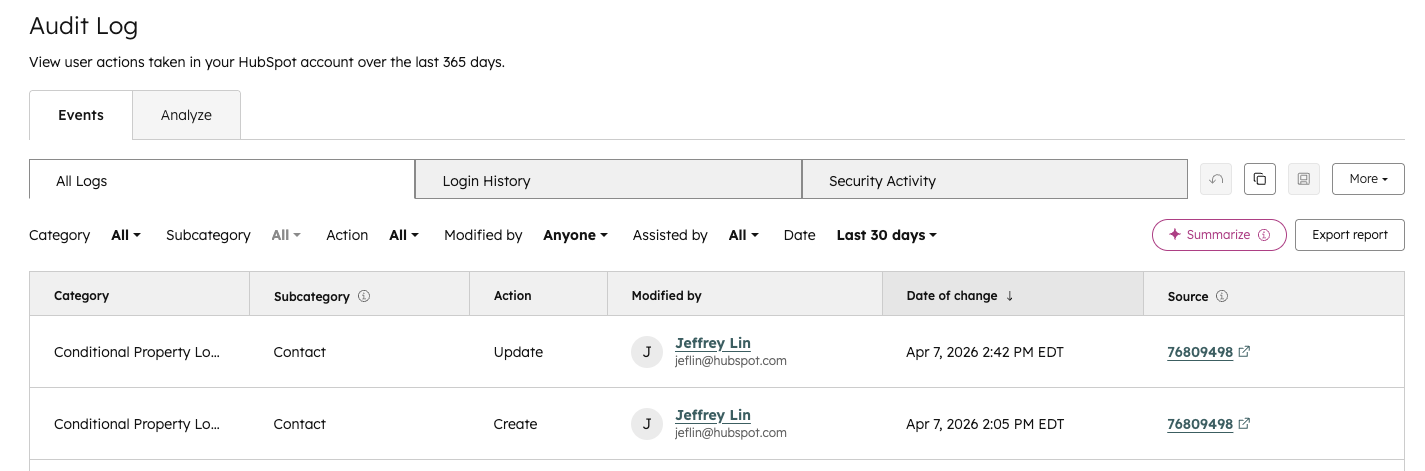
The audit log will now show updates to conditional property logic rules, including conditional property logic and conditional property options.
Why does it matter?
Audit logs for conditional logic give HubSpot admins full visibility into changes made to conditional property configurations. Every time a user creates, edits, or deletes conditional options or conditional logic rules, that action is now captured in HubSpot's account audit log, recording who made the change, what changed, and when.
11. Customize Confirmation Email in Meeting Scheduling Pages
What is it?
Customize the meeting booked confirmation email that is sent to contacts when they book a meeting through your scheduling page.
Why does it matter?
Instead of sending a generic confirmation email to each contact that books a meeting, you can now customize it to include the best information to send to a contact to help them understand what to expect for that upcoming meeting.
12. Marketing Event Associations
What is it?
You can now associate marketing events with Companies, Deals, Leads, Payments, Orders, Custom Objects, App objects, and other marketing events.
Why does it matter?
Until now, your marketing events data has lived in isolation, making it difficult to tie event activity to real business outcomes.
With marketing event associations, you can:
- Connect event engagement to revenue by linking events to deals and payments
- Track the full customer journey from event participation to conversion
- Unify your data model by tying events to custom and app objects
- Improve reporting and attribution with richer, connected data
This means you can finally answer questions like: "Which events are influencing pipeline? How do event attendees convert into customers? What downstream impact do my events have on revenue?"
13. Create calculation properties using Breeze
What is it?
You can now use Breeze to generate the formula for a calculated property using natural language, instead of building it from scratch.
With this release, Breeze can:
- Turn a plain-language prompt into a calculated property formula
- Generate formulas for:
- Custom equation
- Time since
- Time until
- Time between
Why does it matter?
Calculated properties are powerful, but building the formula can be intimidating or time-consuming—especially for users who don’t work with them every day. Letting Breeze handle the heavy lifting:
- Lowers the barrier to using calculated properties
- Reduces mistakes in complex formulas
- Speeds up setup so admins can focus on what they want to measure, not how to write the expression
14. Activity Timeline Visual Updates and New Filters
What is it?
The activity timeline on CRM records now includes updated visuals and new filter options to help you find relevant activity faster.Why does it matter?
The activity timeline is one of the most frequently used surfaces in the CRM. New visual indicators for pinned and overdue activities make it easier to spot what needs your attention, and expanded filters let you narrow the timeline by direction, ownership, timeframe, and more, so you spend less time searching and more time acting.15. Enhanced Gauge Chart Controls in SORB & CRB
What is it?
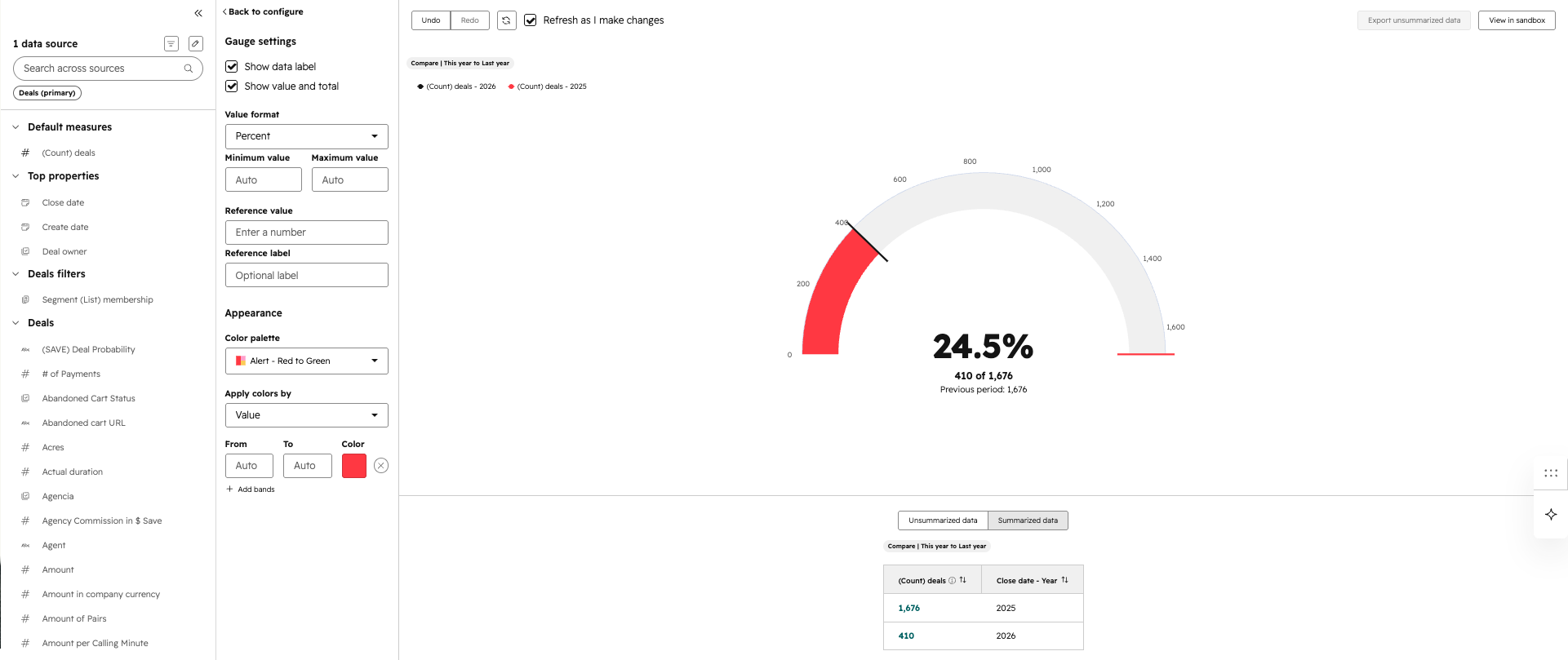
We’ve released three major updates to Gauge Charts within the Single Object Report Builder (SORB) and Custom Report Builder (CRB). These new settings provide greater flexibility in how you visualize progress against goals, allowing for more intuitive data storytelling without extra manual calculations. The three options include: percent mode visualization, fill mode for color emphasis and progress mode labels
Why does it matter?
Previously, visualizing a percentage of a goal often required creating custom calculated properties. These updates allow you to transform raw numbers into meaningful progress visuals—like "Percent of Quota Met" or "Tickets Resolved vs. Goal"—instantly within the reporting interface.
16. Connect Live Buyer Intent Signals to Breeze Agents with the G2 MCP for HubSpot
What is it?
The G2 MCP for HubSpot connects your Breeze Agents to real buyer behavior and verified customer voice from G2, no data engineering required. Reps can instantly understand what prospects are researching, which competitors they’re evaluating, and what’s driving their decisions, all without leaving HubSpot. The result is more relevant outreach, stronger conversations, and a faster path to revenue.
The G2 MCP for HubSpot connects Breeze Agents with:
- Buyer Intent: Identify and analyze companies showing purchase intent for specific products
- Review Analysis: Retrieve and analyze G2 review data to surface real buyer language and competitive sentiment
- Product & Category Intelligence: Retrieve product listings, category data, and competitor comparison activity with advanced filtering
Why does it matter?
Never Go Into a Conversation Cold. Before, reps relied on generic web research or waited on data teams to understand what a prospect actually cared about — leaving them guessing at the right message and the right moment to reach out. Now, Breeze Agents can pull live G2 buyer intent signals and verified customer voice data directly into HubSpot CRM context. Reps can see what products a prospect is researching, which competitors they're evaluating, and what real buyers say drove their decisions — before the first touchpoint.
Re-engage accounts at the right time. The separate G2 app for HubSpot provides reps with data directly in the CRM. But reps didn’t have access to real time G2 signals like first-party buyer intent and verified customer voice to connect more context to the prospect’s research. Now reps can leverage Breeze Agents with the G2 MCP connection to identify when accounts return to market and why, helping teams prioritize re-engagement based on real buyer behavior instead of manual monitoring.
17. Prospecting Agent Daily Digest Email
What is it?
A daily digest email that lists contacts with prospecting agent-drafted outreach awaiting your review, with direct links to each draft.
Why does it matter?
Without a notification outside the sales workspace, prospecting agent drafts are easy to miss or delay — which means slower outreach and missed opportunities. The daily digest brings pending drafts to your inbox so you can review and act without having to check the app.
18. Breeze Assistant in Slack
What is it?
Breeze Assistant is now available directly in Slack. Using a simple @-mention, you can ask questions about your CRM data, summarize conversations, prepare for upcoming meetings, and create tasks or notes in HubSpot — all without leaving Slack.
This update expands the existing Slack app for HubSpot with AI-powered capabilities, bringing Breeze into the conversations where your work is already happening.
Why does it matter?
The Slack app for HubSpot already unifies data across your conversations and CRM. This new update now brings HubSpot’s AI into Slack, so you can ask questions about your customer context in plain language, get instant summaries, and take action without having to know exactly where to look or how to find it.
This helps teams:
- Stay in flow by accessing HubSpot insights without leaving Slack
- Make faster decisions with instant CRM summaries and meeting context
- Capture important updates such as notes or tasks without needing to navigate back to HubSpot
- Bring AI-powered assistance into the collaboration tools teams use every day
19. Conversation Volume Estimation from Customer Agent
What is it?
You now have access to conversation volume estimation when setting up Customer Agent on email or live chat channels. This feature predicts how many conversations the agent will handle based on your configuration, so you can better understand its expected impact before going live.
Why does it matter?
Before this, you had to deploy Customer Agent without a clear sense of how much volume it would take on or how configuration changes would affect performance. This created uncertainty and slowed adoption.
Now, you can see estimated conversation volume in real time as you configure the agent. This helps you:
- Make more confident deployment decisions
- Understand expected coverage and workload upfront
- Reduce risk when rolling out to new or existing channels
- Optimize configurations before going live
20. Permission Sets & Seats Are Now Decoupled
What is it?
We’ve decoupled permission sets from seats.
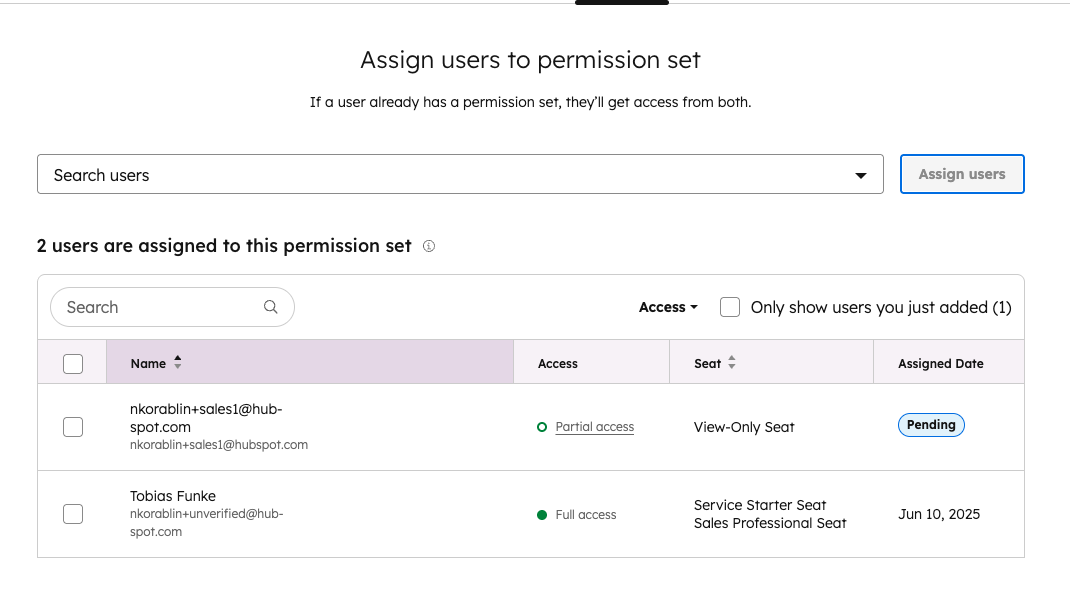
- You can now assign any user to any permission set, regardless of the seat type.
- HubSpot automatically grants the maximum access allowed based on a user’s permission set(s) and their seat.
- You’ll see clear indicators showing whether a user has no, partial, or full access in a permission set.
Why does it matter?
Previously, permission sets and seats were tightly linked. This often led to:
- Errors when assigning users to permission sets
- Users being blocked or removed unexpectedly after seat changes
- Confusing situations where users in the same permission set had different access with no clear explanation
This update removes those pain points by:
- Giving admins more flexibility to grant access per their business needs
- Preventing disruptive removals of users from permission sets
- Making it clear why a user does or doesn’t have certain permissions
The result is fewer surprises, less cleanup work, and a more predictable permissions experience.
21. Create report with AI option in Reporting
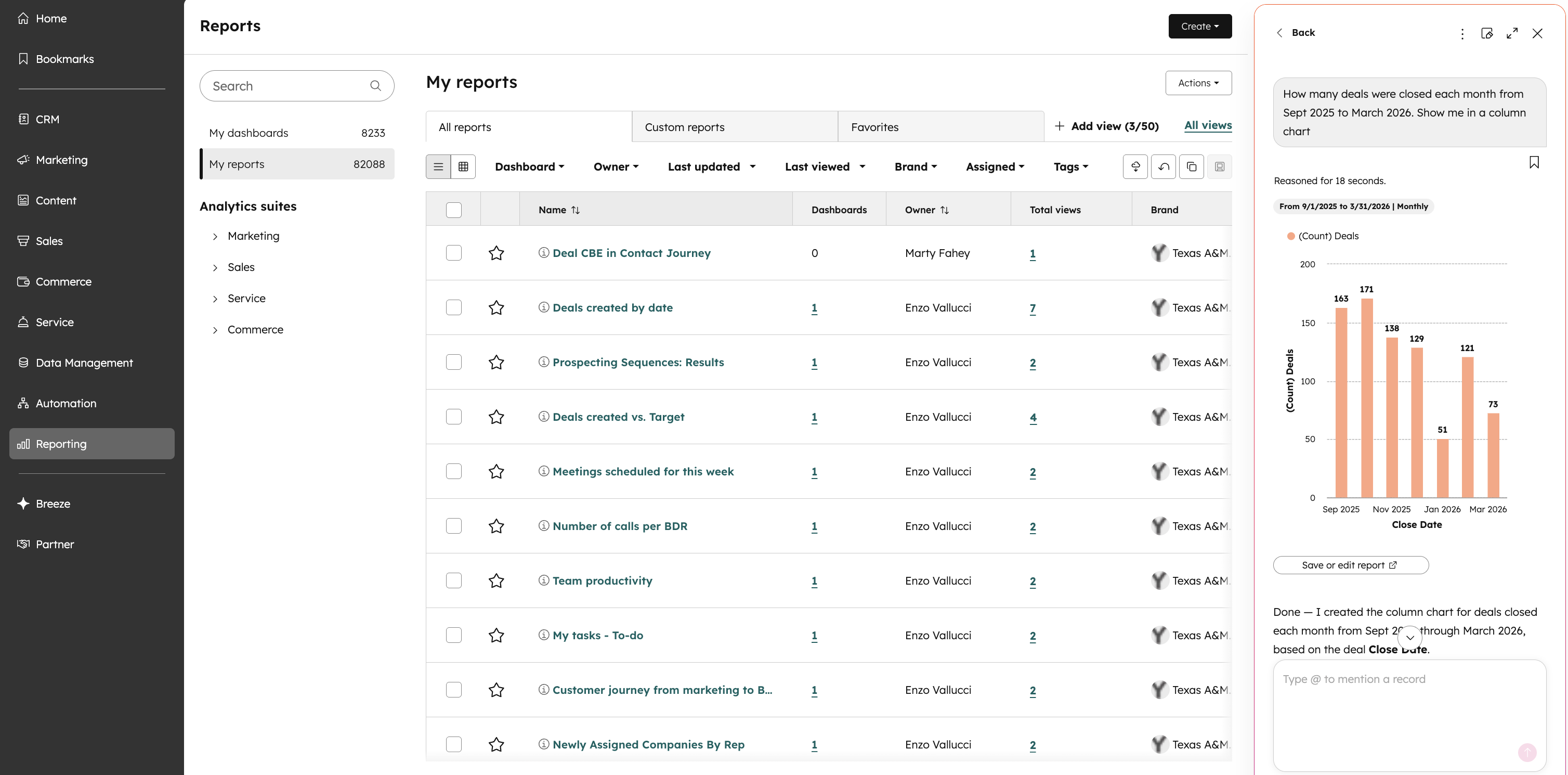
What is it?
Users can now select 'Create report with AI' from the Reporting page to open Breeze Assistant and generate reports via chat. They will have the ability to open this report in the appropriate report builder at any point as well.
Why does it matter?
This change provides a much more powerful AI reporting option available to users in the form of creating a report in the latest Breeze Assistant. This should also be a more usable and consistent experience with the rest of the product and makes it more discoverable to our users as well to provide more simple and easy to use ways to create and filter reports.
22. Quick Filter Bar Redesign
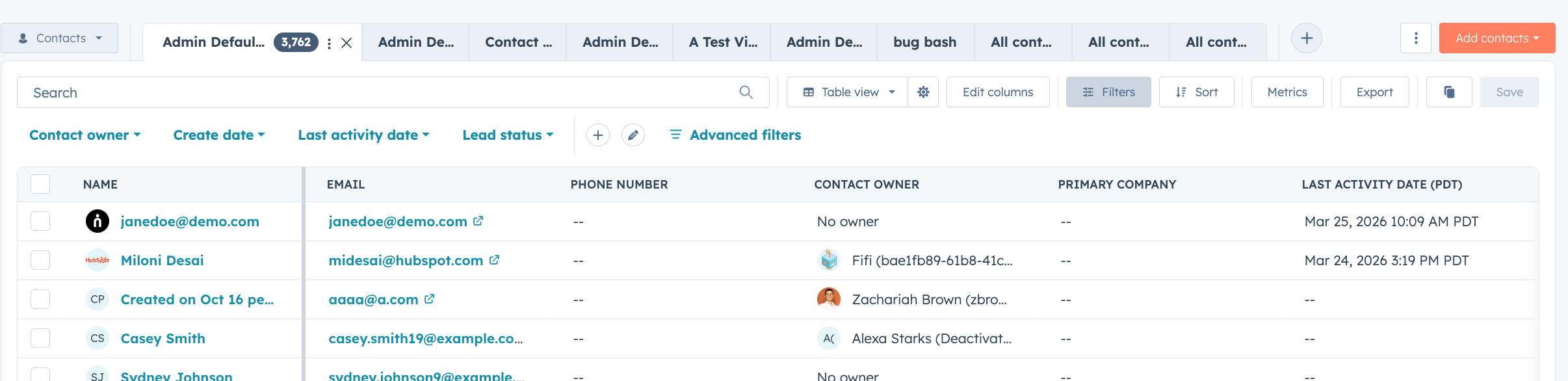
What is it?
The quick filter bar on CRM index pages has been redesigned to make filtering faster, clearer, and easier to manage as your filter set grows.
Why does it matter?
Filtering is one of the most common actions across CRM views, and small inefficiencies add up. With the redesigned quick filter bar, active filters now appear at the beginning of the bar so you always know what's shaping your current view. A more intuitive filter picker makes it easier to find and add the right filters, and a cleaner editing experience helps you manage multiple filters without losing context.
23. Data Agent: Analyze Specific URLs with Property Data
What is it?
Data Agent can now access data from specific URLs stored in URL properties, rather than searching the web broadly or scanning an entire website.
Why does it matter?
You can point Data Agent at a specific public webpage for analysis, giving you more precise, targeted results.24. Data Agent: Required and Optional Tokens for Prompts
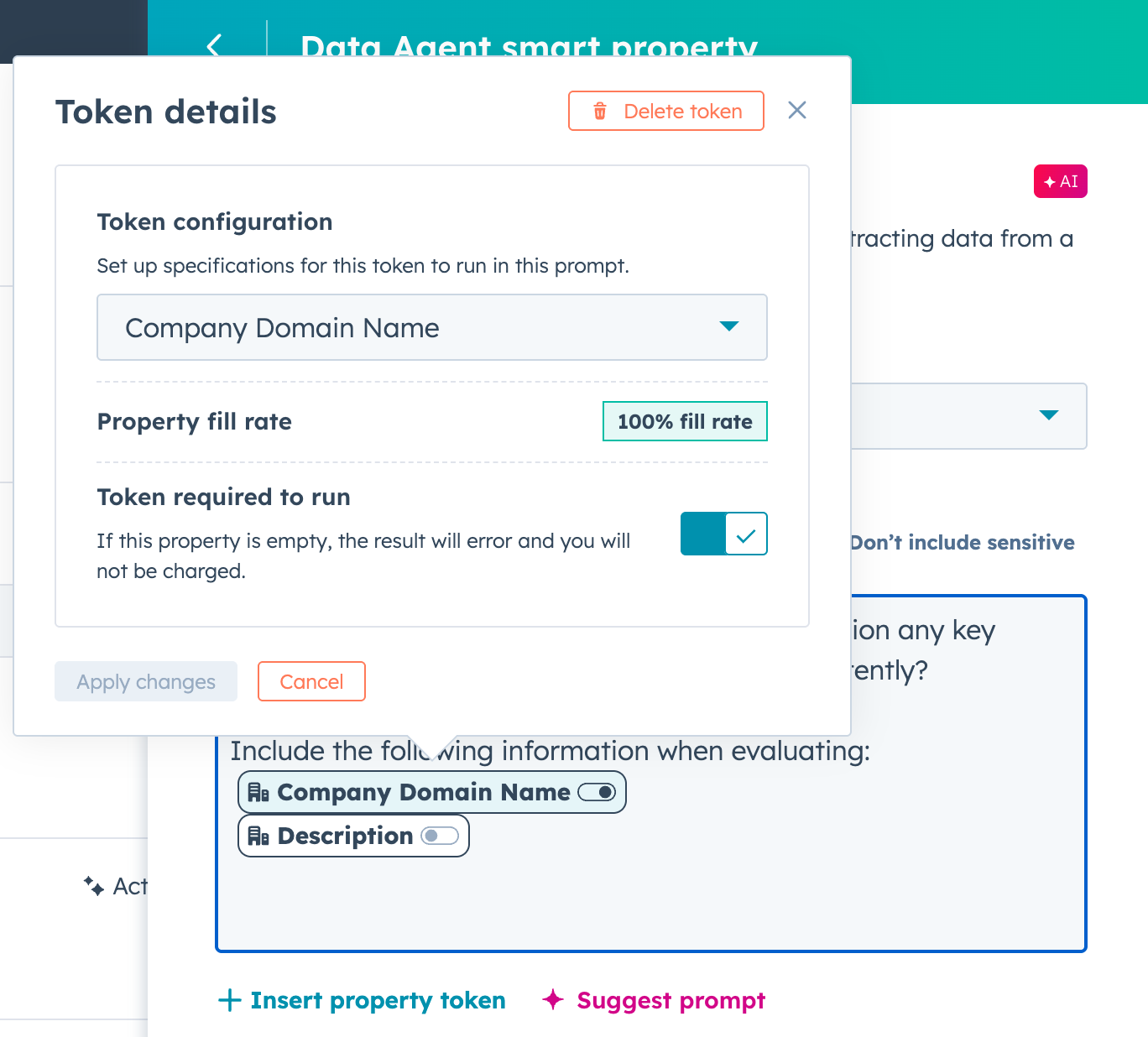
What is it?
You can now configure multiple tokens in Data Agent prompts to accept blank values, giving you more flexibility in how you structure prompts.
Why does it matter?
Not every record will have every field filled in. You can now mark tokens as optional so prompts still run when some context is missing, and mark others as required so prompts don't run without critical data. Either way, you're in control of when Data Agent fires and when it doesn't.
25. Email Management Actions in the Email Editor
What is it?
You can now clone, translate, move to a folder, archive, and delete emails directly from within the Email Editor without saving and navigating back to the email listing page.
Open the File menu in the editor's top navigation to access all available actions for your email. Each action keeps you in your workflow:
- "Clone" and "Translate" open in a new tab so you keep your current email open.
- "Move to Folder" updates in the background.
- "Delete" redirects you back to the listing page.
Why does it matter?
Leaving the editor to perform a simple administrative task can break momentum and wastes precious clicks and time.
This update:
- Keeps you in your creation flow: Perform any management action without losing your place in the editor. No more save-exit-find-act-reopen loops.
- Speeds up global campaigns: Create a translated version of your ready-to-send email in one click, directly from the editor. The translation opens in a new tab — your original stays untouched.
- Helps you stay organized as you work: Move your email into the right folder during creation, not as an afterthought on the listing page.
- Reduces risk of accidental clutter: Archive or delete emails you no longer need without navigating away from where you're already working.
26. Write and Send Emails in Breeze Assistant
What is it?
Breeze Assistant now helps users draft, refine and send 1:1 emails or replies directly from CRM records. It uses CRM data, past email conversations, and available email templates to generate ready-to-send emails that can be inserted into the CRM composer with all fields pre-filled.
Why does it matter?
Writing and sending emails is one of the most frequent tasks for front office teams, yet it remains fragmented and manual. Today, users often have to gather context themselves, iterate on drafts and complete the sending step outside of Breeze Assistant, which breaks flow.
This feature closes that gap by enabling Breeze Assistant to generate high-quality, context-aware emails and take users all the way to a ready-to-send message, reducing the effort required and helping them complete email tasks faster.
27. Find Reports You're Not Using
What is it?
A view in your reports list that shows reports that haven't been viewed in 6 months or more.
Why does it matter?
If you're managing a growing collection of reports, it's hard to know which ones are still relevant. Unused reports clutter your list and make it harder for you and your team to find the reports you actually need. With this view, you can identify and delete reports that are no longer useful and keep your reports list focused on what you actively use.
28. Centralized Sharing Management for Reports and Dashboards
What is it?
A centralized view where you can manage all recurring report and dashboard shares across your account, including filtering and taking bulk actions.
Why does it matter?
When a user's account is deactivated, their recurring shares break and can be difficult to find and fix. With this centralized view, you can quickly identify and resolve broken shares by updating or removing them—no need to contact support. If you're an admin managing multiple users, you can prevent disruptions to scheduled reports before they happen.
29. Expanded Intent Signal Volume
What is it?
We've improved how HubSpot processes company activity for Intent Signals, resulting in higher signal volume. We're also now including contact names in signals like Executive Hiring, giving you the context you need to personalize outreach right away.
Why does it matter?
More signals mean more opportunities to act on your target accounts. You'll now see increased activity from the companies you're tracking, at no additional cost. And knowing who just joined a target account matters as much as knowing when.
Contact names in signals like Executive Hiring let your team reach out immediately, with the right context, instead of tracking that information down separately.
30. Breeze Assistant is now in HubSpot Mobile
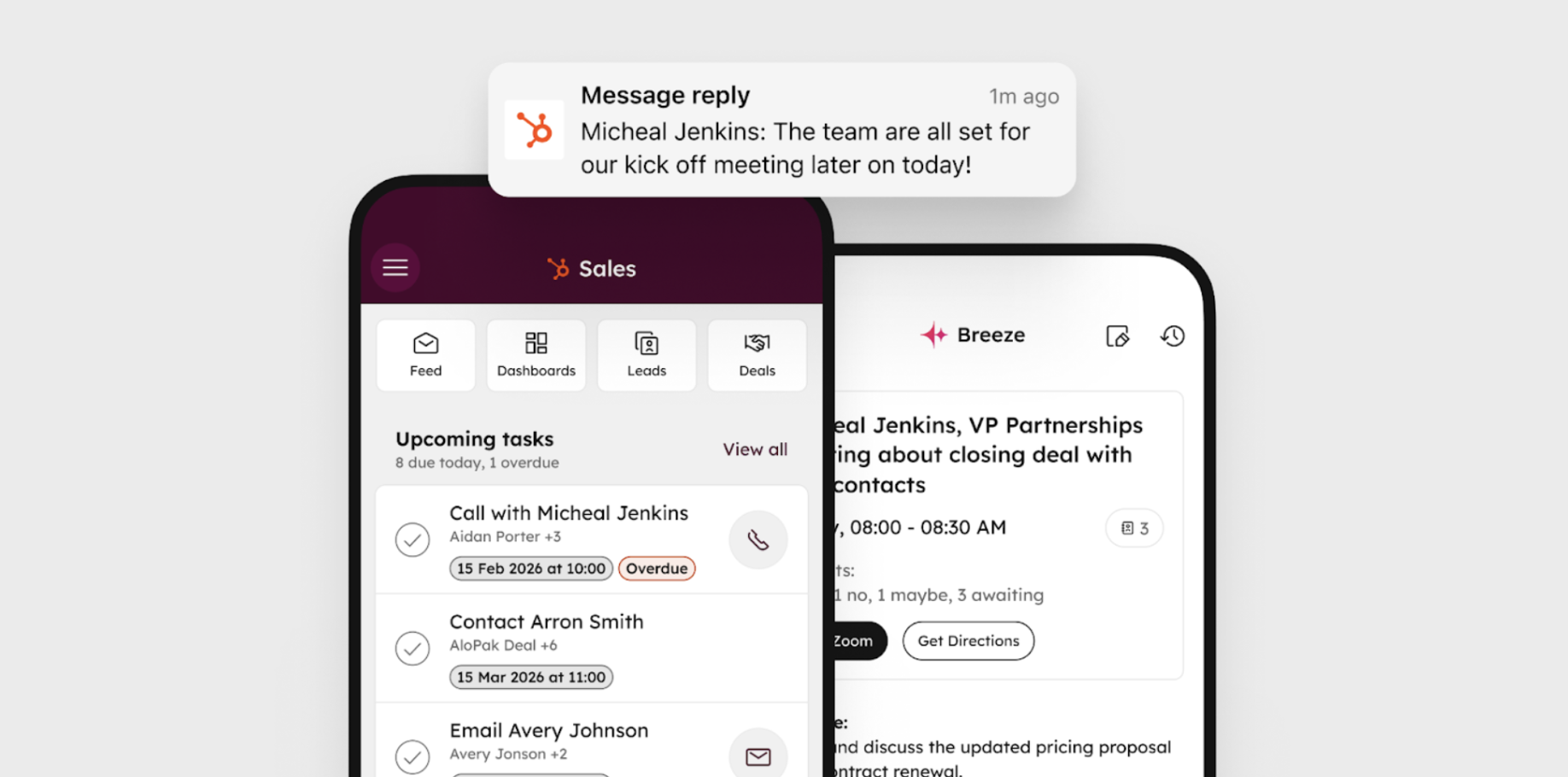
What is it?
Breeze Assistant is now part of HubSpot Mobile. If you've been using the standalone Breeze Assistant app, you'll find everything you need inside HubSpot Mobile from now on.
Why does it matter?
Breeze Assistant is built to save you time — pulling from your HubSpot data, your pipeline, your accounts, and your conversations to give you the right answer fast. Now that it lives inside HubSpot Mobile, that context goes with you everywhere, and you get more out of both tools without switching between them.
Beta
These updates are currently in the works and nearly ready to be released on your HubSpot Portal.
1. Duplicate Similarity Score
What is it?
There is a new similarity score that users can filter the duplicate management table by. This score looks specifically at duplicates surfaced by the default HubSpot model.
Why does it matter?
The default HubSpot model for duplicate detection looks at a specific set of properties to identify what is a duplicate, and what is not. Previously, we surfaced all contacts above a score of 30% similarity, and all companies above a score of 80% similarity -- but we never surfaced this data point to you. This led to many users thinking of our duplicate detection model as a bit of a "black box."
By surfacing this similarity score, you can now get more insights into why a duplicate is shown on the table, and filter the table down to only view duplicates above a specific threshold so you can get more targeted with how you manage duplicates.
2. Customizable Analyze tabs
What is it?
You can now customize the Analyze tab by replacing the default dashboard with your own, adding or removing reports, editing report settings, and rearranging the layout. This is supported in multiple places in HubSpot, details below. Watch this video for a walk-through.
Why does it matter?
The default Analyze tab may not reflect the metrics your team tracks day-to-day, which means you end up switching to separate dashboards to find the data you need. Now you can tailor the Analyze tab to show the reports most relevant to your goals, keeping your reporting and your workflow in the same place.
3. Cleanup Automation for Tickets
What is it?
You can now automate the removal of old tickets using the account cleanup tool. Set criteria like time since last update to determine which tickets are eligible for cleanup.Why does it matter?
Outdated tickets clutter your views, making it harder to find active customer issues and slowing down your service team. Automated cleanup keeps your ticket pipeline organized, without the manual effort of sorting through and removing outdated records one by one.
4. Enhanced Activity Details on Board View Cards
What is it?
Board view cards now display more details about a record's previous and upcoming activities. When no upcoming activity is planned, the card visually alerts you and suggests contextual next steps like scheduling a meeting or creating a task.
Why does it matter?
Assessing which records need attention often means opening each one individually. Previously, board cards showed only the next and previous activity with no additional detail, making it difficult to prioritize without doing extra clicks to open the card.
Now you can see recent and upcoming activity details at a glance directly from board view, quickly identify records with no upcoming activities planned, and take action right from the card.
5. Deal Context in Gmail Extension
What is it?
Sales reps can now see key deal context directly within the HubSpot Gmail extension for Chrome. Deal context includes critical deal properties, Breeze deal summaries, recent activity, and associated contacts, companies, and tasks. Reps can now respond to emails and update records without switching between their inbox and the CRM.
Why does it matter?
Sales reps lose valuable time and context while replying to emails by switching between their inbox and the CRM to get deal information.
This update lets reps make informed decisions and respond faster by surfacing the most relevant deal details right in the inbox, reducing workflow friction and improving response quality. Reps can also easily update key deal properties in real-time as they are reading an email, ensuring their CRM data is trustworthy and up to date.
6. Updated Calling experience in Help Desk
What is it?
An updated calling experience in Help Desk that integrates voice AI tools like live captioning and Breeze Q&A directly into your support workspace.
Whats new:
- An integrated call workspace in Help Desk that keeps the conversation, notes, and AI assistance in one place.
- Persona‑aware call summaries generated from transcripts & notes. Tailored for support reps.
- Quick access to Breeze-powered insights and guidance to help reps gain context and close tickets more efficiently.
Why does it matter?
Today, Help Desk reps juggle multiple tabs and tools to manage calls, take notes, and update tickets. Creating a disjointed workflow that makes it harder to stay present with customers. With this updated calling experience, users can stay focused on the conversation while AI handles the heavy lifting.
Live captions and an integrated notetaker sit directly in help desk threads, so the system captures everything while you focus on helping customers. AI tools like Breeze are embedded alongside the call and ticket, letting you surface real-time insights without leaving the page. After each call, AI-generated summaries combine your manual notes with transcript data, making it easier to understand what happened at a glance
7. Real-Time Table Updates on Index Pages
What is it?
The Index page now updates automatically in real time as you create or modify records.
Why does it matter?
Stale data leads to missed opportunities and mistaken priorities. With real-time updates, you're always working with current information—whether a new record is created, ownership changes, or a status updates. You can act confidently knowing your view reflects the latest data without manual refreshing.
8. Cleanup Automation for Contacts
What is it?
You can now automate the removal of outdated contacts using the account cleanup tool. Set policies based on criteria like time since last update to automatically clean up contacts that are no longer needed.
Why does it matter?
Outdated contacts clutter your CRM, making it harder to find active contacts and slowing down your team. Automated cleanup keeps your contacts organized without the manual effort of sorting through and removing old records one by one.
9. Custom Refund Reasons
What is it?
You can now create custom refund reasons giving you valuable data to understand what is causing refunds.
Why does it matter?
The ability to assign custom reasons to refunds helps reduce revenue loss by allowing you to identify and address the root causes of refunds.
10. Tasks App Refresh
What is it?
The Tasks app now functions the same way that other CRM objects do.
This new experience unlocks powerful, familiar features you already expect across the CRM—like multiple views, richer filtering, and more flexible ways to organize and manage your work—all in a dedicated Tasks app
Why does it matter?
Tasks are core to how teams stay organized and move work forward but historically, Tasks behaved differently from the rest of the CRM.
Tasks are now:
- More flexible to view and organize
- More consistent with other CRM objects like contacts and deals
- Easier to adapt to different workflows and working styles
The result is a more powerful, more predictable Tasks experience that scales with how your team works in HubSpot.
11. Data Agent: CRM Data Source
What is it?
Data Agent can now research across your entire CRM with a single data source selection, finding information without requiring you to specify individual properties or activities.
Why does it matter?
When you select CRM as a data source, Data Agent automatically searches across all relevant properties, activities, and events to give you the most complete answer using full context from your CRM.
12. Throttle Marketing Email
What is it?
Customers can set a custom email send rate for campaigns to control how quickly messages are delivered.
Why does it matter?
Lowering your send rate can help protect your systems and teams by spreading activity over time and reducing the risk of traffic spikes to your website or support channels. It can also strengthen deliverability by creating a more consistent sending pattern that builds trust with receiving servers, which is especially valuable for re-engagement campaigns.
13. Team Email signature included when sending from a CRM record
What is it?
Team email account signatures are now used when sending a one-to-one from a team email address in the composer on a CRM record page.
Why does it matter?
Previously, when sending from a team email address via a CRM record (Contact, Company, Deal, Ticket) you could only use your personal email signature. This is confusing and inconsistent, as admin-configured team email signatures are always included when sending an email from Inbox or Help Desk.
14. AEO: Track and improve your brand visibility in AI-powered search
What is it?
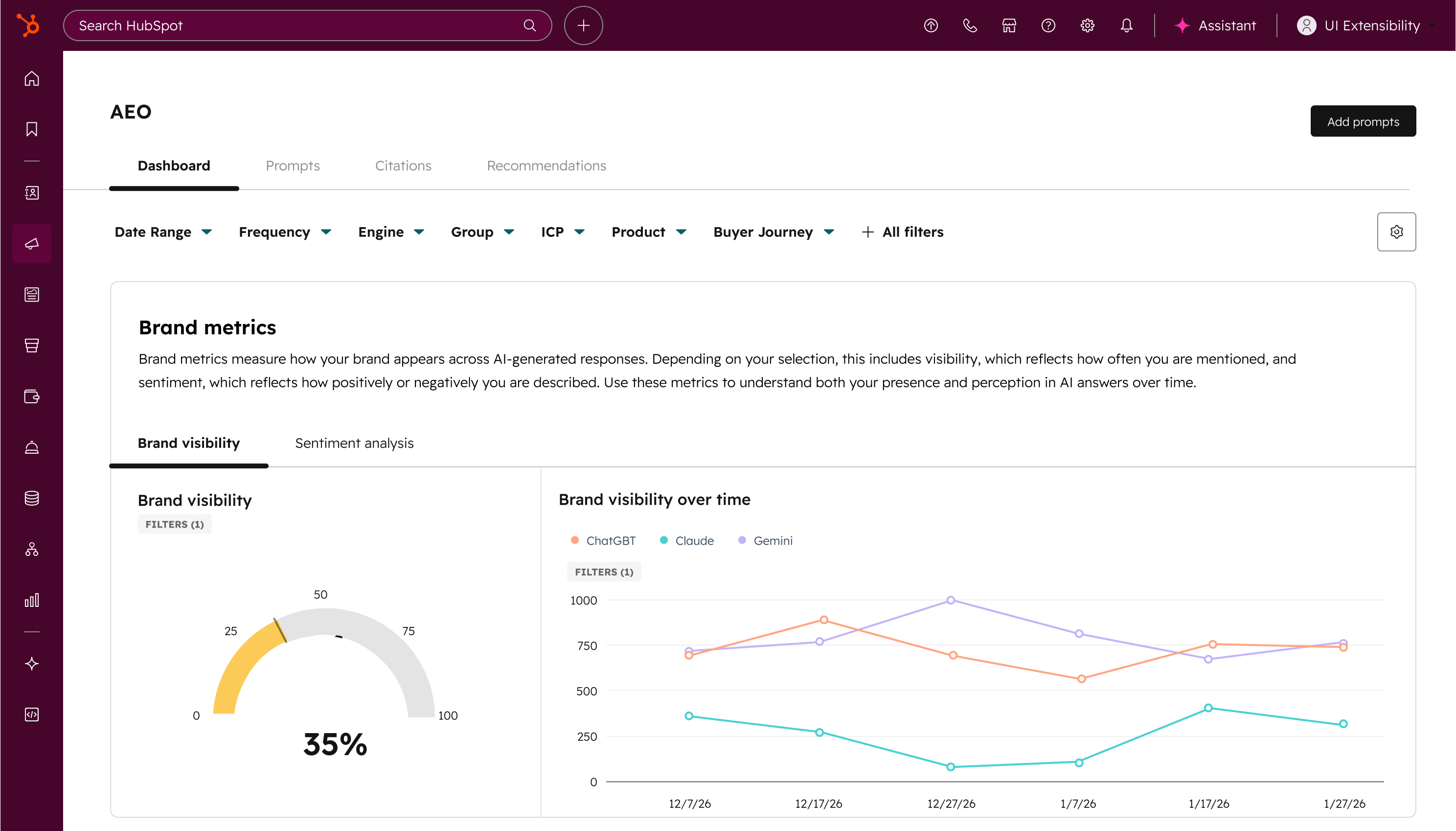
AEO (Answer Engine Optimization) is now available in Marketing Hub. Measure, track, and improve your brand's visibility across ChatGPT, Perplexity, and Gemini, and go from insight to published content without leaving HubSpot.
Why does it matter?
How people discover brands is changing.
Instead of clicking through traditional search results, buyers are increasingly asking questions directly in answer engines. These AI responses often summarize the market, recommend vendors, and cite sources before a customer ever visits a website.
Because AI pulls from consensus across third-party sources, buyers tend to trust these recommendations more than traditional search results. This means leads coming from AI search arrive better informed and further along in their decision.
The challenge: SEO is no longer enough. You need to start showing up in AI recommendations.
Most AEO tools hand you a visibility report and wish you luck. AEO in Marketing Hub is different. It shows you exactly where the gaps are, connects recommendations directly to the content tools you already use, and gets smarter over time because it's drawing from your CRM data. Other AEO tools don't know your business. HubSpot already does.
15. Tags in Dashboards
What is it?
You can now add, remove, and filter tags on dashboards, including bulk actions and filter-based selections, to organize and locate dashboards faster.
Why does it matter?
As the number of dashboards in your account grows, finding the right one gets harder. Dashboard tags let you categorize dashboards by project, team, campaign, or any label that fits your workflow, so you spend less time searching and more time acting on your data.
16. Customer agent now handles all your front office conversations with Agent Goals & Lead Qualification
What is it?
The Customer Agent just got a major upgrade! Now, it can handle all your front office traffic—qualifying prospects, adding them to your CRM, and even booking meetings with your sales team.
Why does it matter?
Your website attracts everyone from loyal customers to curious prospects. While the Customer Agent has always been great at solving customer issues and engaging prospects, it didn’t turn those conversations into real growth—until now.
17. Save draft emails and Edit scheduled emails
What is it?
You can now perform two essential actions when sending one-to-one emails
- Save a draft email and finish it later
- Edit a scheduled email to change the content or the scheduled date or time before sending.
Why does it matter?
Users today cannot save emails before they are ready to send them. Drafts make it easy to save your work to revisit later, collaborate with teammates for review, and not lose your work.
18. WhatsApp Home
What is it?
** Please note that once enrolled in this beta, if you wish to send WhatsApp templates from the mobile inbox, you must also enroll in the Mobile Conversations Inbox Migration HERE
HubSpot are introducing a new WhatsApp experience designed to align more closely with HubSpot’s core messaging tools. WhatsApp will now have its own dedicated Home, alongside our other primary HubSpot messaging channels.
This update includes a new:
- WA Messaging Management page
- Template Management experience
- A comprehensive Reporting suite
- Additional enhancements to support day-to-day needs
Why does it matter?
These changes are in response to customer feedback in order to make WhatsApp more discoverable, easier to use, and ultimately drive more more success for customers as a core messaging product within HubSpot.
19. Prospecting Agent Gets Smarter: Buying Signals and Contact Sourcing
What is it?
Prospecting Agent has evolved to become an end-to-end outbound agent, enabling sales organizations to automatically identify in-market companies based on real-world triggers and instantly source the right contacts via 3rd party integrations.
With this update, Prospecting Agent can:
- Detect companies that match key buying signals (like growth, hiring, funding, or intent)
- Automatically identify and source relevant contacts at those companies from within the CRM or through 3rd party integrations
- Generate and enroll contacts in personalized email outreach and calling tasks
Why does it matter?
Sales reps currently spend significant time manually building account lists, finding contacts, and researching companies before they even begin outreach. This manual process lacks intent and often leads to engagement with prospects when the timing isn’t right or produces generic outreach that doesn't resonate.
Prospecting Agent addresses this by automatically identifying companies showing buying signals, sourcing contacts, and generating personalized outreach, so reps can engage buyers at the right time without any manual research.
20. Use deal properties in forms
What is it?
You can now use deal properties directly inside HubSpot Forms, enabling you to:
✔ Connect capture to revenue: Forms can instantly create deals, making marketing’s contribution measurable.
✔ Eliminate duplication: Stop collecting deal data on contacts and copying it later.
✔ Improve CRM accuracy: Deal data lives where it belongs, increasing reporting trust.
✔ Reduce manual work: No more workflows, hidden fields, or duplicate properties.
Why does it matter?
Historically, data that logically belongs on the Deal (e.g., quote configuration, renewal intent, shipping information, loss reason) had to be collected on the Contact first - then copied over via workflows or custom code.
This created:
- Duplicate data
- Broken automation
- Reporting inaccuracies
- Friction for teams managing multiple deals per contact
For marketing, sales, and RevOps teams operating in deal-centric workflows, this was a major limitation.
Now, you can collect and report on deal data natively - without workarounds.
21. Customer Success Rooms
What is it?
Customers and customer success managers share a collaborative workspace to track project tasks, documents, and status updates in one portal.
Why does it matter?
Customers and CSMs need an easy, shared space to manage onboarding tasks, share documents, and track project progress to reduce miscommunication, missed deadlines, and reliance on emails or spreadsheets.
22. Customized Task Properties and Subtasks
What is it?
You can now break tasks into subtasks, create custom properties for tasks, and customize which properties appear when creating a task.
Why does it matter?
Until now, tasks in HubSpot couldn't be tailored to how your business operates. With subtasks, you can break complex work into manageable steps. Custom properties let you capture the specific data your team needs on every task. And by customizing the task creation form, you ensure the right information is collected every time someone creates a task.
23. Knowledge Base Agent
What is it?
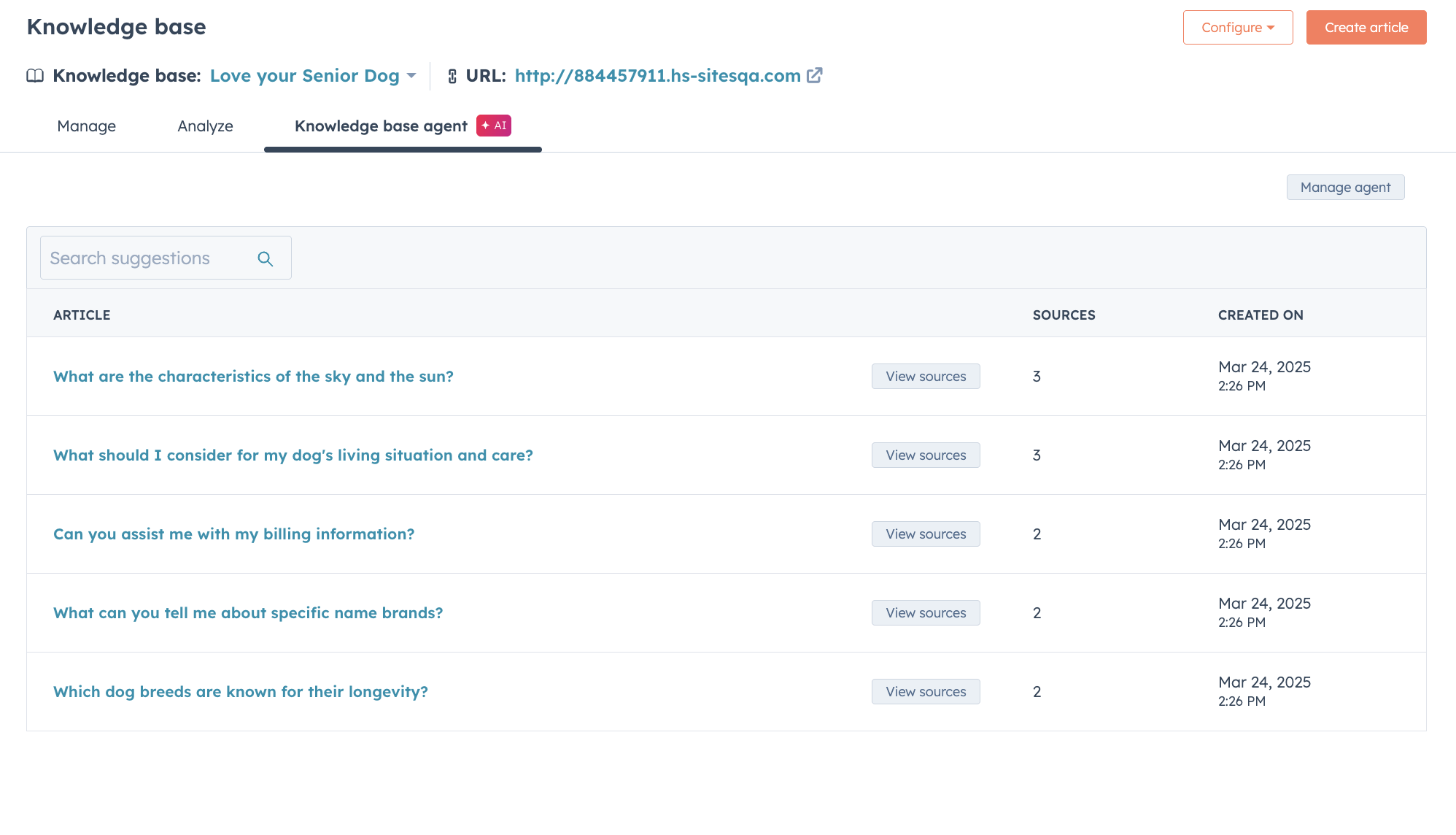
Breeze knowledge base agent extracts topics from tickets to create article drafts for your knowledge base automatically.
You can simply review article content, make edits, and publish!
Why does it matter?
The knowledge base agent looks for knowledge gaps and corresponding answers by comparing ticket data to your existing knowledge base articles and writes new knowledge articles for you.


.png)



.webp?width=98&height=94&name=HubSpot%20Elite%20Badge%20(2).webp)